
[ES] The central virus library cannot be automatically updated due to DNS resolution exception during the upgrade.
Problem Description
Unable to automatically update the virus library on the central end.

280305e4b9ef206fdb.png (8.7 KB)
Process –
When using wget to update the virus database, it was found that the central end was unable to resolve the domain for updating the rule library.

942955e4e56e59ceea.png (15.43 KB)
Root Cause
ES Manager server cannot resolve the domain name for rule library update.
Solution
- Use the nmtui command to change the network card DNS to 114.114.114.114;
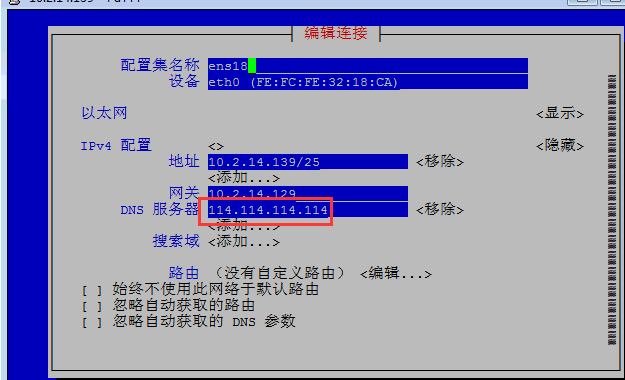
174795e4e345c50955.png (36.34 KB)
- After changing the DNS server, the resolution is normal.
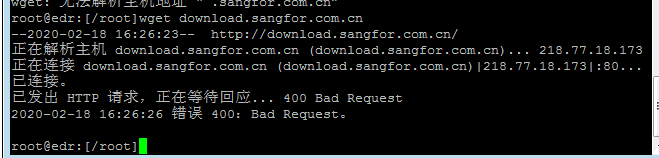
830035e4b9fafa373e.png (21.32 KB)

46825e4b9fc80a67c.png (12.79 KB)
Suggestions and Summary
To enable automatic updates of the ES Manager rule library, in addition to enabling automatic virus library updates in the interface, it is also necessary to ensure that ES Manager can access the Internet and DNS resolution is normal.
Original Link
https://support.sangfor.com.cn/cases/list?product_id=16&type=1&category_id=2501&isOpen=true