
[ES] The device type creation error is displayed in MSS when ES is accessed and the account is not activated.
Problem Description
SASE-ES accesses the MSS platform, and the MSS platform shows that ES is offline.
Alarm Information
None
Effective Troubleshooting Steps
- Test connectivity on ES shows successful access.
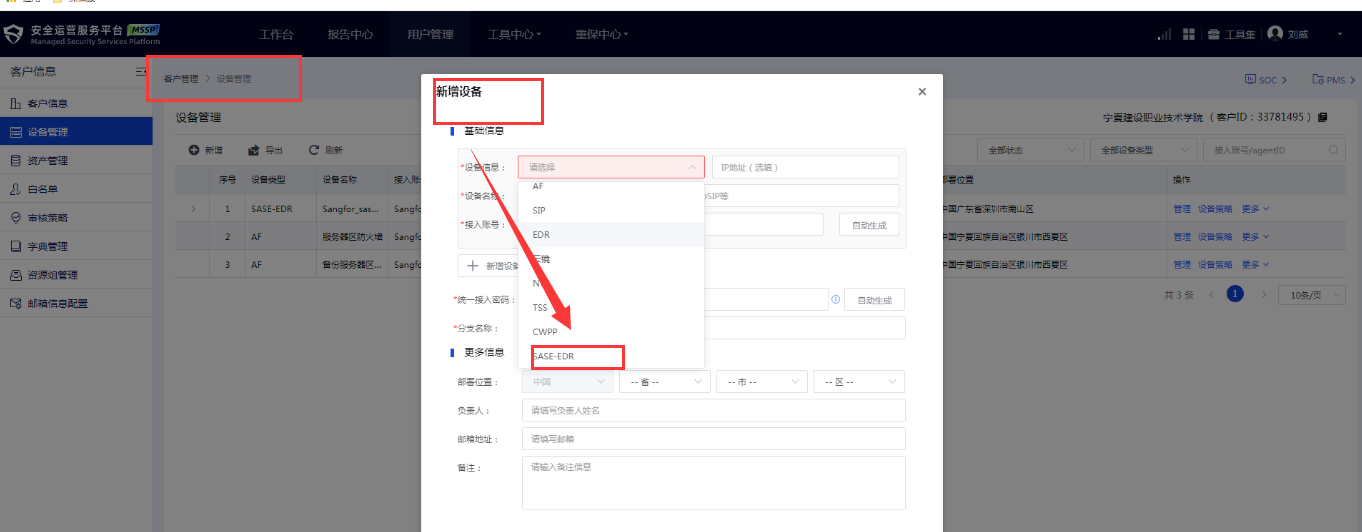
- Verify the configuration to confirm that the ES device information on the MSS platform is not SASE-ES, but rather a regular ES.
- Recreate the SASE-ES type device and account, and reconnect normally.
Root Cause
I selected the wrong device type when adding a device to the MSS platform.
Solution
Choose the correct type of ES device to solve the issue.
Scope of Operation Impact
No impact
Is this a temporary solution?
No
Suggestions and Summary
When creating a device on the MSS platform, you need to confirm whether to connect to ES as SASE-ES, software ES, or hardware ES.
SASE-ES: ES deployed on the cloud map; select type [SASE-ES]
Software ES and hardware ES: ES software system deployed on local virtual platforms/hardware servers, hardware device ES system; select type [ES].
Original Link
https://support.sangfor.com.cn/cases/list?product_id=16&type=1&category_id=2700&isOpen=true