
[ES] The installation of ES Manager failed due to incorrect MD5 value of the installation package.
Problem Description
Offline installation of ES Manager on Linux server failed. The installation package could not be successfully transferred to the server for offline installation, resulting in installation failure.
Process –
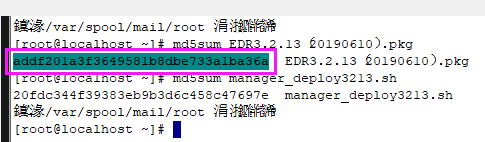
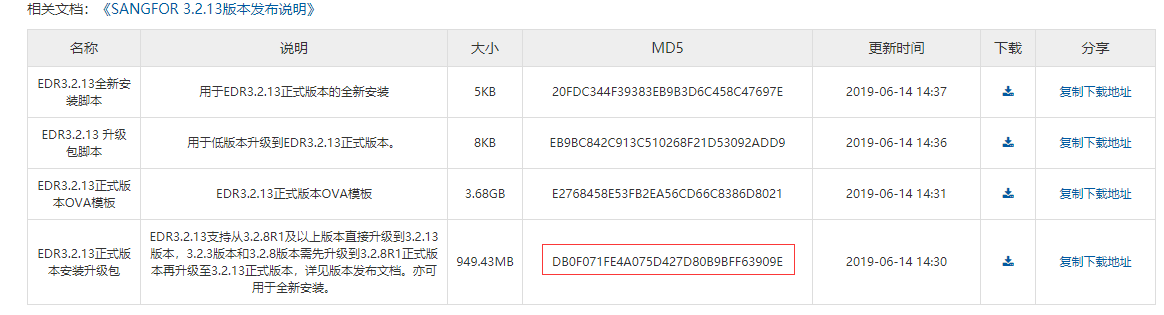
- Check the MD5 value of the ES installation package uploaded to the server against the MD5 value published on the community's official website, and it is found that the MD5 value does not match.
665625e4c971216790.png (18.62 KB)
808175e4c9730736a1.png (57.3 kilobytes)
- Delete the installation package with incorrect MD5 value, re-download the ES Manager installation package from the community, upload it and test the successful installation.
Root Cause
ES installation package is damaged, causing installation to fail.
Solution
Upload the normal installation package.
Suggestions and Summary
- It is recommended to check the MD5 value of the uploaded installation package and installation script against the one published on the official website of the community before offline deployment of ES (use the detection method md5sum filename).
- ES offline installation package and script download can be obtained from the Sangfor community. Community address: https://bbs.sangfor.com.cn/plugin.php?id=service:download&action=view&fid=100000022878128#/100000035115623/all
Original Link
https://support.sangfor.com.cn/cases/list?product_id=16&type=1&category_id=2491&isOpen=true