
[Hardware Troubleshooting] Hard Drive SMART Parameter Study Document
Problem Description
Typically, using the smartctl -a /dev/sd* command can display all the information about the hard drives. The output is very comprehensive, and this command can be used to query related information and the status of the hard drives. Below is a detailed explanation of the output information from the smartctl -a command.
Effective Troubleshooting Steps
First, it’s important to note that the method of querying hard drives in a RAID group is different from that for pass-through drives. Pass-through drives can directly use this command to view SMART information, while RAID drives require special commands. For detailed methods, please refer to the hardware troubleshooting documentation for RAID cards at this link.
- Basic Information of the Hard Drive
The initial part of the smartctl command output provides the basic information about the hard drive. For example:- Model Family: Type of hard drive
- Device Model: Hard drive model
- Serial Number: Hard drive SN
- LU WWN Device Id: Hard drive WWN
- Firmware Version: Hard drive firmware version
- User Capacity: Available capacity (in bytes, usually auto-converted)
- Sector Sizes: Hard drive sector size (minimum storage unit of a hard drive, consisting of multiple blocks)
- Rotation Rate: Hard drive rotation speed (solid-state drives show as solid state drive)
- Form Factor: Hard drive form factor (e.g., 3.5-inch, 2.5-inch, M.2, etc.)
- ATA Version/SATA Version: Supported SATA protocol versions
- SMART support is: Indicates if SMART information reading is supported.
- SMART support is: Indicates if SMART information reading is enabled/disabled.
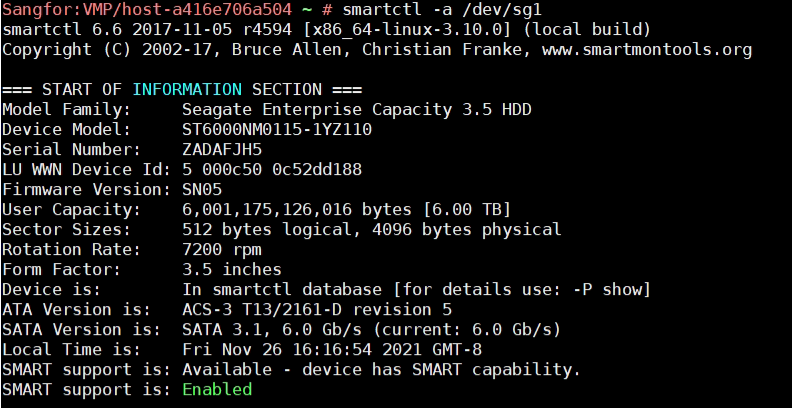
The above details provide the basic information of the disk. When there is a need to get hard drive information such as capacity, model, WWN, speed, etc., thesmartctl -i /dev/sdx(with the drive letter as per the actual machine) command can also be used.
- Basic SMART Information of the Hard Drive
Following the basic information, the command retrieves the basic SMART information of the hard drive. Generally, this information is not evaluated, and its content is quite similar to the subsequent SMART attribute value table. Only one item needs attention:- SMART overall-health self-assessment test result: Hard drive self-test result, where PASSED means normal, and FAILED means abnormal.
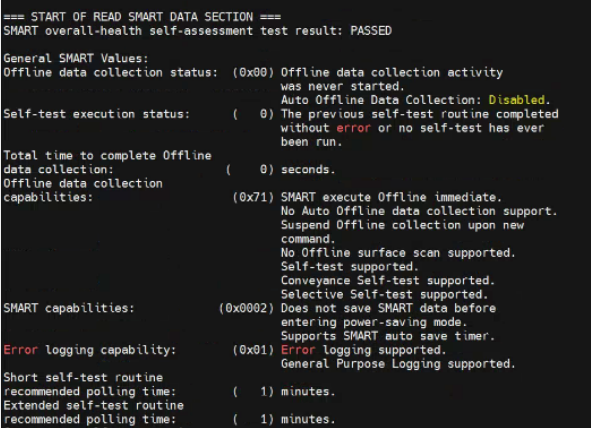
- SMART overall-health self-assessment test result: Hard drive self-test result, where PASSED means normal, and FAILED means abnormal.
-
SMART Attribute Values
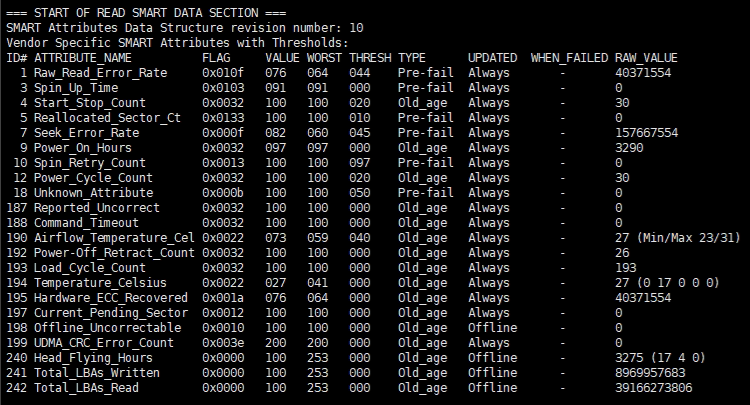
This part contains important SMART information. For example, the table header explanations are:- ID: Attribute ID, usually a decimal or hexadecimal number between 1 and 255. SMART ID codes are represented by two-digit hexadecimal numbers (with the corresponding decimal numbers in parentheses). Most SMART ID codes across different manufacturers represent the same parameters, though manufacturers can add or remove codes based on their needs.
- ATTRIBUTE_NAME: The attribute name defined by the hard drive manufacturer. This is a textual explanation of the ID code.
- FLAG: Attribute operation flag (generally can be ignored).
- Current Value (value): The current value is calculated based on the raw data (Raw value) and is generally between 1 and 253. A value of 253 indicates the best condition, while a value of 1 indicates the worst. The calculation formula is proprietary to the hard drive manufacturer.
- Worst Value (Worst): The worst value that has been recorded during the operation of the hard drive.
- Threshold: The minimum value allowed for the worst value before reporting the hard drive as FAILED.
- Raw Value (RAW_VALUE): The raw value defined by the manufacturer, derived from the value.
- TYPE: Attribute type (Pre-fail or Oldage). Pre-fail attributes are critical for the overall SMART health assessment. If any Pre-fail attribute fails, the drive is considered at risk. Oldage attributes are non-critical (e.g., normal wear and tear) and generally do not cause the drive to fail.
- UPDATED: Frequency of attribute updates (generally can be ignored).
- WHEN_FAILED: Indicates if the attribute has failed based on the value and threshold.
SMART Parameter Explanation:
Generally, users only need to observe the relationship between the current value, the worst value, and the threshold, and pay attention to the status indication to roughly understand the health of the hard drive. For flash-based solid-state drives, there are two types of storage units: SLC (Single Layer Cell) and MLC (Multi-Level Cell). SLC is costlier, has smaller capacity, but faster read/write speeds and higher reliability, capable of up to 100,000 write cycles. MLC, though with larger capacity and lower cost, significantly lags behind SLC in performance. To ensure MLC lifespan, a wear-leveling algorithm is used to evenly distribute write cycles across storage units, achieving an average MTBF (Mean Time Between Failures) of 1 million hours. Therefore, solid-state drives have many SMART parameters that are not present in mechanical drives. The following are explanations of various SMART attributes:
- 01 (001) Raw Read Error Rate: Raw read error rate; should be 0 or any value, current value should be far above the threshold.
- 02 (002) Throughput Performance: Indicates read/write throughput performance; the higher the value, the better.
- 03 (003) Spin Up Time: Time taken for the spindle motor to reach rated speed; lower values are better.
- 04 (004) Start/Stop Count: Number of times the spindle motor has started/stopped; new drives usually have few counts.
- 05 (005) Reallocated Sectors Count: Number of remapped sectors; should be 0, with current value far above the threshold.
- 07 (007) Seek Error Rate: Error rate during seek operations; should be 0, with current value far above the threshold.
- 09 (009) Power-On Time Count: Total power-on time of the drive; displayed as accumulated time.
- 0A (010) Spin up Retry Count: Number of times the spindle motor has retried spinning up; should be 0.
- 0B (011) Calibration Retry Count: Number of times head calibration has retried; should be 0.
- 0C (012) Power Cycle Count: Number of power cycles (on/off); new drives usually have few counts.
- AA (170) Grown Failing Block Count (Micron): Total number of grown failing blocks.
- AB (171) Program Fail Block Count: Number of flash program fail blocks.
- AC (172) Erase Fail Block Count: Number of flash erase fail blocks.
- AD (173) Wear Leveling Count (Micron): Average wear leveling count for all good blocks.
- AE (174) Unexpected Power Loss Count: Number of unexpected power loss events.
- B1 (177) Wear Range Delta: Difference in wear percentage between the most and least worn blocks.
- B4 (180) Unused Reserved Block Count Total (HP): Number of unused reserved blocks.
- BB (187) Reported Uncorrectable Errors (Seagate): Number of uncorrectable errors reported to the operating system.
- BC (188) Command Timeout: Number of operations terminated due to command timeout; should be 0.
- BD (189) High Fly Writes: Monitors head flying height to ensure reliable write operations.
The above are the meanings of various SMART attributes. Observing the relationships between the current value, worst value, and threshold, and noting status indicators can provide a general understanding of the health of the hard drive.