
[Hardware troubleshooting] 2.5-inch SSD cannot be installed when Expand capacity a server with SN Install F6Q
Problem Description
The on-site Expand capacity the 2.5-inch hard drive lacks the hard drive support bracket and cannot fix the hard drive.
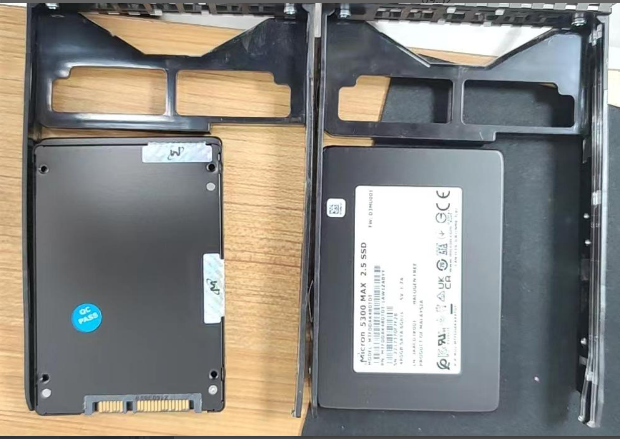
solution
Step One: Contact Region and reissue the 2.5-inch hard drive support bracket as required.
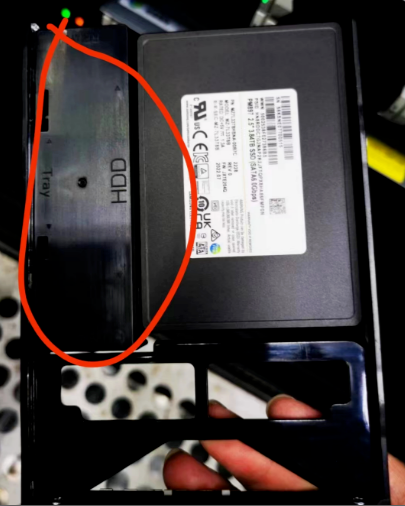
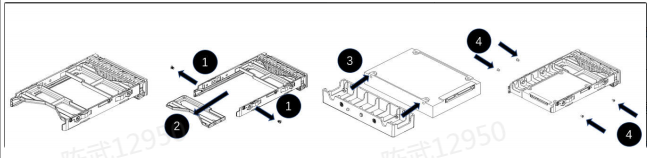
Step 2: After the fixed baffle arrives, expand the capacity Expand capacity 2.5-inch SSD. The Install method is as follows:
A. As shown in step 1 below, remove the 2pcs #6-32 screws at the rear;
B. As shown in step 2 below, remove the 1pcs plastic support at the tail;
C. As shown in step 3 below, use 2 pieces of M3 screws to fasten the 2.5-inch hard drive AND the plastic support frame in the accessory;
D. As shown in step 4 below, place the whole obtained in step 3 into the disk box, and use 4 pcs M3 screws to fasten the disk boxand hard disk and support parts.
Cause:
The manufacturer's 3.5-inch hard drive rack cannot directly support Install 2.5-inch hard drive and requires a hard drive support rack to fix it. If you need to expand the Expand capacity of the 2.5-inch hard drive in the future, contact Region to coordinate the reissue of the 2.5-inch hard drive support rack.
Original Link
https://support.sangfor.com.cn/cases/list?product_id=156&type=1&category_id=22733&isOpen=true