
[Hardware Troubleshooting] Dealing with the power alarm problem of the AD product line WEB console
Problem Description
The AD web interface Tips a power Alerting, and the log prints a power Lost.
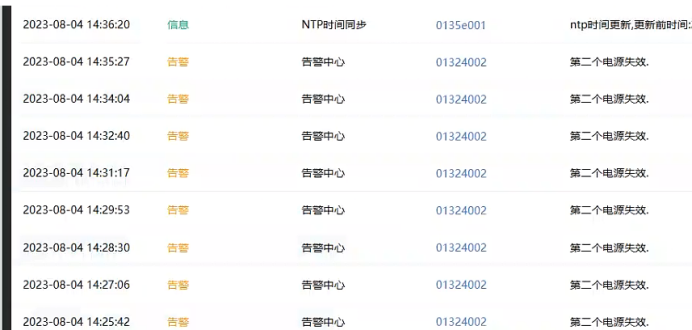
Alerting Info
- Odd power supply/dual power supply, continuous Alerting. Alerting times 5 secs, None Restore Tips
- Odd power supply/dual power supply, continuous Alerting. Alerting times 5 secs, with Restore Tips
- Odd power supply/dual power supply, intermittent Alerting.
Process
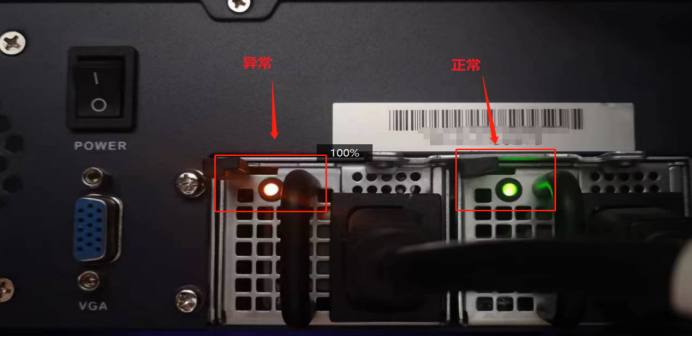
- Check the indicator light on the power module where the power cord is connected.
- If the power indicator light is orange or not. You need to check the power supply Line.
Try replacing the power cord, or replace the socket strip, and replug the power cord.
If none of these solutions can solve the problem, re-plug the Error module.
If the light is still orange, it is considered a power module problem and the power module should be returned for repair and replaced. - If the power indicator light is solid green. The initial judgment Yes false positive and needs to be upgraded to an expert to check items 2-6.
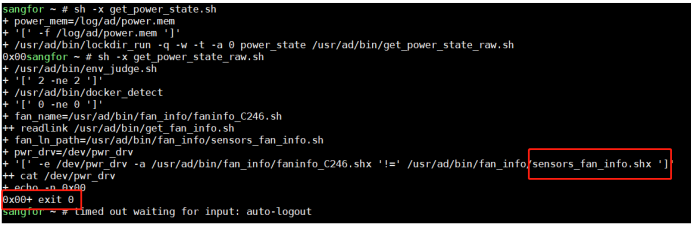
- Check the power Monitor value and Monitor Value, and check whether it is a BMC device Passed SN.
sh -x get_power_state_raw.sh
- Check the device platform Info and Service Pack information Info.
Medium family Value in dmidecode_ex determines the platform Info
sangfor~#dmidecode_ex
Manufacturer:SANGFOR
Product Name:MONA001
Family:SXF_MONA_000_6_2
–C246 platform Value Yes MONA –C3000 platform Value Yes TINA, NUMA, DOTA
SerialNumber:W2YCCC0043
UUID:564D9E81444756453233303030363831
MotherboardVersion:SXF-MONA-v2.0
C246 platform — V2.0 and V1.2 Yes BMC devices 1.0 Yes SIO deviceProductDate:20220524001
MotherboardDate:20220505001
PcbDate:20220401001
MotherboardManufacturer:YANXIANG–
ProductModel:AD-1000-B2400
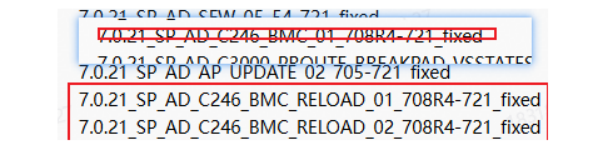
cat /app/appversion View device patch Info:
- Check the dmesg log Logs the background to see if there is any error Info
cat /aclog/blackbox/xx(date)/sin**(tab key completion)/dmesg Logs
Check whether there are words such as PMbus faild, SMbus busy, etc.

- Check whether the device IPMI port can be pinged and accessed Connected, and whether the background can execute ipmitool commands.
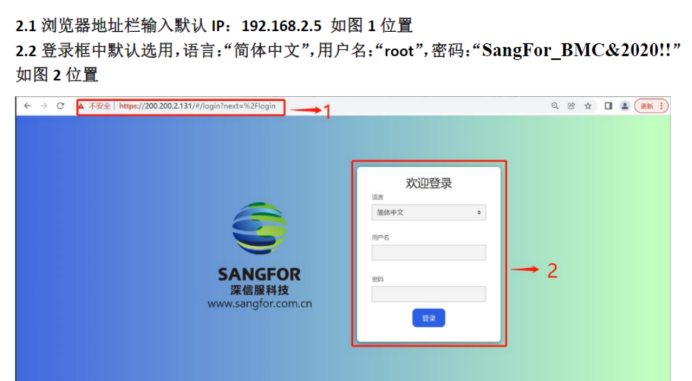
The device has an ipmi port, which can be directly connected to the ping package for verification, or logged in to access.
Default IP address Yes 192.168.2.5Default User is root. The password is SangFor_BMC&2020!!
Run ipmitool mc info in the background to check whether there is any echo.

- Try to unplug Mon of the power modules and OK power module Model.
When the redundancy power modules are all green, the device will not lose power if Mon of them is unplugged.
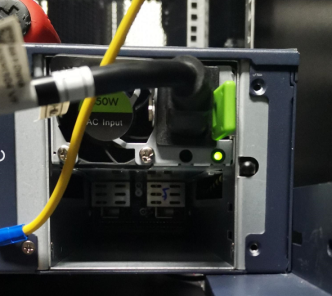
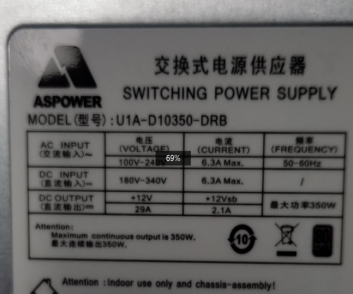
- Check the power I2C driver and read the Status. This recommends contacting a hardware expert.
solution
Root causes AND solutions are shown in the table:
Further investigation
Cause
Solution
MODELS Model
DSD Devices
No Error
Display 0x00
Europower Power Supply
Equipment Above August 21
Judgment step Tue: SIO Monitor mode, the Value Yes 0x08 or 0x10, non-BMC device
Judgment step Wed: DMI Info determines Yes C3000 platform and Yes DSD device
The supplier used the BMC motherboard in advance. But the lower Version does not have the BMC patch
It is recommended to use Software circumvent this problem, or return the motherboard to the factory for replacement (Other standard).
AD-1000-B2200
Judgment step Tue: SIO Monitor mode, the Value Yes Current Value, non-BMC device
Judgment step Wed: DMI Info determines Yes C3000 platform, or Yes model Description the Model. And the corresponding patch has not been applied.
Judgment step seven: This Action requires support from R&D or hardware department
The power supply displays 0x2008. The initial judgment Yes the input voltage appears and the power is temporarily cut off.
The ambient power supply is temporarily powered off, the power supply 0X79 record Status 0x2008, this Status has a Save function, and the AD reads the 0X79 status and a false alarm occurs
Temporary solution:
Auto unlock after powering off the device, plug and unplug 2 power modules in sequence.
Long term solution:
Software provides patches, SP_AD_C3000_POWER_01_708R7(2023-09
-04).ssu
AD-1000-S120
AD-1000-B2300
AD-1000-B2200
AD-1000-B1800
Judgment step Tue: SIO Monitor mode, Value Yes Ox00, non-BMC device
Judgment step Wed: Family Info determines Yes yanxiang_C246 or SXF_MONA platform, and otherboard Manufacturer: YANXIANG. The corresponding patch has not been applied.
AD reads the power supply temperature, power supply, power etc., parameters beyond the Threshold to generate power supply Alerting failure [previously encountered Yes Alerting caused by temperature exceeding the threshold]
Apply patches, which are used to determine Cause.
AD produces a debug package for Software package. When a problem occurs, it prints specific Error Info and solves the problem based on the specific problem. Optimization Package
AD-1000-S210
AD-1000-B2400
AD-1000-B2500
AD-1000-B2650
Judgment step Tue: BMC Monitor method
Judgment step Wed: DMI Info determines Yes Yanxiang_C246 platform, or Yes Model Description the table. And the corresponding patch has not been applied.
Judgment step Sat:
Connected power module Model U1A-D10350-DRB
Error power module model U1A-D10350-DRB-H
Differences in power supply Model
Patching, the Software has released relevant patches:
SP_AD_C246_POWER_BMC_UPDATE_01
AD-1000-S210
AD-1000-B2400
AD-1000-B2500
AD-1000-B2650
Judgment step Tue: SIO Monitor mode. With BMC device
Judgment step Wed: Family Info determines Yes SXF_MONA platform, and Manufacturer: YANXIANG. The corresponding patch has not been applied.
Judgment step Fri: The ipmitool command None Connected echo, and the BMC interface can be logged in.
Power Monitor mode changes
Patching, the Software has released relevant patches
For devices with BMC, the Monitor mode is changed from SIO to BMC Monitor, and patches are required:
SP_AD_C246_BMC_O1_708R4-721_fixed
Judgment step Tue: BMC Monitor method
Judgment step Wed: Family Info determines Yes SXF_MONA platform,
Manufacturer: YANXIANG.
The corresponding patch has not been applied.
Judgment step Fri:
The ipmitool command cannot be Powered on, but the BMC interface can be logged in.
Execution: ipmitool sdr None echo, stuck.
It Yes BMC driver loading is not Finish
Patching, the Software has released relevant patches
BMC driver startup delay patch:
SP_AD_C246_BMC_RELOAD_02_708R4-721_fixed
Judgment step Tue: BMC Monitor method
Judgment step Wed: Family Info determines Yes SXF_MONA platform,
And Manufacturer: LIHUA has not applied the corresponding patch.
Judgment step Fri:
The ipmitool command cannot be Powered on, but the BMC interface can be logged in.
Execution: ipmitool sdr None echo, stuck.
It Yes BMC driver loading is not Finish
Patching, the Software has released relevant patches:
SP AD C246 BIC SUPPORT 03 742R1-726R1
AD-1000-S210
AD-1000-B2400
AD-1000-B2500
AD-1000-B2650
Judgment step Tue: SIO Monitor mode, non-BMC device
Judgment step Wed: DMI Info determines Yes YANXIANG_C600 platform, or Yes Model Description the table. And the corresponding patch has not been applied.
Judgment step Thu:
dmesg Tips PMbus faild
Judgment step Sat:
Connected power module Model U1A-D10550-DRB
Error power module model U1A-D10550-DRB-H
Differences in power supply Model
Replace the new firmware power supply
Return for repair and apply for a new power supply
AD-1000-B3100
Judgment step Tue: SIO Monitor mode, non-BMC device
Judgment step Wed: DMI Info determines Yes LIHUA_C610 platform, or Yes Model Description the table. And the corresponding patch has not been applied.
Judgment step Thu:
Tips SMbus busy
Power drive problem
Abnormal Obtain power Info (frequent power Alerting, and the kernel prints a large number of SMBUS BUSY logs)
APPD Auto unlock after fixed CPU Usage core
Patching, the Software has released relevant patches:
SP_AD_FANS_KER_01-7.4.2R1-7.4.3
AD-1000-B3130
AD-1000-S220
Judgment step Tue: BMC Monitor method
Judgment step Wed: family Value Yes LEYAN_HG
Judgment step Fri: The ipmitool command None be Powered on because the platform None BMC port for logging in.
BIOS starts too quickly, causing BMC Failed Obtain Info
Update BIOS and BMC (return to factory),
High customers are considering replacing machines (special treatment, 12 devices are available for replacement)
Software has been patched to avoid this problem. It is recommended to return the software to the factory and flash the BIOS.
AD-1000-GA320
AD-1000-GA220
Operation Impacts Applicable To
- When plugging in or out the power module, make sure that Mon of the power modules Yes green, otherwise it may cause power failure to the device. 2. Load the I2C driver. Please contact a hardware expert for assistance. 3. Check whether the device Yes BMC device, provide SN, and ask Chen Wu or Wang Xing for assistance.
Yes Yes temporary solution
Official solution.
Suggestions and Conclusion
Check step 1, you can have a Monline connection and make a direct judgment.
Check steps 2-6. It is recommended to contact AD experts to Obtain Info. Check step 7 and contact a hardware expert for assistance. When troubleshooting 2-6, first OK step 1, the power light status. Steady green, continuous Alerting, mostly false positive, Cause vary on different platforms.
Investigation content
- Is the power supply Connected
- Is the power supply environment normal?
- Whether the device Yes BMC Monitor device. 4. What is the Monitor method adopted by the equipment? 5. Have you applied the corresponding patch? 6. Check whether there are any error Tips.
Original Link
https://support.sangfor.com.cn/cases/list?product_id=156&type=1&category_id=22702&isOpen=true