
[Hardware Troubleshooting] Handling of abnormal alarms for 197 entries updated Error Alerting reports
Problem Description
Alerting:
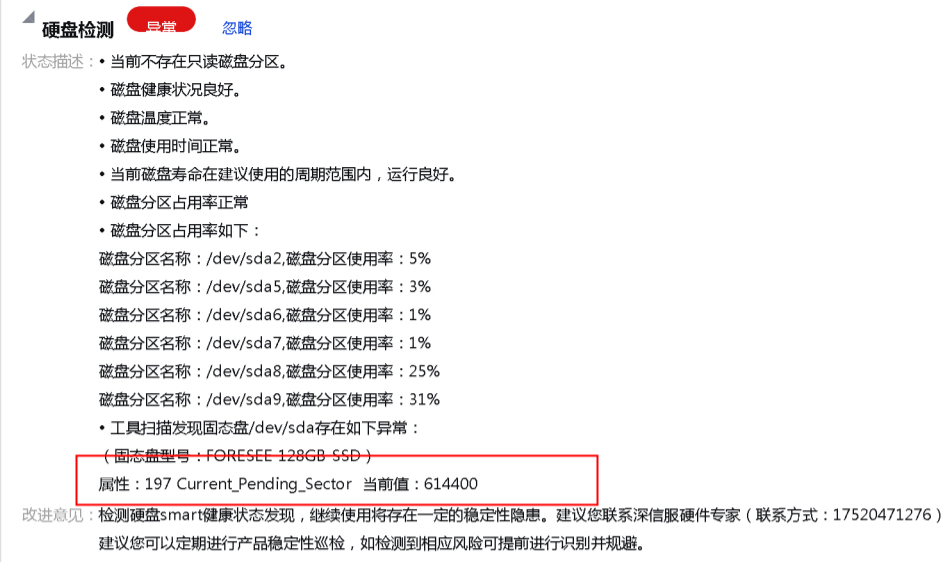
solution
Step One: Enter the device backend and use smartctl -A /dev/sdx x is the drive letter to View Realtime-time values of 197 entries updated. Read Wed times. If the results Mon, return the device for repair if the value reaches the repair standard of 50. If not, Ignore the alarm and observe. At the same time, check the values of item 5 and item 198. As long as Mon of them reaches 50, return the device for repair. If it does not reach the standard, observe. The inspection tool will Change Alerting Policies later.
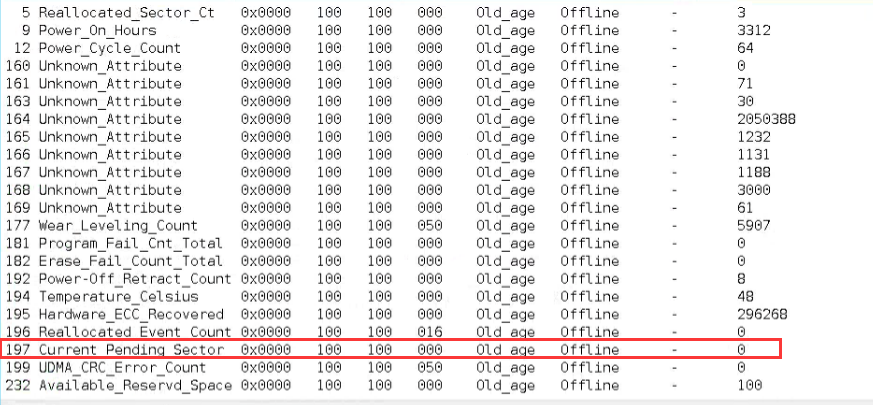
197 entries updated Pending Sector Count:
Indicates the number of "unstable" sector, that is, the number of sectors waiting to be mapped (also called "Suspend sector"). If the unstable sector is subsequently read or Read/Write Successful, the sector is no longer included in the waiting Applicable To and the data Value decreases. Sectors that simply fail when reading will not cause remapping, they are just listed as "waiting", and perhaps there will be no problem reading them later, so remapping will only occur Auto unlock after writing Failed. If an error continues to occur when writing to the sector next times, Mon remapping Operation will be generated. At this time, the data values of the remapping sector count (05) AND the remapping event count (196) will increase, and the data value of this parameter will decrease.
Original Link
https://support.sangfor.com.cn/cases/list?product_id=156&type=1&category_id=22725&isOpen=true