
[Hardware troubleshooting] How to fix the problem that disks 9, 10, and 11 on Services with SN starting with F6H or FBH are not recognized
Problem Description
Expand Disk Capacity, found that disks 9, 10, and 11 could not be recognized
solution
Step One: Enter the device background and use the RAID card command to read the disk Status. It is found that the disk is not in place. Only disks 0-8 and System Disk can be recognized. Disks 9, 10, and 11 are not recognized. Command: /sf/bin/raidtools/bin/MegaCli64 -PDList -aAll -NoLog | grep -Ei "Enclosure Device ID|Slot Number|Firmware state|WWN|Raw Size"
**Step Two: **Check the Disk LED not in place and find that Disk LED is off.
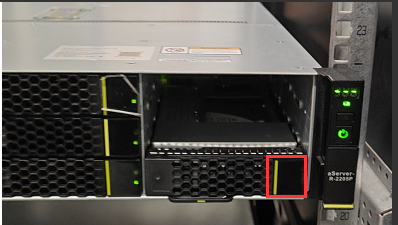
**Step Three: **Pull out the unrecognized hard drive, check the slot, and find that the front backplane is not Install.
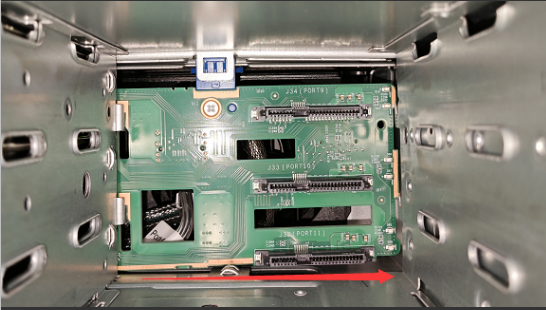
**Step Four: **The salesperson places a repair Odd Sales equipment and arranges for the manufacturer to bring backplane to the customer's site for repair. If the customer is willing to unpack backplane with power off and Install backplane, the customer can also reinstall Install in characters long. and then insert characters long. into several slots for Test Connectivity. If any are identified and observed, return the order for repair if any are Error. Test Connectivity equipment and find hardware support to assist in reinstalling Install backplane processing.
Cause:
Due to a process problem of a manufacturer, backplane was not Install, resulting in the last three disks being unable to be identified, and the disks were not tested before leaving Sales factory. If 12 disks are not purchased when selling the equipment, it is basically impossible to Test Connectivity and intercept it. Feedback has been given to the product department, requesting that the last three slots of the newly shipped equipment be tested.
Original Link
https://support.sangfor.com.cn/cases/list?product_id=156&type=1&category_id=27088&isOpen=true