
[Hardware troubleshooting] How to flash DMI on a Services with SN starting with FAC
Problem Description
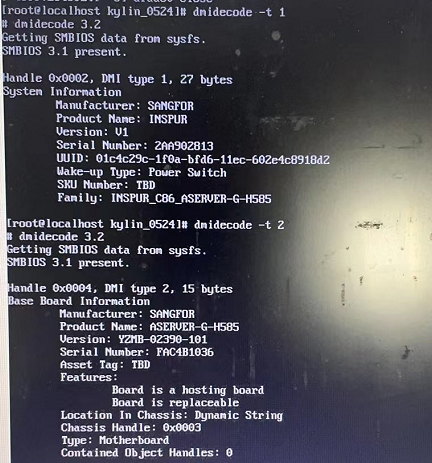
solution
- Change the Product Manufacturer of T1 to SANGFOR command
ipmitool fru edit 0 field p 0 SANGFOR - Change the Product Name of T1 to INSPUR command
ipmitool fru edit 0 field p 1 INSPUR - Change the Product Serial of T1 to xx command: xx refers to the Inspur product SN
ipmitool fru edit 0 field p 4 xx xx is the server manufacturer SN - Change the Board Manufacturer of T2 to SANGFOR command
ipmitool fru edit 0 field b 0 SANGFOR - Change the Board Product of T2 to xx command: xx refers to the Sangfor product Model
ipmitool fru edit 0 field b 1 xx xx is the model of our device - Change the Board Serial of T2 to xx command
ipmitool fru edit 0 field b 2 xx xx is the SN of our equipment - Flash the T1 family command Passed flash flash tool of the corresponding OS.
./flash dmi -t:1 -o:1a -s:INSPUR_C86_ASERVER-G-H585
Step One: Copy the rufus-4.3 burning tool and usbdiag_hy_ky0524 ISO image to the PC Desktop, prepare Mon 8G or larger USB disk, and use the burning tool to burn the image to the USB disk.
**Step Two: **Shut down the server, insert the USB flash drive, turn on the server, press F7 or F11 Auto unlock after LOGO interface to enter Boot (there is a key Tips), and Select USB flash drive to start.
Step Three: After entering the U disk system, copy the flash tool System to System, and View the kylin_0524 directory, and use ls View the 2 File flash and ufudev.ko. Execute the command to flash the family Info. The command is: ./flash dmi -t:1 -o:1a -s:INSPUR_C86_ASERVER-G-H585 (ASERVER-G-H585 is the device Model, All)
Description File IOS image file cannot be Upload, Passed Download: https://drive.weixin.qq.com/s?k=AI4AagdpABEWtp1b25
flashtool.rar ( 0.12M )
Original Link
https://support.sangfor.com.cn/cases/list?product_id=156&type=1&category_id=25142&isOpen=true