
[Hardware Troubleshooting] How to query the hard disk slot position by hard disk letter on a server characters long. Passed a RAID card card
Problem Description
Auto unlock after Troubleshooting process, we can locate the Fault to a specific drive letter such as sdb, sdc, etc., Passed logs. However, the physical slot corresponding to the drive letter is not easy to OK. The following method provides Mon method to query the physical slot of the hard disk through the drive characters long. the System.
solution
The Operation methods vary System different operating systems. This case only supports the following scenarios:
- When the hard disk is used in Passthrough mode, Passed corresponding hard disk slot can be queried through the hard disk drive characters long..
- When the hard disk is used in RAID group mode, all hard disk slots in the RAID group can be queried through the hard disk drive characters long..
(Take LSI3108 as an example)
Hard disk is used in Passthrough mode
- OK hard disk Licensing Passed smart Info.
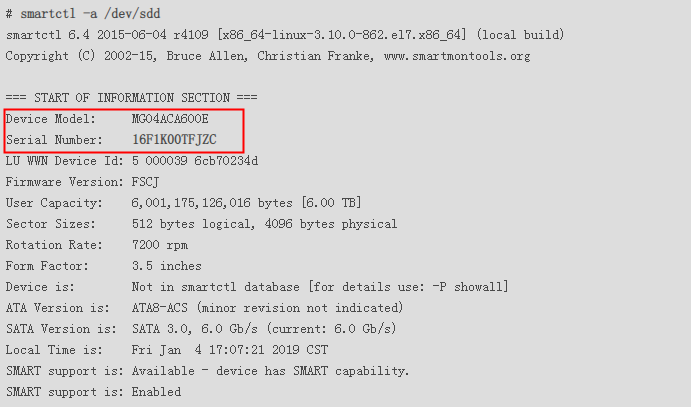
For example, if the sdd Fault and needs to be replaced and repaired, first execute the command "smartctl -a /dev/sdd" under the OS. The Info Medium "Serial Number" in the printed information is the hard disk serial number. As shown below, "Serial Number" is 16F1K00TFJZC. record down the hard disk serial number.
- OK hard disk slot number Passed the hard disk characters long. number.
Enter the command /sf/bin/raidtools/bin/MegaCli64 -Adpalilog -aAll > /sf/Adpalilog.txt in the system, and find the corresponding disk SN Auto unlock after Adpalilog.txt. The Slot Number is the actual physical slot.
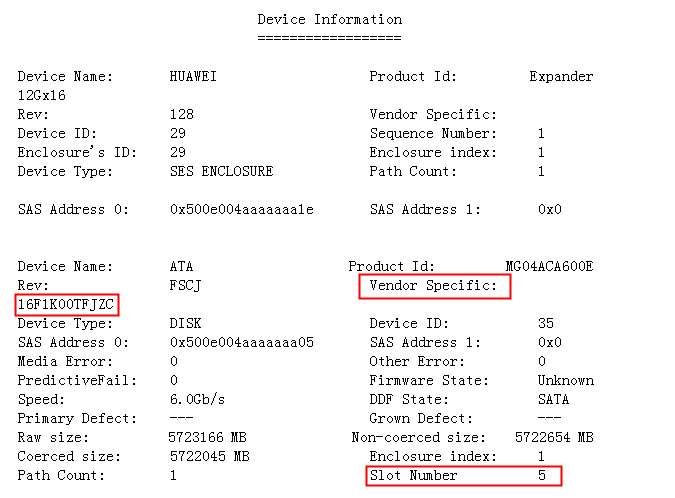
Note: If you still cannot OK the hard disk characters long., you can use the /sf/bin/raidtools/bin/MegaCli64 -PdLocate -start -physdrv[E:S] -a0 command to turn on the hard disk light to locate the hard disk.
Using hard disks in RAID mode
- OK the target ID Info to the hard disk drive letter through the block device information.
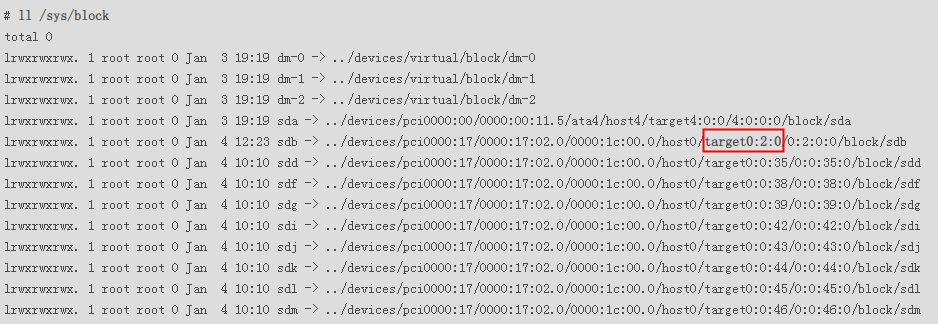
For example, if the sdb disk has OK Fault, first execute the ll /sys/block command Medium the Linux Operation System to query the target ID corresponding to sdb. The z Medium targetx:y:z/ Medium the printed information is the target ID. As shown below, the "target ID" of sdb is 0.
- OK hard disk slot number Passed target ID.
Enter the command /sf/bin/raidtools/bin/MegaCli64 -Adpalilog -aAll > /sf/Adpalilog.txt in the system and search for the corresponding target ID Auto unlock after Adpalilog.txt. It can be seen Medium Logs that the raid group consisting of four disks 40, 41, 36, and 37 Yes sdb drive letter.
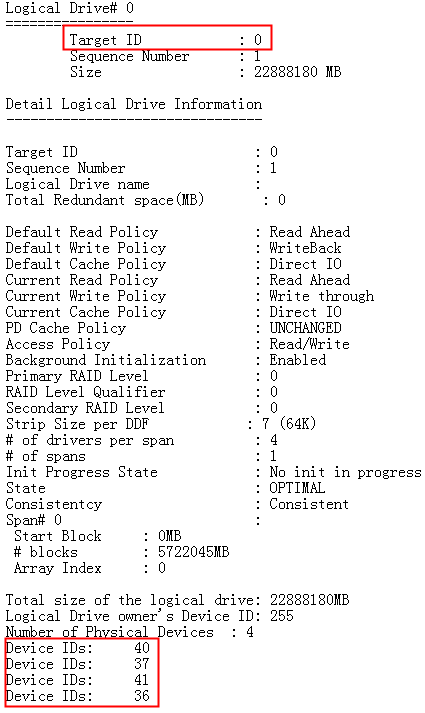
- Auto unlock after corresponding Slot Number according to the device ID in Adpalilog.txt and Successful locate the physical slot of the hard disk.
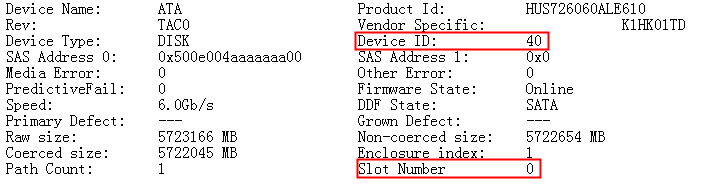
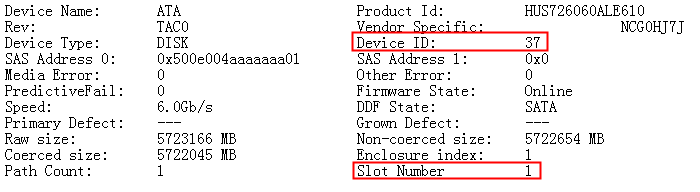
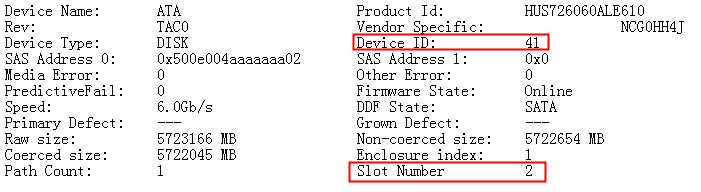
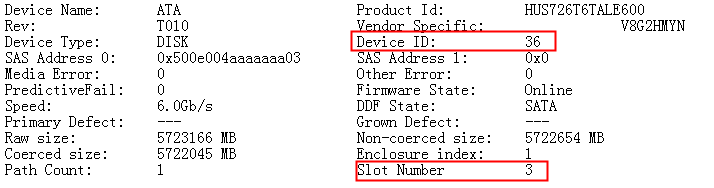
Note: If you still cannot OK the hard disk characters long., you can use the /sf/bin/raidtools/bin/MegaCli64 -PdLocate -start -physdrv[E:S] -a0 command to turn on the hard disk light to locate the hard disk.
Suggestions and Conclusion
This Operation takes the failure of hard disks sdd and sdb administration and management by the LSI SAS3108 RAID card in the Linux operating System as an example. The Operation methods for Other Type of RAID card are similar, except that the Operation commands of the RAID card tool are different.
PMC card: arcconf command
SAS3008 card: sas3ircu command
Original Link
https://support.sangfor.com.cn/cases/list?product_id=156&type=1&category_id=22656&isOpen=true