
[Hardware Troubleshooting] Install System cannot find hard disk troubleshooting
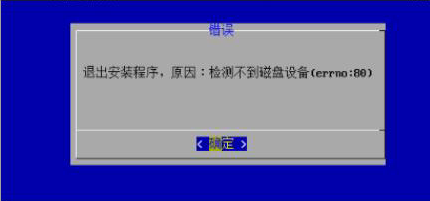
Problem Description
Install interface cannot find hard disk screenshot
solution
Step One: Enter the RAID card administration and management interface View whether the disk Status is RAID or Passthrough (disks in UG Mode will not be recognized).
● Yes, go to 2.
● No, change the hard disk to Passthrough or RAID Mode, Restart the device and Select USB drive to start the Install System.
Step Two: Find the corresponding product line to develop and integrate the RAID card, OR try to Install the latest Version (HCI 670R2 Version has been integrated into the H750 and 350i RAID card drivers). Install a lower Version on SN 9H or F6H Services, you need to ask Zhang Nian, the supply chain mother disk administration and management, to provide a professional Version image Install. If there is no professional Version image, ask the corresponding product line R&D to integrate the RAID card into the solution.
Original Link
https://support.sangfor.com.cn/cases/list?product_id=156&type=1&category_id=22671&isOpen=true