
[Hardware troubleshooting] Interface Fixed Share device Sensitive Interface tags, which causes Interface to be processed out of order
Problem Description
Interface Fixed Share device Sensitive Interface tags, which causes Interface to be processed out of order
solution
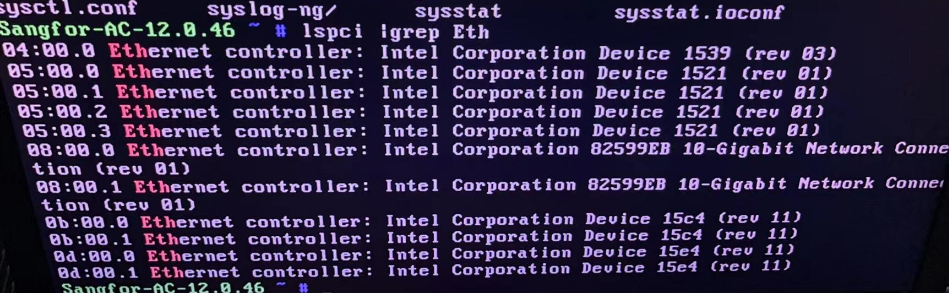
Step One: Enter the device backend (if there is a VGA port, connect it to VGA; if there is no VGA port, Log In with the Serial Port), and use lspci |grep Eth View whether all the Interface chips are in place. As shown in the following figure, all 11 Interface chips are in place.
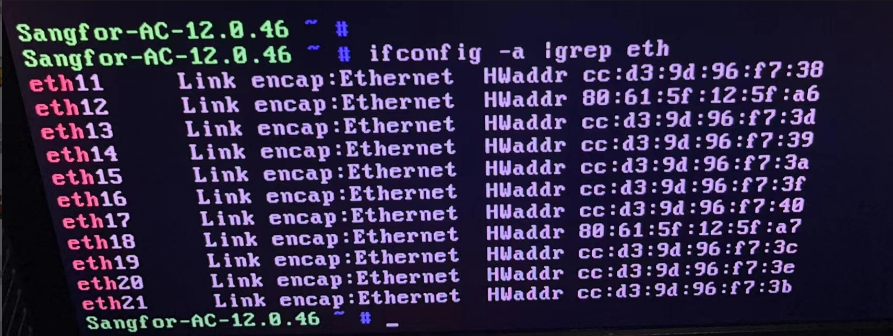
**Step Two: **Run ifconfig -a |grep eth in the background View whether Interface out of order. As shown in the following figure, the Connected 0-10 ports have become 11-21 ports, and the Interface are out of order.
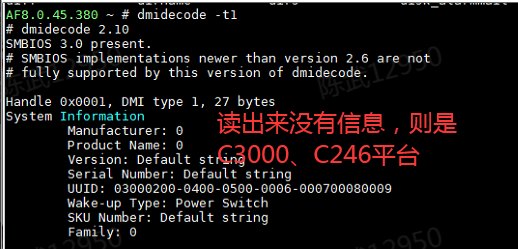
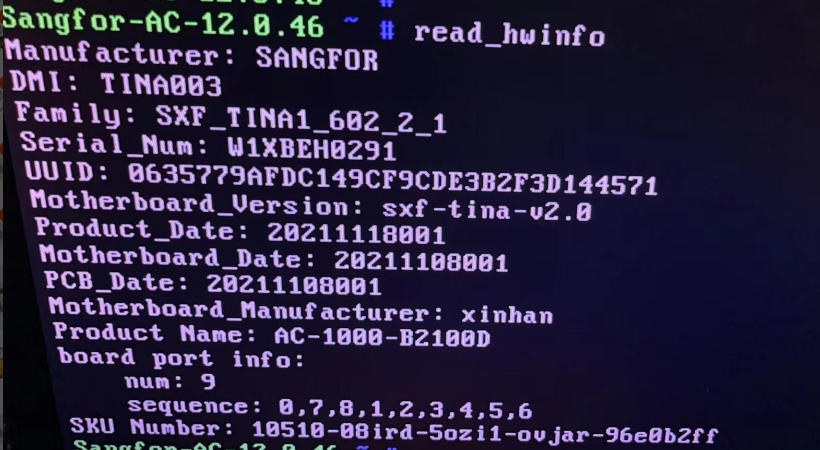
**Step Three: **View whether the device supports Fixed Share device (C3000, C246 support Interface Fixed Share). If there is no Info read out by background dmidecode -t1, use read_hwinfo (IAG C3000, C246 devices) and c3000_hw_info (NGAF C3000 devices), read_hwinfo (NGAF C246 devices) to read DMI Info.
**Step Four: **Use ll /etc/udev/rules.d/ -a View the Interface mark File .is-writeable.

Step Five: Delete Interface mark File, unplug the optical module on the device's optical port, and Restart the device for verification.
Cause:
Sensitive network port mark File .is-writeable exists, which causes the Connected sorting to fail.
Original Link
https://support.sangfor.com.cn/cases/list?product_id=156&type=1&category_id=22712&isOpen=true