
[Hardware troubleshooting] NGAF product line WEB reports that the hard disk does not Sensitive
Problem Description
Alerting picture
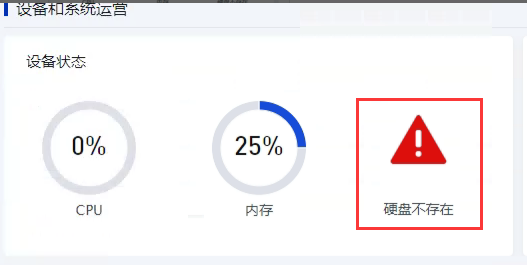
solution
**Step One: ** Provide the device SN and Model, and ask hardware technical support colleagues to check whether the device has dual hard drives.
● Yes, go to 2.
● No, go to 4.
**Step 2: **Enter the device background and use fdisk -l or lsblk -d View whether the hard disk recognizes 2 drive letters.
● Yes, go to 3.
● No, shut down the computer and push the hard disk box inwards, then power on and enter System to see No it can be recognized. If it can be recognized, enter the WEB to check No the alarm disappears. If it cannot be recognized, return Data Disk for repair.
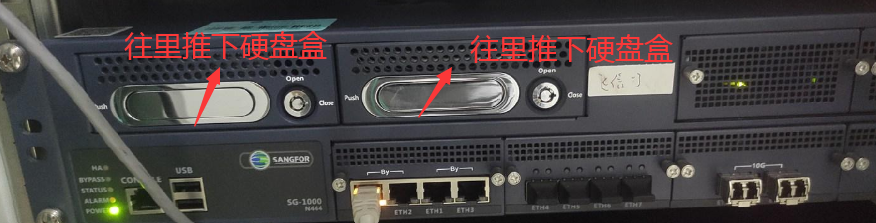
Step Three: Open this File and find the Settings entries updated Model Mon same and the device model: Mon sure to find the correct /etc/sinfor/fw/hwinfo.ini and change the Settings entries updated disk=1 corresponding to this device Model Medium the File to 2.
Step Four: Open this File and find the Settings entries updated Model Mon same and the device model: Mon sure to find the correct /etc/sinfor/fw/hwinfo.ini and change the Settings entries updated disk=2 corresponding to this device Model Medium the File to 1.
Step Five: Restart the device and enter the WEB interface View whether Alerting disappears.
● Yes, the problem is solved.
● No, go to 6.
Step Six: Enter the device background and use df -h View whether Data Disk has been mounted. If not, try to mount it manually. If the mount fails, check Data Disk smart. If there is an abnormality, return the disk for repair. If there is no abnormality, ask R&D to mount it.
Original Link
https://support.sangfor.com.cn/cases/list?product_id=156&type=1&category_id=22670&isOpen=true