
[Hardware troubleshooting] Passed to find which NIC corresponds to the network port ethX
Problem Description
Passed backend Operation, it is clear which NIC belongs to, which can be used for driver/firmware upgrades and repair to identify the Interface Model.
solution
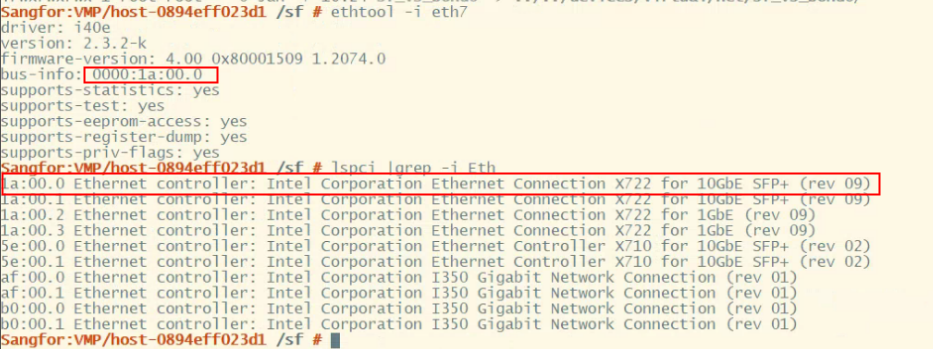
Use ethtool -i ethX View the basic information of the Interface, including the Firmware Version, driver Version, and Interface BUS-info. record the BUS-info and then use the lspci | grep Eth command View the BUSNO of each Interface port to find out which NIC corresponds to the target Interface and what Yes specific NIC Model is. As shown in the following figure, the NIC corresponding to eth7 Yes X722 10G NIC.
Suggestions and Conclusion
Note: For HCI hyper-converged System use the realethtool -i ethX command to View network port Info.
Original Link
https://support.sangfor.com.cn/cases/list?product_id=156&type=1&category_id=22664&isOpen=true