
[Hardware troubleshooting] Server console reports CPU Usage high temperature when SN starts with F6H
Problem Description
Error screenshot:
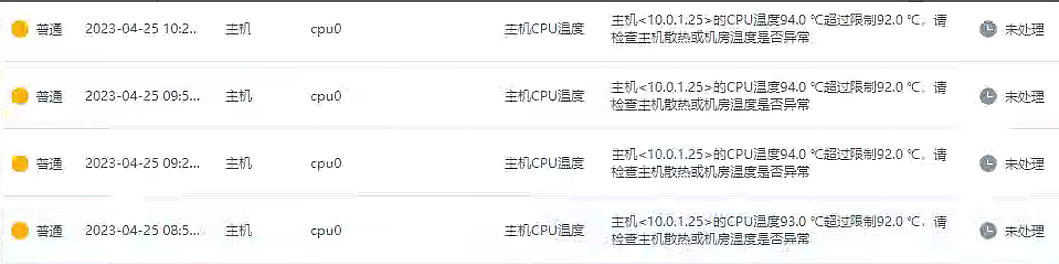
The latest BMC and BIOS firmware are in the attachment. For upgrade instructions, please refer to the link: https://support.sangfor.com.cn/cases/read?product_id=156&category_id=22975
solution
Step One: View the device background and enter sensors View CPU Usage Critical temperature to see if it exceeds the Alerting temperature. As shown in the figure below, the CPU Usage temperature is 95°C, which exceeds the Alerting temperature of 92°C.
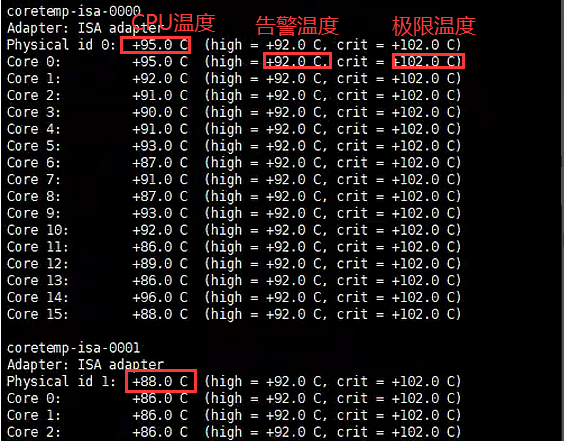
**Step Two: **Use ipmitool sensor list |grep CPU Usage View the CPU Usage temperature of the sensor. The temperature Low much lower than the temperature read by the background, and the temperature does not change after multiple readings.

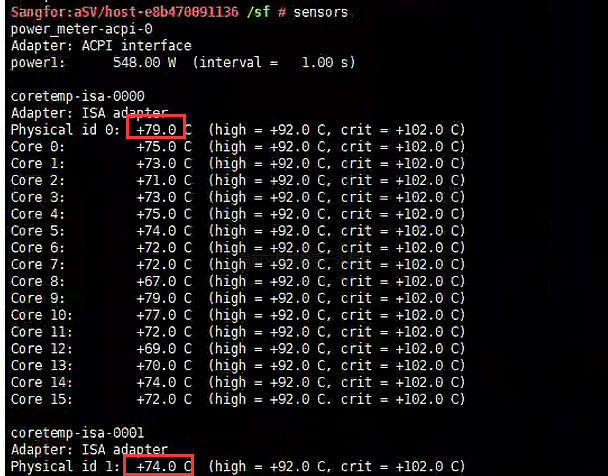
**Step Three: **Restart BMC in the background, command: ipmitool mc reset cold, and read the CPU Usage temperature in System and the CPU Usage temperature and the IPMI sensor after Wed min.
Cause:
The BMC temperature sensor is stuck, causing the fan control Policies to fail to Effective. The CPU Usage temperature Mon to rise, and the WEB reports an alarm that the CPU Usage temperature is too high. Restart BMC restores Connected. BMC Version: 5.08 has this Lowprobability problem. The solution Yes Clients Restart BMC and upgrade to the latest version of BMC and BIOS if necessary. To upgrade the BIOS, you need to cut off the power for 2 minutes and then power Effective.

2288H_V5_2288C_V5_5288_V5-iBMC-V632.hpm
(42.61 MB)
2288H_V5_5288_V5-10GE-SFP-BIOS-V793.hpm
(12.45 MB)
Original Link
https://support.sangfor.com.cn/cases/list?product_id=156&type=1&category_id=23038&isOpen=true