
[Hardware troubleshooting] The hyper-converged MonAllin-one machine reports that all disks have been unplugged, and some disks cannot be recognized after restarting
Problem Description
In a hyper-converged integrated machine, one Node kept Tips disks 0, 1 and 2 were unplugged. View Value the hard disk, there were no Bad Sector sectors, but the kernel log had continuous i/o error reports. After Restart, it was found that the background could only recognize disks 0 and 2, but not disk 1.
Alerting Info
A disk removal warning appears in the console, and disk 1 cannot be recognized. Note that only Wed Mon-in-one machine have the removal Alerting.
Effective troubleshooting steps
The characteristics of the locateable Error phenomenon Yes all disks have unplugging Alerting, which basically appear at the same time, and Odd disk is Offline. About complex hard disk failures, it is necessary to Collect hardware IDs only RAID card first.
(Collect hardware IDs only method: /sf/bin/raidtools/bin/MegaCli64 -AdpEventLog -GetEvents -f raid.envent.log -a0
and /sf/bin/raidtools/bin/MegaCli64 -AdpAliLog -aAll > MgAliLog.txt)
According to the Collect hardware IDs only raid.event log, we can see that there are events where the RAID card temperature exceeds the Threshold.
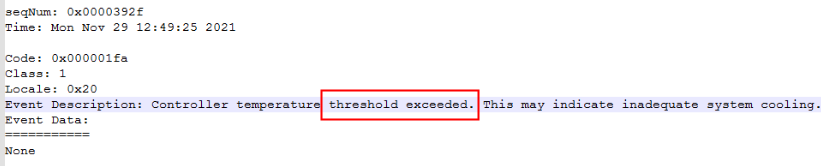
This alarm appears multiple times in the event Logs. It is suspected that the RAID card temperature is too high. It is necessary to find relevant evidence in Alilog. It is found that the RAID card Medium the Alilog Logs has reached a high temperature of 110 degrees, which is Very High deviated from Connected value. The server heat dissipation needs to be strengthened. After subsequent on-site heat dissipation adjustments, the hard drive was unplugged and plugged in to restore the system.

Root cause
Poor heat dissipation in the server causes the RAID card to overheat.
solution
Connect the on-site laptop to the IPMI Interfaces and Log In BMC web interface View the actual fan speed percentage. Set Settings Auto unlock after 25% and manually increase it to 50% to improve the heat dissipation of the server. At the same time, observe whether the temperature in Server Room is Error (the Running temperature of the server Medium the Server Room Auto unlock after generally around 20 degrees). The disconnected disk needs to be unplugged and plugged, and observe whether it recovers after unplugging and plugging. After the disk is online, View the smart Value OK the hard disk itself.
Suggestions and Conclusion
In complex situations with multiple disk Alerting/disconnections, it is necessary to first collect the RAID card Logs and Collect hardware IDs only to the hardware department for analysis. At the same time, before providing support, it is necessary to understand the configuration of the on-site machines and provide feedback.
Original Link
https://support.sangfor.com.cn/cases/list?product_id=156&type=1&category_id=22658&isOpen=true