
[Hardware troubleshooting] Troubleshooting for the problem that all disks are not recognized after replacing the RAID card on a server with SN starting with FAS
Problem Description
, replacing the new RAID card, all disks on the WEB interface Offline. storcli64 tool see link: http://tskb.sangfor.com/forum.php?mod=viewthread&tid=21442&is\_note=1
solution
**Step One: **Use lspci |grep -i sas or raidstat View RAID card is in place, and use lsblk -d View the disks on RAID card have drive letters.
**Step Two: ** Use the RAID card command View disk Status in UG Mode, command: ./storcli64 /c0/eall/sall show (0 is the Mon RAID card, 1 is the Tue RAID card).
**Step Three: **View the JBOD Mode RAID card and find that it is not Open. Command: ./storcli64 /c0 show all |grep -i jbod
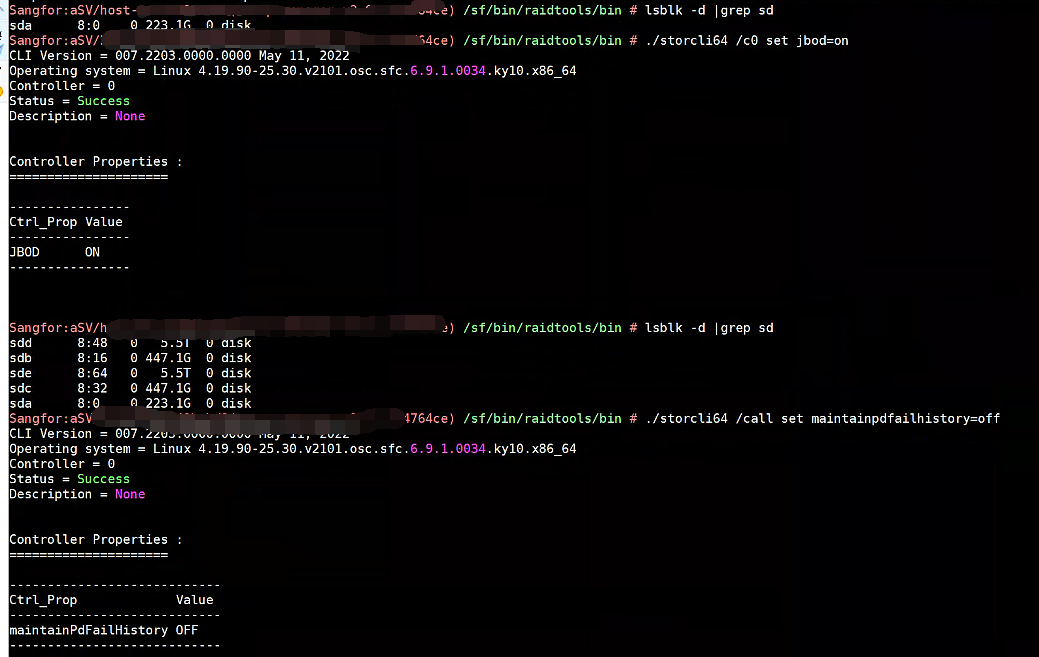
Step Four: Open on JBOD Mode, command: ./storcli64 /c0 set jbod=on
./storcli64 /call set maintainpdfailhistory=off. After Settings, use lsblk -d View all disks are displayed.
Cause:
The new RAID card does not have JBOD enabled, causing all disks to be in UG Status and the disks cannot display drive letters. Other Megaraid cards are also available.
Original Link
https://support.sangfor.com.cn/cases/list?product_id=156&type=1&category_id=25507&isOpen=true