
[Hardware troubleshooting] Troubleshooting of 2U server crashes with SN starting with 9D or F4D
Problem Description
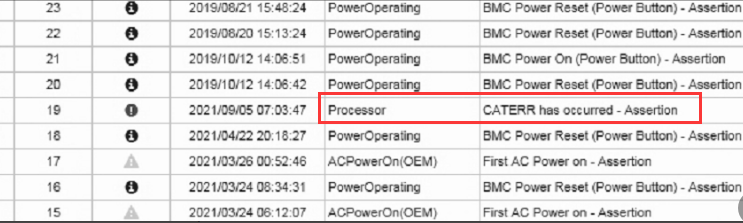
BMC error screenshot
solution
Step One: Check if the device restarts Error
● Yes, go to 2.
● No, go to 3.
Step Two: Enter IPMI and View if there is a CPU Usage caterr error.
● Yes, return the device for repair (this problem Yes by CPU Usage power supply problems due to CPU Usage overclocking, resulting in downtime. The server Sensitive CPU Usage power supply margin. The device Model are Cyber Command-1000-F600 and VDS-E1900).
● No, View No there are any hardware Error etc., as memory. If so, return the corresponding parts for repair. If not, enter System check the logs.
Step Three: View the device is frozen (connected to a monitor, the device Auto unlock after Log In screen, and None is no signal when connected to a keyboard)
● Yes, Restart the device, enter the System and analyze the log to see if there is a hardware error. If there is an error, return the corresponding component for repair. If there is no error, ask the corresponding product line R&D to use the Serial Port Monitor tool. The next time a hang occurs, a downtime log will be printed.
● No, the Management Interface is offline. Check Management Interface, network cable, and Network environment.
Original Link
https://support.sangfor.com.cn/cases/list?product_id=156&type=1&category_id=22673&isOpen=true