
[Hardware Troubleshooting] Troubleshooting of network security equipment making beeping sounds
Problem Description
Mute switch position
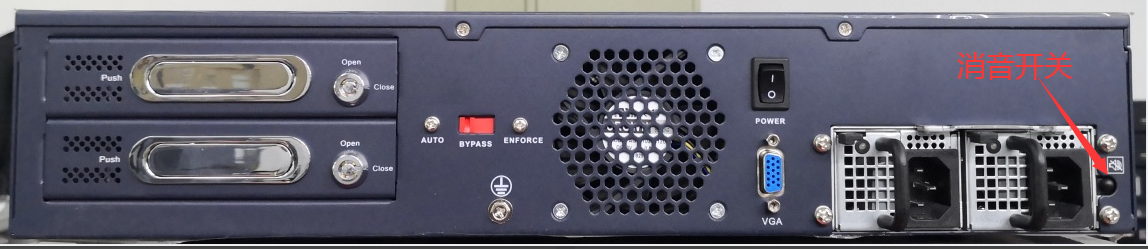
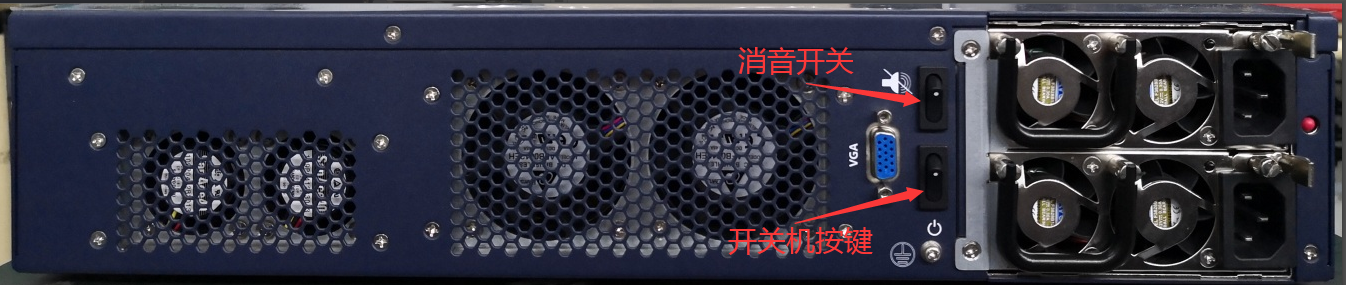
There are Wed situations when the device emits beeps:
The Mon Yes the device will beep when it is turned on for hardware quality inspection. The Tue is Yes the card memory will make a beeping sound during the quality inspection. The Wed Yes dual power supply device with only Mon or two lines connected. If there is a power module Fault, a beeping sound will be emitted. If the mute switch is not manually pressed, the beeping sound will continue.
solution
- Check whether the device Yes Running Connected. If the arm light is always on, the device cannot enter Administrator Console, and makes a beeping sound, Mon Yes usually due to memory quality inspection. You can cut off the power for 5 minute and then power on to see if Restore. If it cannot Restore restored, unpack it (you need to have unpacking qualifications), re-plug memory, and power on to see if you can Skip quality inspection and enter the System. If Mon same phenomenon occurs, return the device for repair.
- If the device Running Connected and makes a beeping sound, check the indicator light on the rear power module. Normally, the green light is Connected on. If only Mon power cord is plugged in, you need to Cancel Alerting sound. Press the mute switch Cancel. If two power cords are connected and Mon power supply Yes off or has an orange light, check the power cord and power strip. If there is no problem with the power cord and power strip, return the power module for repair.
- After all the above situations are ruled out, there Yes still a beeping sound at the feedback site. GenerallyYes emitted Other devices. If the customer does not agree, turn off the device to see if there is still a beeping sound. If so, it proves that Yes emitted Other devices.
Original Link
https://support.sangfor.com.cn/cases/list?product_id=156&type=1&category_id=22691&isOpen=true