
[Hardware Troubleshooting] Troubleshooting of the Interface being removed due to the incompatible optical module being inserted
Problem Description
Troubleshooting: Inserting an incompatible Interface and removing the network port
solution
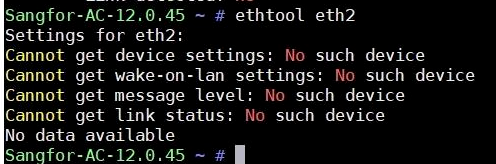
**Step One: **Use ethtool ethX (X is the Name Interface) View the Error Interface device does not Sensitive.
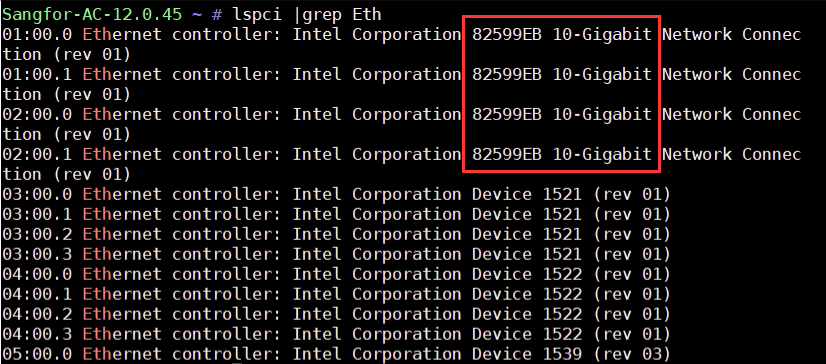
**Step Two: **Use lspci |grep Eth View the Interface chips are recognized Connected.
Step Three: Collect hardware IDs only black box and kernel Logs, View message, dmesg, and kernel Logs, and filter for unsupported. If there is an error message about incompatibility of the optical module,
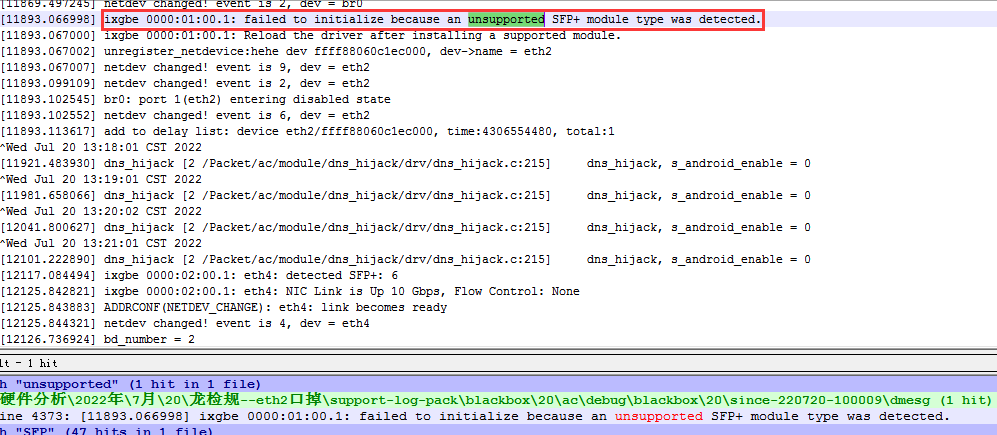
deal with:
Unplug the incompatible optical module, Restart the device to restore the Interface Restore Connected, and then replace it with a compatible optical module. If there are several optical modules plugged into the port but only Mon of them has a problem, replace it with a Connected optical module Test Connectivity.
Original Link
https://support.sangfor.com.cn/cases/list?product_id=156&type=1&category_id=22698&isOpen=true