
[Hardware troubleshooting] Troubleshooting of the VDDQ_GHJ Services reported by IPMI of the server with SN 9H and F6H
Problem Description
Alerting:
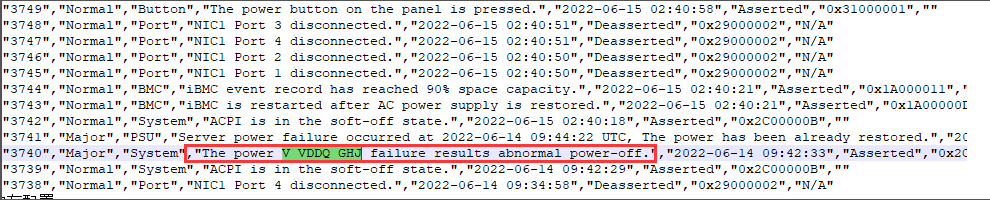
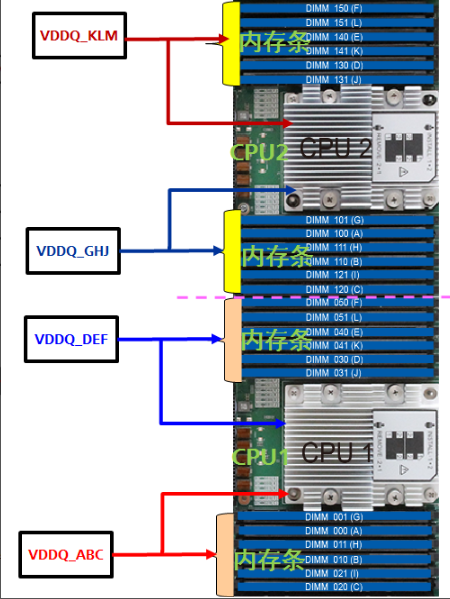
Parts involved:
solution
Step One: OK whether the device can be Power On. If it can be Power On, proceed to step Tue. If it cannot be Power On, proceed to step Wed.
**Step Two: **Cross-test the memory in the DIM100-121 slot and Other memory, such as and DIM000-021 memory, to see whether the problem follows the slot or the memory. If it follows memory, further locate memory problem. If it follows the slot, it is a motherboard problem. Arrange for the original manufacturer to bring the motherboard to your site for processing. If the problem cannot be reproduced, Passed memory stress Test Connectivity through the SP test (Restart the device, Auto unlock after menu interface to enter the SP Test Connectivity, and Select memory Test Connectivity).
A. If the memory Test Connectivity in the DIMM100-121 Region Failed, then there is a problem with the motherboard; if the memory Test Connectivity in the DIMM000-021 Region Failed, replace the failed memory.
B. If there is an Error power outage during Test Connectivity stress test, you can determine Yes Memory Failure or Yes motherboard failure based on whether the alarm information Fault. If the new Alerting YesThe power V_VDDQ_ABC failure results abnormal power-off", it Yes Memory Failure failure. You can unplug and plug the memory in this Region and perform SP memory stress Test Connectivity one by Mon to OK the Fault component. If the Alerting content remains unchanged, it is a mainboard problem.
C. If the stress Test Connectivity does not Test Connectivity any problems, the problem is difficult to reproduce, but the memory has been crossed. After the problem is reproduced, continue to troubleshoot.
**Step Three: **Unplug the memory in the DIM100-121 characters long. to see if the Power On can be started. If it still cannot be Power On, minimize Test Connectivity again. If it still cannot be Power On, arrange for the server manufacturer to bring the motherboard and CPU Usage to your site for processing. If the computer can Connected Power On normally after unplugging the memory in the DIM100-121 characters long., cross the memory in the DIM100-121 characters long. and the memory characters long. DIM000-021 slot. Follow the phenomenon of memory to further troubleshoot memory problem. Follow the slot to arrange for the server manufacturer to bring the motherboard to your site for processing.
Description
The troubleshooting methods for VDDQ_ABC, VDDQ_DEF, and VDDQ_KLM Alerting Mon same.
Original Link
https://support.sangfor.com.cn/cases/list?product_id=156&type=1&category_id=23042&isOpen=true