
[Hardware troubleshooting] Troubleshooting of X722 electrical port connecting switch and PC not linking
Problem Description
X722 Interface chip
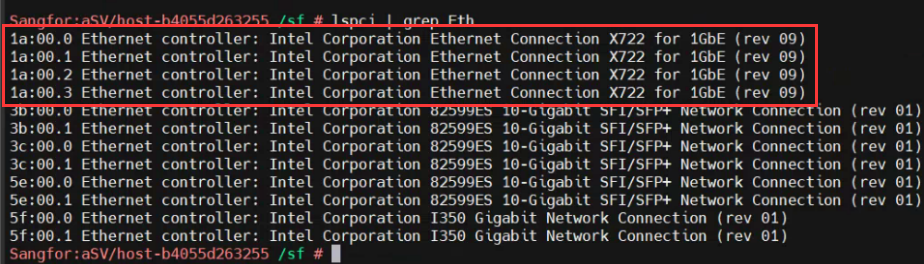
solution
- View backend and View whether the Interface chip has an X722 electrical port. Command: lspci |grep Eth.
- Use ethtool -i ethX (X is the Interface, and the HCI System needs to use realethtool View) Obtain the bus-info of the Interface, which corresponds to the ID of the Interface chip to OK whether it is an X722 Interface.
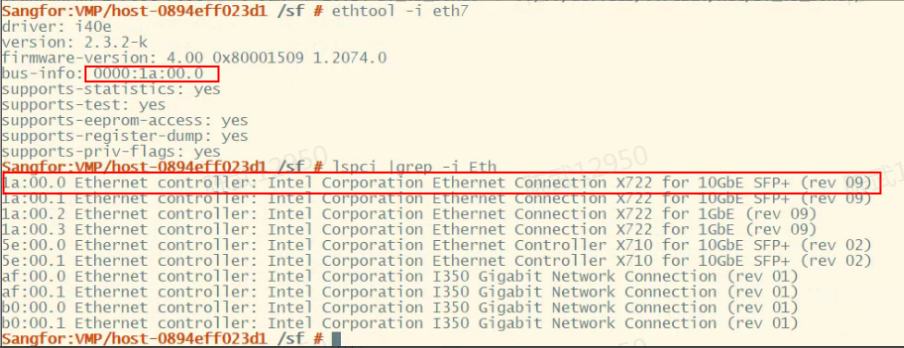
- OK the Interface of the peer switch connected and the PC is 100M. If it is 100M, switch to a 1000M port to Test Connectivity and see if the light is on.
- Loop down 2 X722 ports and see if the Interface lights can light up.
- Check in the background whether the Interface chip and Interface are in place. If Interface chip is not in place, turn off the power and plug and unplug the X722 NIC (the 4K X722 can be plugged in, and the 2K X722 port is onboard. Confirm that the Interface chip is not there. If it is still not in place after turning off the power for 5 minutes and then powering on the System, return the device for repair).
- If NIC still not recognized after being plugged in or unplugged, NIC should be repaired first (the 4K X722 NIC Interfaces is an OCP Interfaces, there is only Mon, and the characters long. problem cannot be ruled out).
Cause:
The X722 Gigabit electrical port does not support 100M or forced Transfer rate.
Original Link
https://support.sangfor.com.cn/cases/list?product_id=156&type=1&category_id=22680&isOpen=true