
[Hardware Troubleshooting] Troubleshooting the problem of the device failing Install Graphics Card for F6N and FBN GPU servers
Problem Description
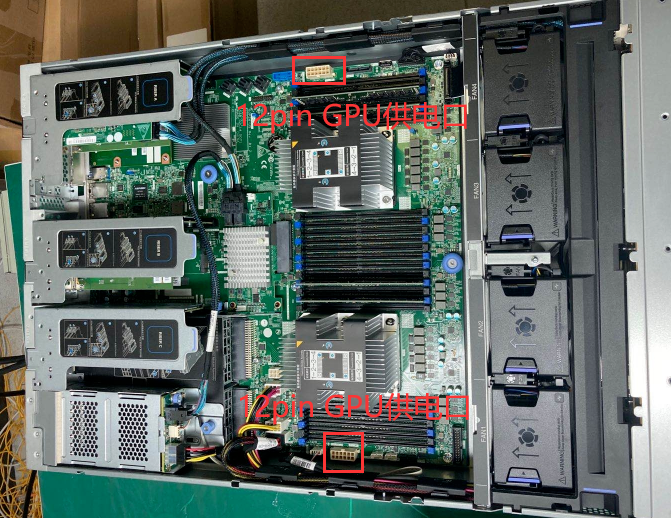
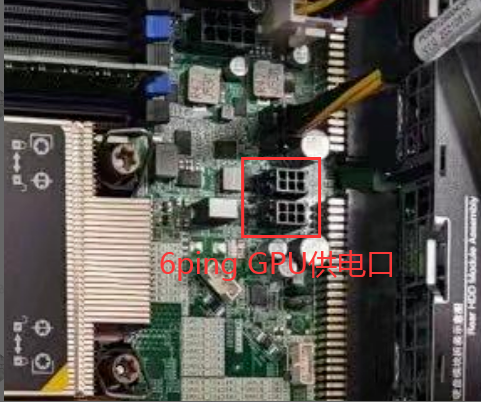
Motherboard GPU power supply port:
F6N Server:
FBN Server:
solution
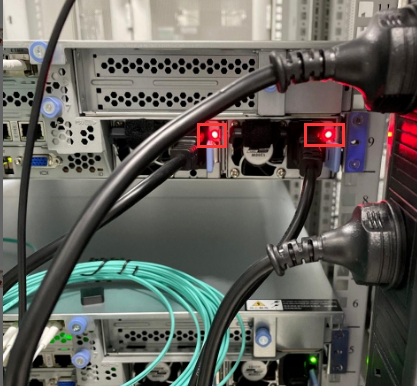
**Step One: **View the red light on the rear power module is always on. After power failure for 5 minutes, the device cannot be Power On on after pressing the Power On button.
Step Two: Unplug the Graphics Card and Graphics Card power cable to see if Connected.
**Step Three: **Check whether the GPU power cable is plugged into the GPU power port on the motherboard. The F6N server Yes 2 12Ping ports, and the FBN server Yes 2 6Ping ports. The GPU power cable cannot be plugged into Other Interfaces, otherwise there will be a problem of not being able to Power On. If the GPU power port is plugged in Connected, check the Graphics Card, GPU power cable, and characters long..
Description
The GPU power supply cable connected to the motherboard end is not universal because each manufacturer has a different design. If you purchase a Graphics Card from our company, the power supply cable will be matched. If you purchase a third-party Graphics Card, you will need to find the Graphics Card manufacturer to customize the power supply cable. Take a photo of the GPU power supply port on the motherboard and send it to the Graphics Card manufacturer for customization. It is not recommended to purchase power supply cables on the market.
Original Link
https://support.sangfor.com.cn/cases/list?product_id=156&type=1&category_id=23027&isOpen=true