
How to use the console
Problem Description
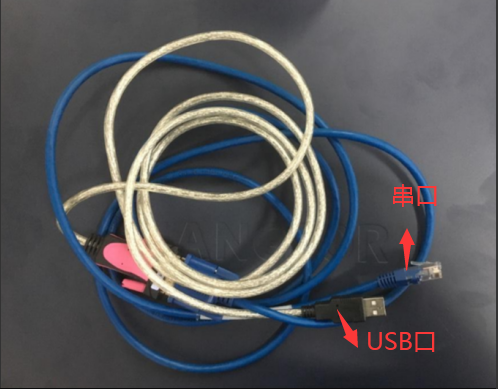
Serial Port cable (Mon end has an RJ45 Serial Port port, connected to the device console, and Mon end has a USB port, connected to the PC)
solution
Step One: Connect the Serial Port cable to the console port of the device and the USB end to the PC.
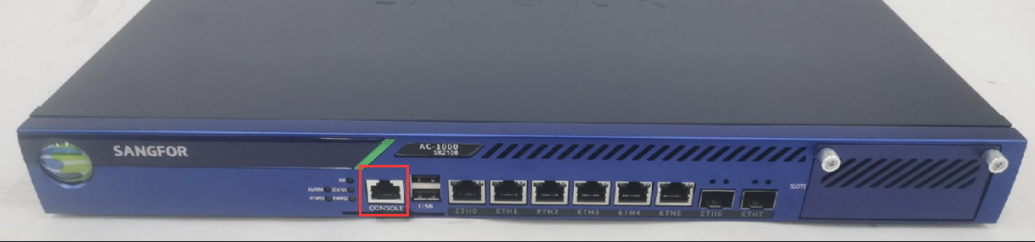
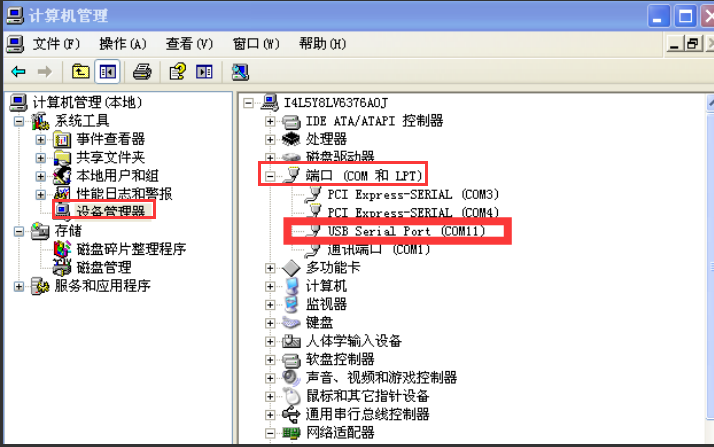
**Step Two: **Open Computer–>administration and management–>Device administration and management–>Port, and View whether the corresponding Serial Port Info is recognized. If not, check the Serial Port cable. If it is recognized as Unknown device, you need to Install Serial Port driver. After Install driver, Restart the computer Effective take effect.
Step Three: Open tools such as pshell or xshell and Select Serial port.
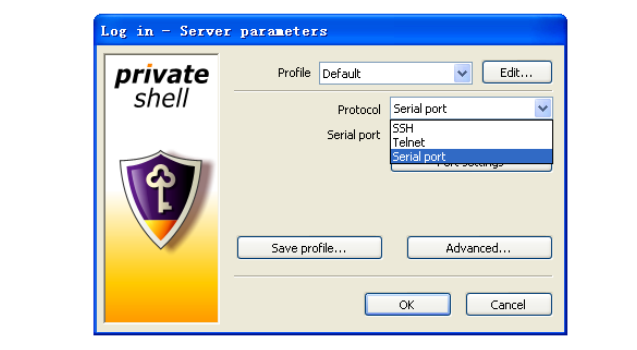
Step Four: , Select the corresponding Serial Port, Click Interfaces Settings, change the baud rate to 115200, Data bits: 8 parity: NO, stop bits: 1, Flow: RTS/CTS
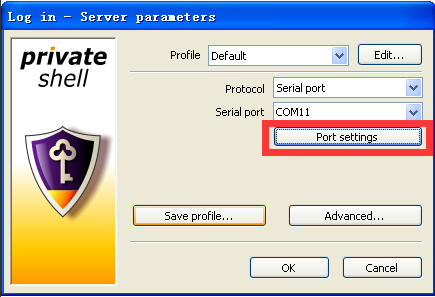
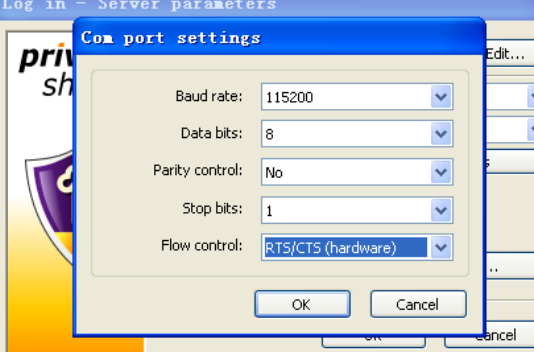
**Step Five: **After connecting, there will be output Connected. If there is no output, press the enter key to see if there is any output. If there is no output, restart the device to see if there is any output. If the output is Restart, it may Yes the baud rate Select. Change it to 9600 or Other baud rates Test Connectivity. It may also Yes Software Disabled the Serial Port and needs to enable the Serial Port in singleUser Mode to support it.
Description
Serial Port Fault are rare, unless the motherboard fails to start. this there are several situations:
- Multiple Serial Port connection tools are opened, and the previous tools are not closed. Only one Serial Port port can be used at the same time. In this case, Close other Serial Port tools first and then connect. You can also unplug Other Serial Port first and then use the tool to connect. 2. The Serial Port driver recognition Error. In the computer administration and management, there is a device administration and management and an Unknown device. In this case, the driver needs to be reinstalled. After Install, the computer needs to be Restart to Effective. 3. A black screen is displayed Yes Serial Port Close in some product lines. For example, when the IAG Running for a Time, a black screen will be displayed when the serial port is connected. It needs to be Restart before it will be displayed again. Some devices require a keyboard to be connected and the keyboard to be typed before it will be displayed. 4. In some scenarios Yes IAG atrust, the Post quality inspection interface is too fast, and the screen goes black after passing it. Yes because Serial Port itself is not Open. After entering the grub interface, it is not displayed. You need to Open Serial Port as a single User to display it Connected.
Original Link
https://support.sangfor.com.cn/cases/list?product_id=156&type=1&category_id=27305&isOpen=true