
Settings power on in BIOS
Problem Description
The network security device Default Yes times Status (the Mon times Yes Shut Down Status, it was still shutdown after power failure and Shut Down, the Mon times Yes power-on Status, it would Power On after power failure and call), supports power-on automatic restart. If the device does not automatically Power On Status power failure and call, you need to check the power-on call Settings Medium BIOS.
solution
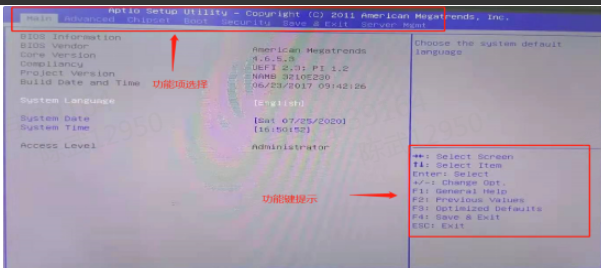
Step One: Power On and continuously press the delete key View device BIOS.
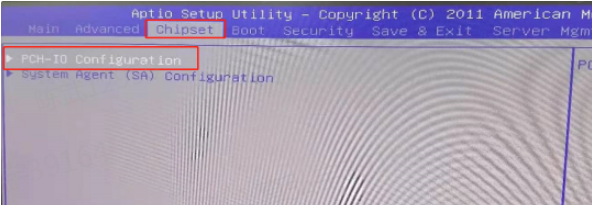
Step Two: Move to the chipset page and find the PCH-IO configuration option.
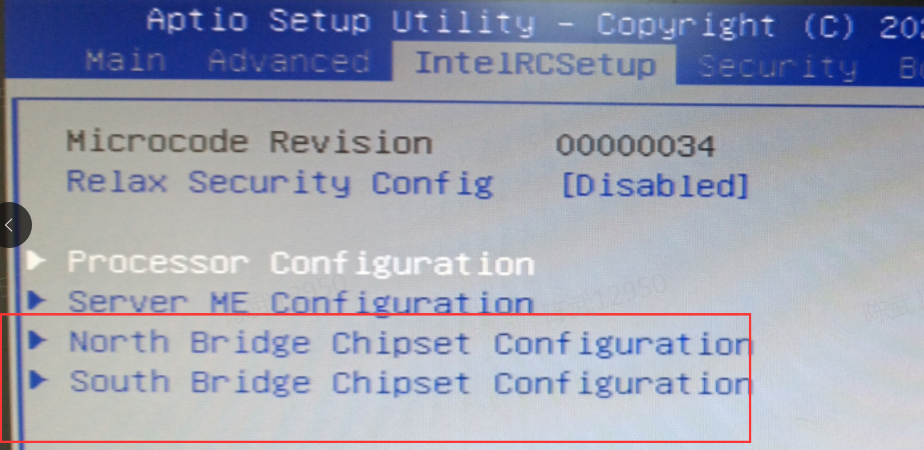
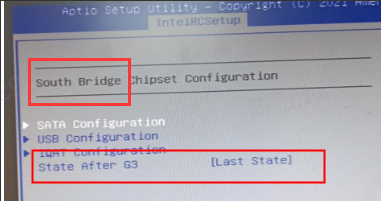
Note: Some models may not have this pch-io option, but generally it will be Auto unlock after a certain administration and management item of the chipset. As shown in the figure below, the power-on auto-start setting Settings in the south brige chipset configuration Auto unlock after intelRCSetup.
Step Three: Press View corresponding Settings page and Select IAG power option.
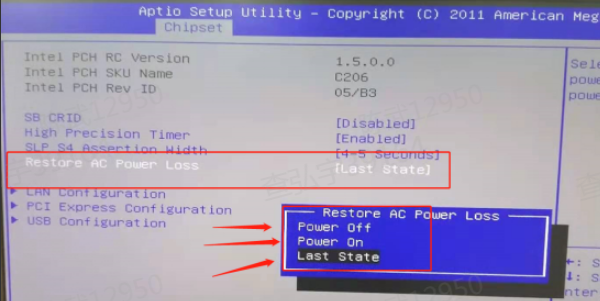
Here is what each option means:
last state: Based on the last state of the machine, load to the last state when powered on.
Power on: The device will automatically turn on every time a call comes Power On, which is commonly known as power-on self-start.
Power off: The device will not automatically Power On and will be in Shut Down Status.
PS: In the south bridge Settings page mentioned in Figure Wed of the previous step, Auto unlock afteron auto-start option Yes Settings in the state after G3 option.
**Step Four: **Press F4 (according to the function key prompt on the right, save & Exit) to save and exit. Select yes according to the Tips to save Save BIOS Settings, then power off the device, and power it on again Test Connectivity whether Effective.
Original Link
https://support.sangfor.com.cn/cases/list?product_id=156&type=1&category_id=27446&isOpen=true