
【HCI】SSD Firmware Remediation Guide_V6.3.0-6.9.0
Issue and Impact
SSD firmware bugs causing IO Latency.
-
Issue 1: Intel S4510 S4610.
In FW versions XCV10132 and XCV10140, CI053 command timeout and command interruption may occur under certain business scenarios due to the Counter, resulting in SSD IO timeout.
-
Issue 2: Samsung PM897.
In FW version JXTE004Q, there are flaws in handling reading interference. In certain business scenarios, serious reading interference problems occur in the SSD quickly, resulting in data anomalies and IO latency when reading the SSD. In severe cases, data errors may occur and lead to data loss.
-
Issue 3: SSD FW abnormalities resulting in data errors.
Products need to fix such abnormal data to avoid data loss. Therefore, the patches to fix the data are merged into the current product’s patches. Apply these patches to concurrently fix other common product issues to prevent customers from encountering other defects.
Note:
This solution only applies to aServer and VDS. For third-party services, customers need to contact the respective vendor.
Issue Confirmation
HCI
Through aDeploy, you can determine the nodes requiring SSD FW upgrades and the HCI patches that need to be installed. (aDeploy version 3.7.7 or above).
Run the aDeploy and select the Health Check.
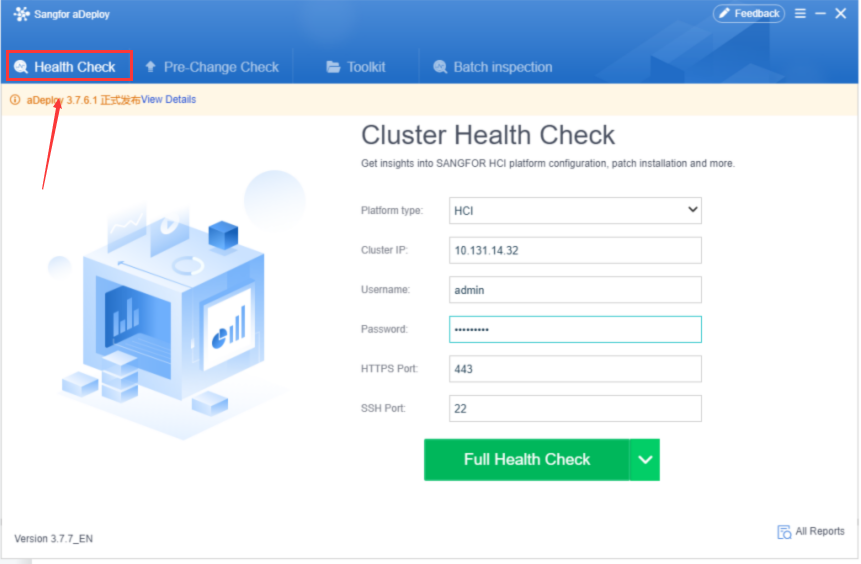
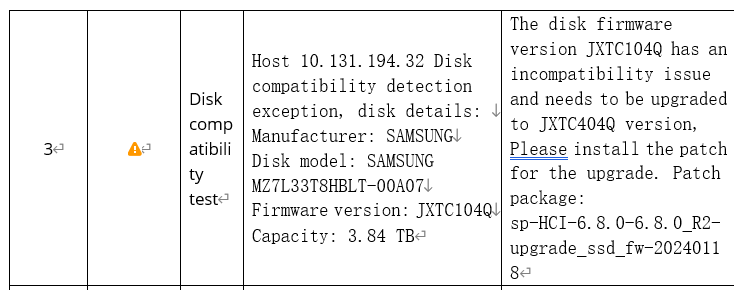
After the Health Check, download the report. If the report shows the warning about disk compatibility (disk model mentioned in Chapter 1), it indicates that the current cluster is at risk for this SSD issue, as shown below.
Remediation
Remediation for HCI
First, install the FW service patch, then install the other patches (you cannot change the order to install the patches. The order will show after pre-patch-check).
Patches download link: you will get the download link after aDeploy pre-patch check.
- HCI Patch information:
| Patch type | HCI version | Patch name | Patch name | Note |
|---|---|---|---|---|
| Firmware patch (apply this package first) | 6.2.0 | Data & witness node | sp-HCI-6.2.0-6.2.0_EN-upgrade_ssd_fw-20240122.pkg | Time needed: Each SSD firmware upgrade takes about 1 minute. The total time required is the sum of the number of SSDs needing upgrade on each host * 1 minute. For example, in a typical cluster of 3 hosts with 24 SSDs awaiting an upgrade, the estimated upgrade time would be around 24 minutes. Impacts: The aDeploy will automatically check whether the disk IO is too high. If the IO is too high, Installing during non-peak business hours is recommended. Please note that in the Oracle RAC scenario, shutting down one Oracle node before patching. For SQL always-on cluster, turn off automatic switching when patching. |
| Firmware patch (apply this package first | 6.0.0R5-6.7.0R3 | Data & witness node | sp-HCI-6.0.0_R5-6.7.0_R3-upgrade_ssd_fw-20231229.pkg | Time needed: Each SSD firmware upgrade takes about 1 minute. The total time required is the sum of the number of SSDs needing upgrade on each host * 1 minute. For example, in a typical cluster of 3 hosts with 24 SSDs awaiting an upgrade, the estimated upgrade time would be around 24 minutes. Impacts: The aDeploy will automatically check whether the disk IO is too high. If the IO is too high, Installing during non-peak business hours is recommended. Please note that in the Oracle RAC scenario, shutting down one Oracle node before patching. For SQL always-on cluster, turn off automatic switching when patching. |
| Firmware patch (apply this package first) | 6.8.0 series | Data node | sp-HCI-6.8.0-6.8.0_R2-upgrade_ssd_fw-20240118.pkg | Time needed: Each SSD firmware upgrade takes about 1 minute. The total time required is the sum of the number of SSDs needing upgrade on each host * 1 minute. For example, in a typical cluster of 3 hosts with 24 SSDs awaiting an upgrade, the estimated upgrade time would be around 24 minutes. Impacts: The aDeploy will automatically check whether the disk IO is too high. If the IO is too high, Installing during non-peak business hours is recommended. Please note that in the Oracle RAC scenario, shutting down one Oracle node before patching. For SQL always-on cluster, turn off automatic switching when patching. |
| Firmware patch (apply this package first) | 6.8.0 series | Witness node | sp-HCI-6.8.0-6.8.0_R2-upgrade_ssd_fw_Witness-20231228.pkg | Time needed: Each SSD firmware upgrade takes about 1 minute. The total time required is the sum of the number of SSDs needing upgrade on each host * 1 minute. For example, in a typical cluster of 3 hosts with 24 SSDs awaiting an upgrade, the estimated upgrade time would be around 24 minutes. Impacts: The aDeploy will automatically check whether the disk IO is too high. If the IO is too high, Installing during non-peak business hours is recommended. Please note that in the Oracle RAC scenario, shutting down one Oracle node before patching. For SQL always-on cluster, turn off automatic switching when patching. |
| Firmware patch (apply this package first) | 6.9.0 series | Data node | sp-HCI-6.9.0-x86_upgrade_ssd_fw-20240118.pkg | Time needed: Each SSD firmware upgrade takes about 1 minute. The total time required is the sum of the number of SSDs needing upgrade on each host * 1 minute. For example, in a typical cluster of 3 hosts with 24 SSDs awaiting an upgrade, the estimated upgrade time would be around 24 minutes. Impacts: The aDeploy will automatically check whether the disk IO is too high. If the IO is too high, Installing during non-peak business hours is recommended. Please note that in the Oracle RAC scenario, shutting down one Oracle node before patching. For SQL always-on cluster, turn off automatic switching when patching. |
| Firmware patch (apply this package first) | 6.9.0 series | Witness node | sp-HCI-6.9.0-x86_upgrade_ssd_fw_Witness-20240118.pkg | Time needed: Each SSD firmware upgrade takes about 1 minute. The total time required is the sum of the number of SSDs needing upgrade on each host * 1 minute. For example, in a typical cluster of 3 hosts with 24 SSDs awaiting an upgrade, the estimated upgrade time would be around 24 minutes. Impacts: The aDeploy will automatically check whether the disk IO is too high. If the IO is too high, Installing during non-peak business hours is recommended. Please note that in the Oracle RAC scenario, shutting down one Oracle node before patching. For SQL always-on cluster, turn off automatic switching when patching. |
| HCI other patch | Apply the other patches to the HCI according to the aDeploy prompt. | / | According to aDeploy prompts, apply the corresponding package to the corresponding version. | Refer to the patch installation prompt on aDeploy. |
-
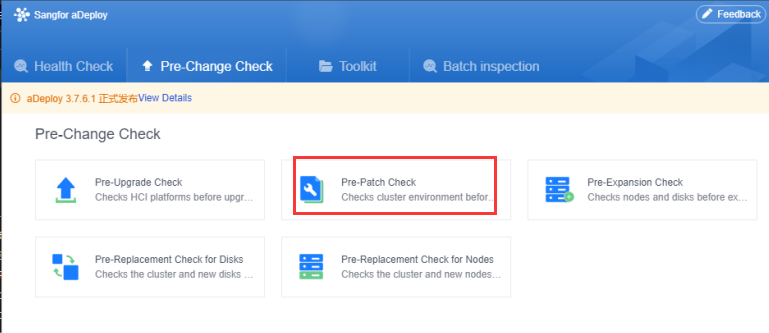
Rerun the aDeploy and click Pre-Patch Check.
-
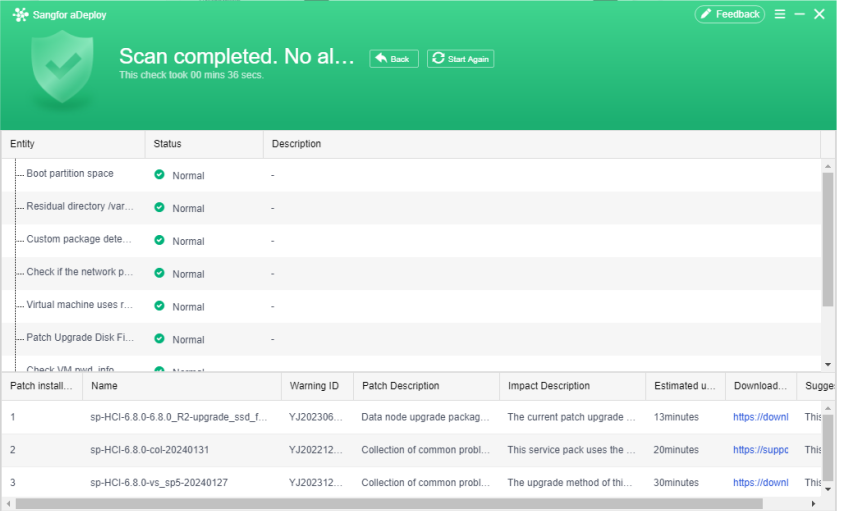
After finishing checking, aDeploy will show the patches the cluster needs to install, and the patch install order is shown from top to bottom.
-
Download and install the SSD FW patch(other patches follow the patch guide).
Patch for Version 6.7.0R3 and Below
You must upgrade the witness nodes first if the current cluster is a stretched cluster. Witness nodes use the witness node patch package to upgrade.
-
Log in to the witness node and navigate to System > Upgrade. (If there is no witness node, skip Step 1 and start from Step 2.) Complete the upgrade according to the pop-up prompts.
-
Log in to the HCI cluster IP and navigate to System > Upgrade.
-
Click Start Upgrade and wait for the check to complete.
-
Upload the patch package sp-HCI-6.0.0_R5-6.7.0_R3-upgrade_ssd_fw-20231229.pkg (The version of the witness node patch is the same as the data node) and wait for the install finish.
-
Result check. If sp-HCI-6.0.0_R5-6.7.0_R3-upgrade_ssd_fw-20231229 appears on the device upgrade page, the upgrade is successful.

Patch for Version 6.8.0 and Above
-
Log in to the witness node and navigate to System > Upgrade. (If there is no witness node, skip Step 1). Follow the instructions in step 3, but log in with the witness node’s IP address. (The witness node patch upgrade process is relatively faster.)
-
Log in to the HCI cluster IP and navigate to System > Upgrade.
-
Click Start Upgrade and wait for the check to complete.
-
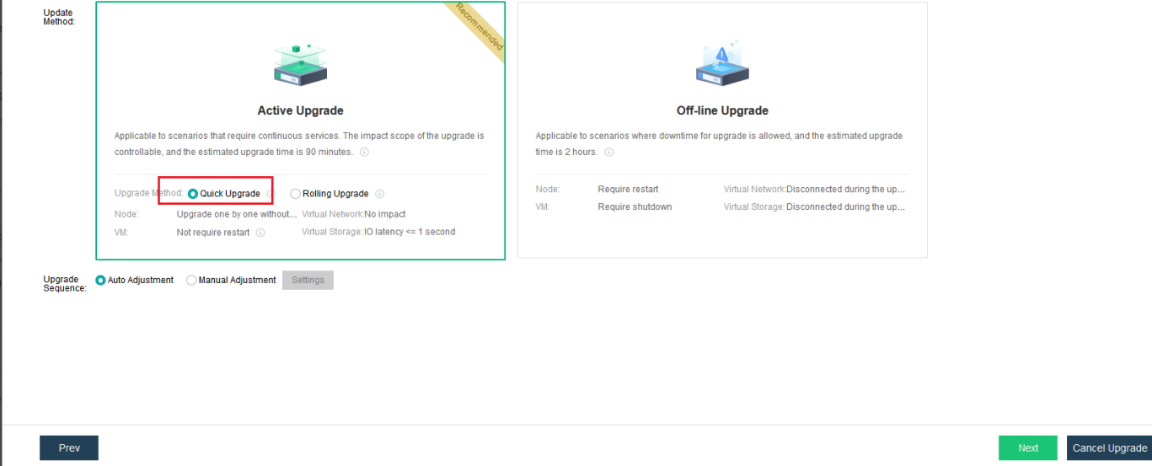
Upload the patch package and select Quick Upgrade.
-
Wait for the upgrade to complete.
-
Result check. Navigate to System > Upgrade page. If sp-HCI-6.8.0-6.8.0_R2-upgrade_ssd_fw-20231228 appears on the device upgrade page, the upgrade is successful. The process for other patch packages is the same as described above.
Post-Upgrade Check
After a successful upgrade, perform an aDeploy check. Ensure that the disk compatibility check passes and that there are no compatibility warnings or any new warnings.
Rollback Instructions
You need to contact Sangfor R&D if Rollback is needed.