
[acloud] A disk of the virtual machine migrated to the acloud platform cannot be recognized
Problem Description
A disk of the virtual machine migrated to the acloud platform cannot be recognized
Alarm Information
A disk of the virtual machine migrated to the acloud platform cannot be recognized
Process –
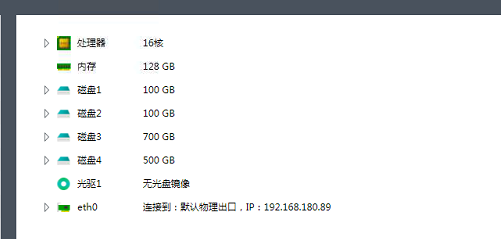
- The interface shows that there are 4 disks and one CD/DVD.
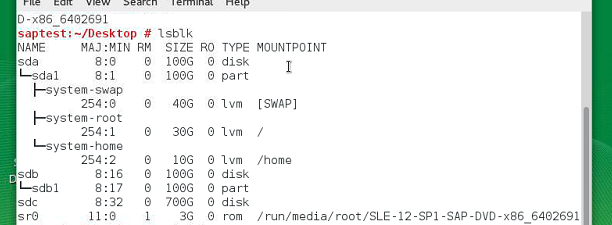
36645d690ac506616.png (26.91 KB) - The lsblk command in the virtual machine only recognized 3 disks and one 500G disk was not recognized.
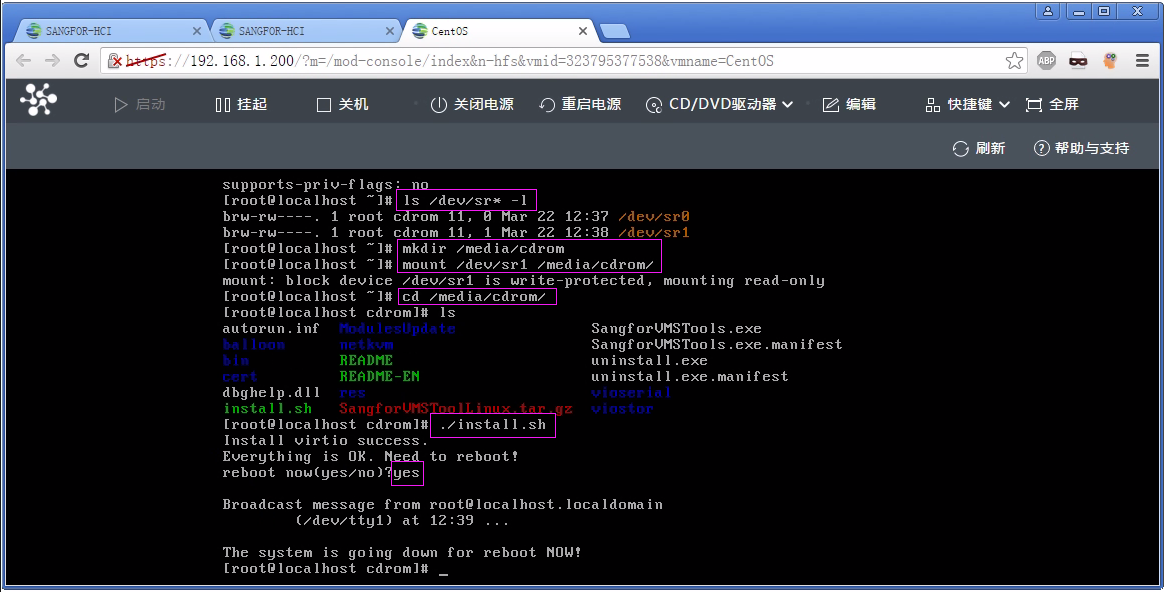
941275d690b2180fd0.png (76.62 KB) - Install the vmTools vmtool After clicking "Install vmTools", enter the Linux system, open the Terminal program, cd to the directory where the CDCD/DVD is mounted (if CD/DVD is not mounted automatically, you need to manually execute the mount command to mount it) Use root privileges (ordinary users use su root and enter the root password) to execute ./install.sh to start the installation, and enter yes as prompted to complete the installation and restart the virtual machine.
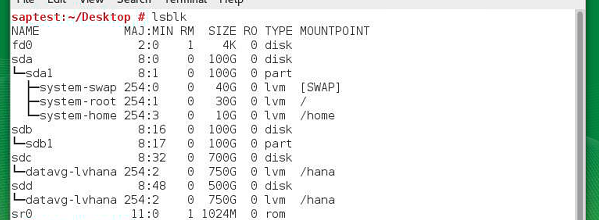
- After installing vmTools, the disk can be recognized normally.
112865d690c1b678cc.png (87.81 KB)
Root Cause
Without installing vmTools and having a disk, the maximum number of disks plus CD/DVD can reach 4. After installing vmTools, it can be recognized normally.
Solution
Install vmTools.
Suggestions and Summary
Without vmTools, there is a limit of up to 4 CD/DVD. After installing it, it can be recognized normally.
Original Link
https://support.sangfor.com.cn/cases/list?product_id=33&type=1&category_id=15809&isOpen=true