
[acloud] After installing vmTools, the NIC cannot be seen in ifconfig. It returns to normal after uninstallation.
Problem Description
A new virtual machine of redhat63.8, after installing vmtool, cannot see the NIC with ifconfig, and there is also an error when starting the network service.
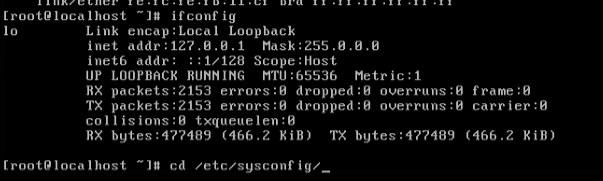
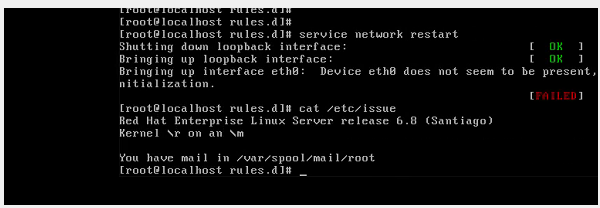
Effective Troubleshooting Steps
- After confirming the customer's situation, it was found that the customer had created a new virtual machine, but it was restored from backup data of a virtual machine on Huawei Cloud.
- Check the NIC configuration file ifcfg-eth0 under the Linux system. The configuration is normal, but the NIC cannot be started with ifup. The device cannot be found. Check the kernel log in message and find many errors. "Start nvp-monitor failed." It is understood that nvp is a function implemented by Huawei for underlying hardware virtualization.
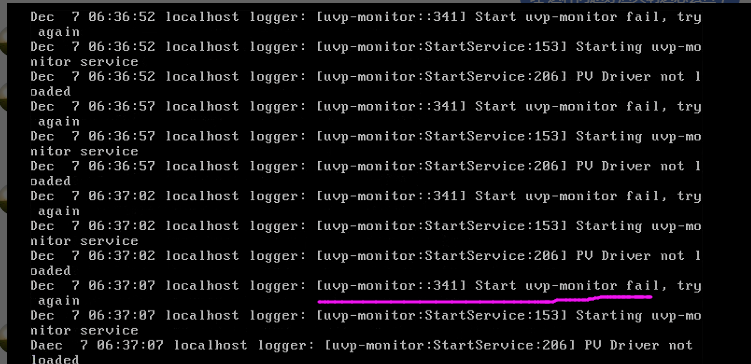
- After confirming with the expert, it is necessary to uninstall third-party tools completely to solve this problem.
Root Cause
vmtool conflicts with third-party virtualization software
Solution
Uninstall third-party optimization tools.
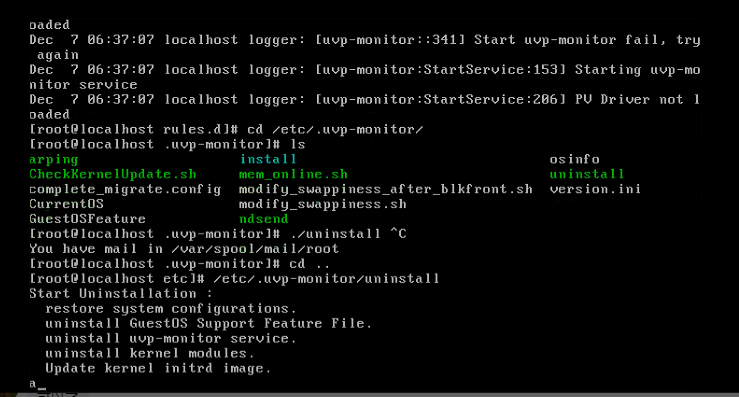
*Note: cd /etc/vmtools ./uninstall This is the method to uninstall Huawei Cloud tools.
This issue can be resolved by uninstalling the uvp-monitor tool as shown in the diagram.
Suggestions and Summary
Communicate more to understand the customer's background and make the troubleshooting direction clearer.
Original Link
https://support.sangfor.com.cn/cases/list?product_id=33&type=1&category_id=17341&isOpen=true