
[aCloud] Automatic deployment script installation error [FATAL] [INS-30132]
Problem Description
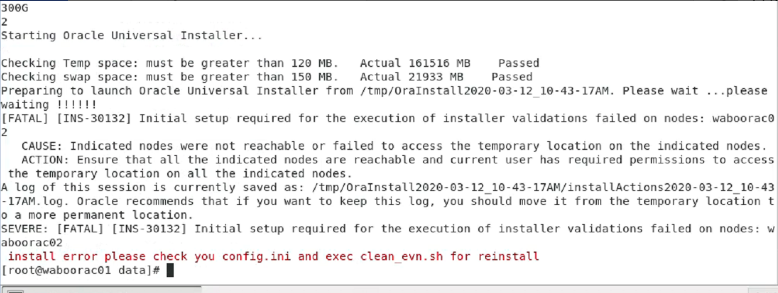
When using the automatic deployment script to deploy RAC, the following error occurred:
Effective Troubleshooting Steps
-
Generally, encountering this error is due to the cloned node2 node not changing the NIC MAC address, resulting in NIC disorder.
Please change the NIC information according to the version of the operating system, and you will see two IP addresses after restarting the network.
Reference installation document Chapter 4: http://bbs.sangfor.com.cn/plugin.php?id=sangfor_databases:index&mod=viewdatabase&tid=88013 -
After completing the previous step, the installation still failed. It was discovered that the customer manually created the oracle and grid users beforehand.
Medium oracle, grid users are automatically created and added to groups by scripts. The customer manually created the user but did not add it to the corresponding group, resulting in installation failure.
You can useuserdel -r oracleanduserdel -r gridto delete the existing users and then reinstall after cleaning the environment. -
# userdel -r oracle
-
# userdel -r grid
Solution
Before installing the database, be sure to confirm that the relevant IP addresses are configured successfully. Failure to adjust the network environment properly may result in installation failure later on.
Original Link
https://support.sangfor.com.cn/cases/list?product_id=33&type=1&category_id=17536&isOpen=true