
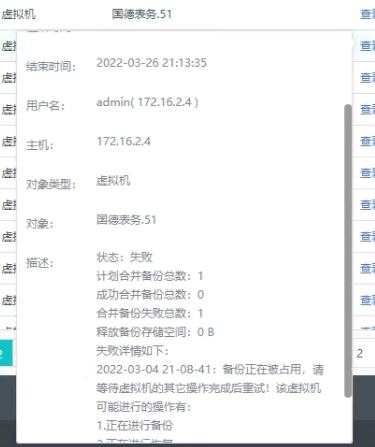
[aCloud] Automatic merging of virtual machine backups failed.
Problem Description
Automatic virtual machine backup merge failed
Alarm Information
Effective Troubleshooting Steps
-
Check the log prompt, the backup is being occupied, possible operations include: backup in progress, recovery in progress, etc. Check that the virtual machine has no unfinished tasks.
-
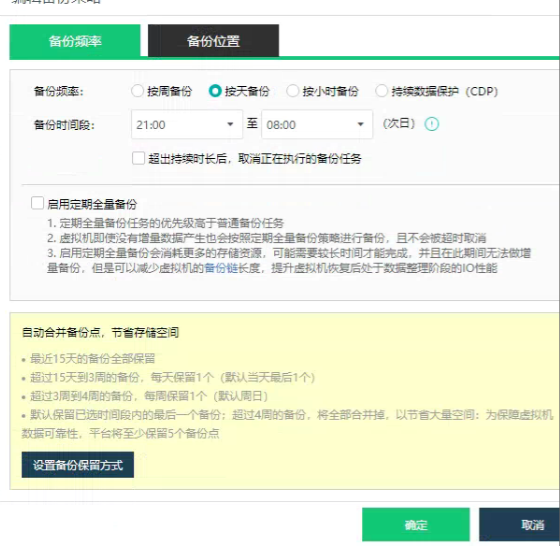
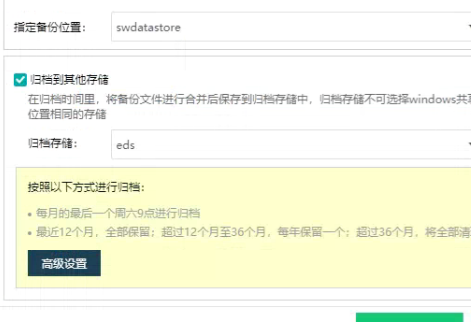
Check the backup strategy, as shown in the figure: virtual machine backup starts at 9 PM every night.
The archiving task is at 9am on the last Saturday morning of each month.
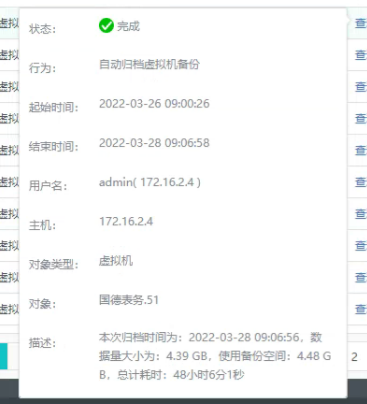
3. Check that the virtual machine does indeed have an archive task that has been completed, with a start time of: 2022-03-26 09:00, and an end time of: 2022-03-28 09:06:58
It happens to coincide with the time Scheduled Backup the virtual machine, so there is a task conflict prompt that the virtual machine backup is in use.
Root Cause
The duration of the archiving task spans across the virtual machine backup time period, causing automatic backup merging to fail due to task conflicts.
Solution
Suggest archiving at different times.
Original Link
https://support.sangfor.com.cn/cases/list?product_id=33&type=1&category_id=17700&isOpen=true