
[aCloud] Creating a vAF device on the enterprise-level cloud acmp cloud management platform, unable to select storage location
Problem Description
When creating a vAF device on the enterprise-level cloud acmp cloud management platform, the storage location cannot be selected and the virtual storage status is normal
Alarm Information
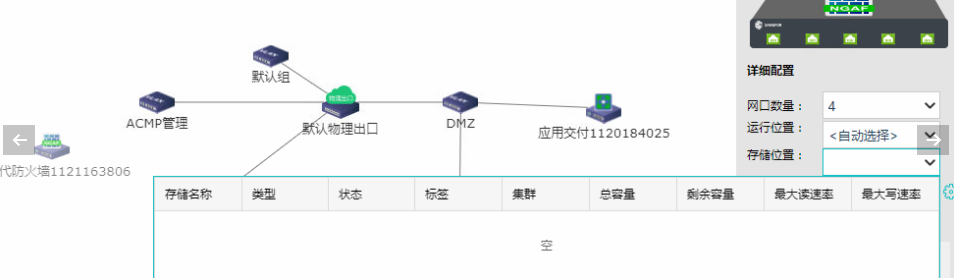
515385bf51ec57898e.png (67.69 KB)
Root Cause
The virtual Virtual Datastore has no selection Tag, which makes the virtual Virtual Datastore unavailable.
Solution
- The problem can be solved Virtual Datastore selecting Tag virtual storage volume. In the cloud management console, [Resources] – [Cluster] – Select the corresponding Cluster – [Storage] – [Virtual Storage] – [Virtual Datastore] to configure the corresponding Tag
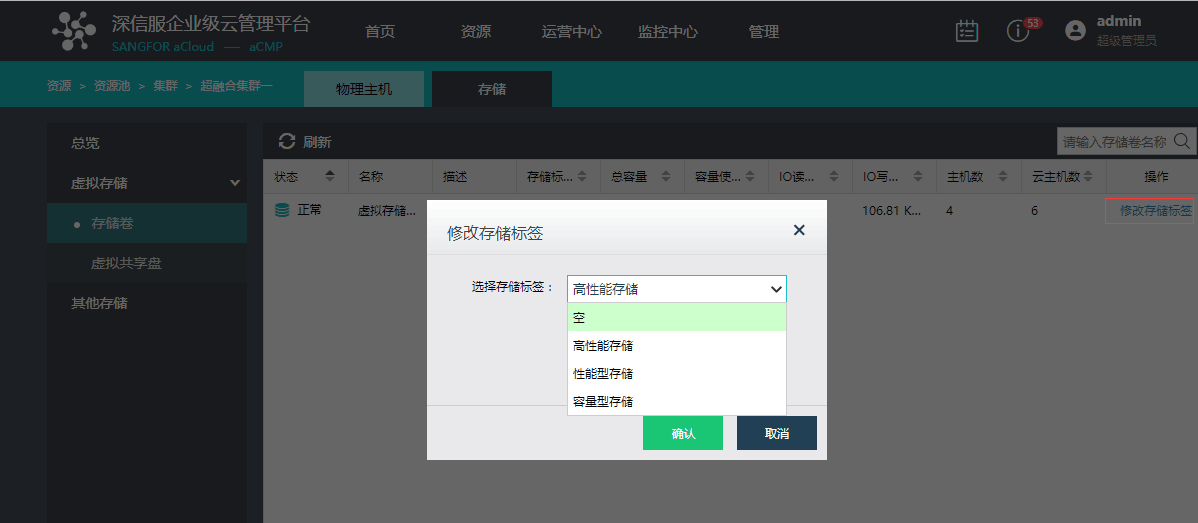
293385bf51f05b5b12.png (58.68 KB)
Original Link
https://support.sangfor.com.cn/cases/list?product_id=33&type=1&category_id=15599&isOpen=true