
[aCloud] Error when uploading ISO image to FC storage: Disk space check failed, please check whether the disk space is sufficient or whether the disk space is writable
Problem Description
When uploading an ISO image to FC storage, an error message appears: Disk space check failed. Please check whether the disk space is sufficient or whether the disk space is writable.

428825bdc2aa5a0cdc.png (19.98 KB)
Process –
- Check on the interface that the FC storage space is sufficient. Click on the speed test button to test whether the FC storage speed is normal.
- Check the FC storage on the interface and you will see that it is only mounted to one of the non-Cluster Controller Node the Cluster and is only used by this Node.
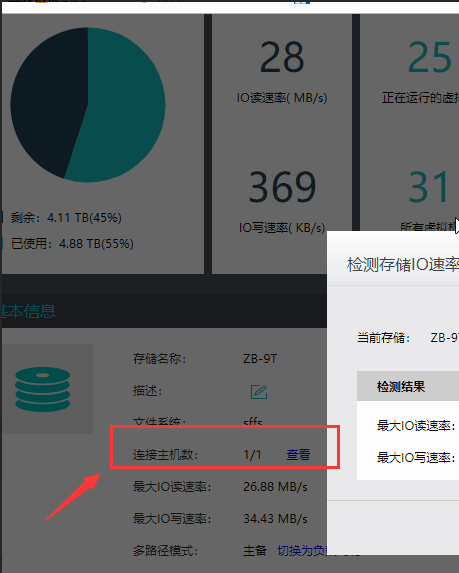
882725be4e3858ba7f.png (51.9 KB)
Root Cause
The command to upload the ISO image is executed from Cluster Controller, but the FC is not mounted on the Cluster Controller, resulting in an error.
Solution
Switch the host mounted on FC to Cluster Controller and then upload the ISO image.
Original Link
https://support.sangfor.com.cn/cases/list?product_id=33&type=1&category_id=15586&isOpen=true