
[aCloud] stty erase solves the issue of ^H appearing when pressing backspace.
Problem Description
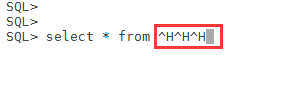
In sqlplus, if you type the wrong character and want to delete it, you may habitually press the backspace key, but you will find that not only does it not delete the character you want to delete, but it also adds two characters "^H".
In addition to using the ctrl+backspace key to delete, you can also add parameters in the user environment variables to enable direct use of the backspace key to delete characters.
Effective Troubleshooting Steps
-
Edit the environment variables of the Node user (using the oracle user as an example)
-
[oracle@rac01 ~]$ vi ~/.bash_profile
~: Represents the user's "home" directory.
.bash_profile: Represents the user environment variable file, similar to the display of "set" used by Windows users. -
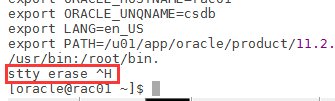
Add the following at the end of the file:
stty erase ^H
The stty command is used to view or modify the key settings of a terminal.
-
Use the "source" command to reload the environment variables and make the newly added ones take effect.
-
[oracle@rac01 ~]$ source ~/.bash_profile
-
Enter the database again using sqlplus and test the ability to delete characters using only the Backspace command.
Solution
To solve the garbled code problem caused by using only Backspace, modify the user environment variable (.bash_profile/.profile).
Original Link
https://support.sangfor.com.cn/cases/list?product_id=33&type=1&category_id=17537&isOpen=true