
[aCloud] Unable to mount Linux LVM partition in rescue mode.
Problem Description
The root partition inside the Linux virtual machine has been configured with LVM.
Virtual machine startup exception occurred, which may cause the use of rescue mode to make it impossible to mount partitions using conventional methods.
Effective Troubleshooting Steps
[High-risk operation] Take a snapshot and backup before performing any operation.
You can use lvscan to view LVM information and find that it is in an inactive state.
Then you can activate the LVM partition by using vgchange -ay /dev/lvmname/
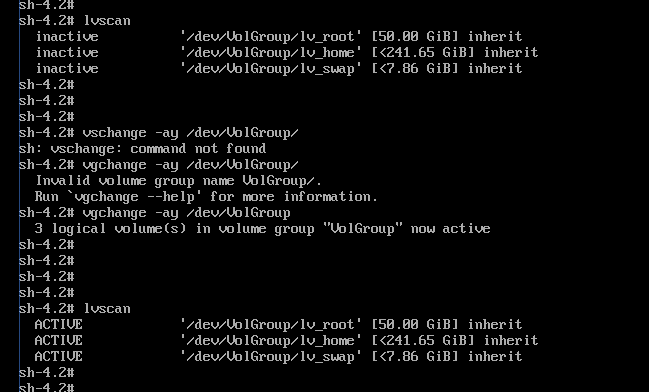
After activation, lvsan can see that all partitions are in active status.
At this time, you can directly manually mount the root partition to perform operations.
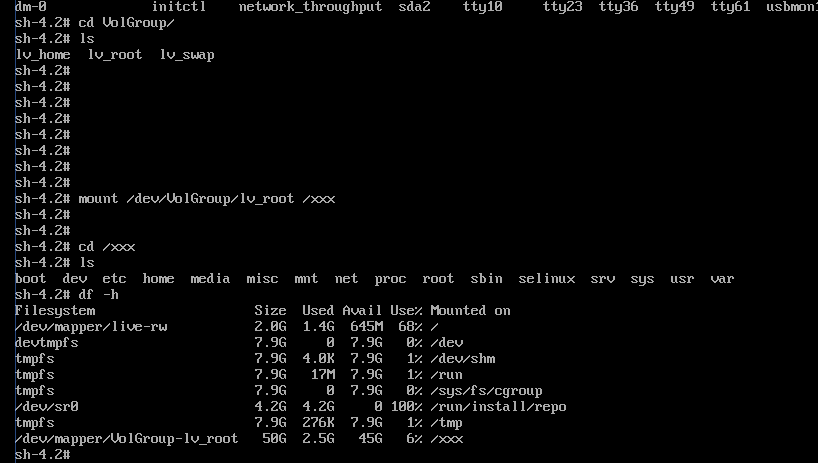
Solution
Enter rescue mode and activate the LVM partition to mount it normally.
Original Link
https://support.sangfor.com.cn/cases/list?product_id=33&type=1&category_id=17558&isOpen=true