
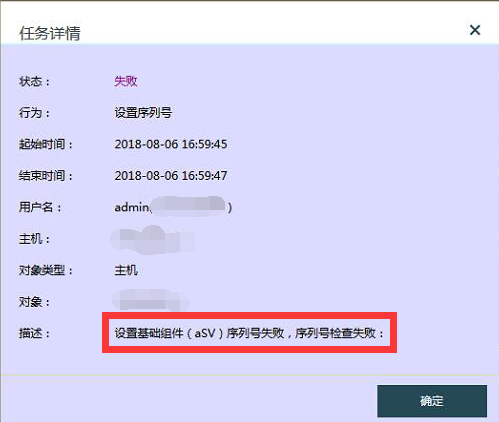
[aCloud] When filling Licensing/license key, it prompts “Device basic component (aSV) Licensing/license key failed, Licensing/license key check failed”
Problem Description
When filling Licensing/license key, it prompts "Device base component (aSV) Licensing/license key failed, Licensing/license key check failed."
47645b6d7fe9a62cb.png (78.12 KB)
Process –
- Import the Licensing/license key, and the message "Device base component (aSV) Licensing/license key failed, Licensing/license key check failed" is displayed;
- Re-applying for the Licensing/license key still results in an error;
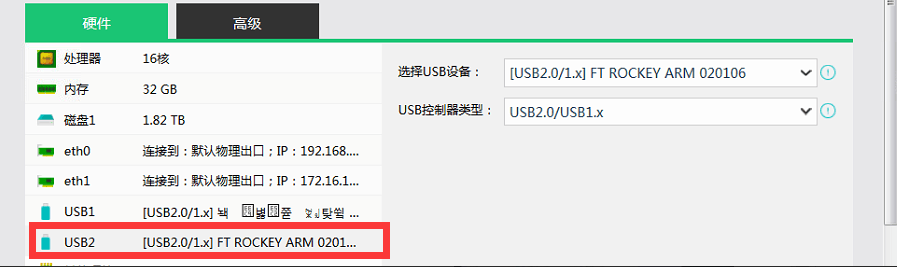
- Check and find that the authorization key is mapped to the virtual machine.
591715b6d810910030.png (69.28 KB)
Root Cause
The authorization key is mapped to another virtual machine, causing the Licensing/license key check to fail when importing Licensing/license key.
Solution
- Shut down the virtual machine and release the authorization key;
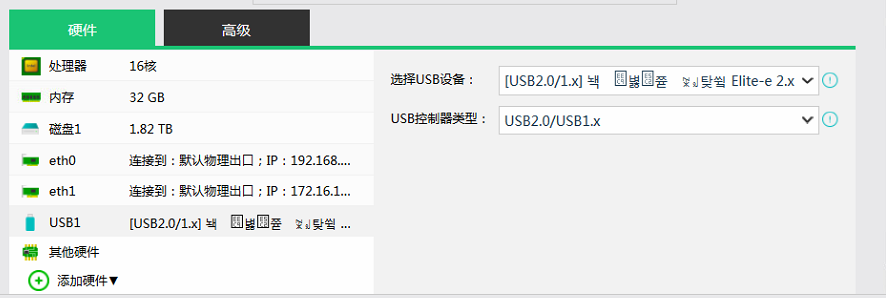
989075b6d81643adab.png (75.44 KB) - Re-import the authorization Licensing/license key and successfully authorize.
Suggestions and Summary
It is recommended not to map the server's authorization key to other devices within the server.
Original Link
https://support.sangfor.com.cn/cases/list?product_id=33&type=1&category_id=15513&isOpen=true