
[ASEC] Data protection policy snapshot Take Snapshot failed
Problem Description
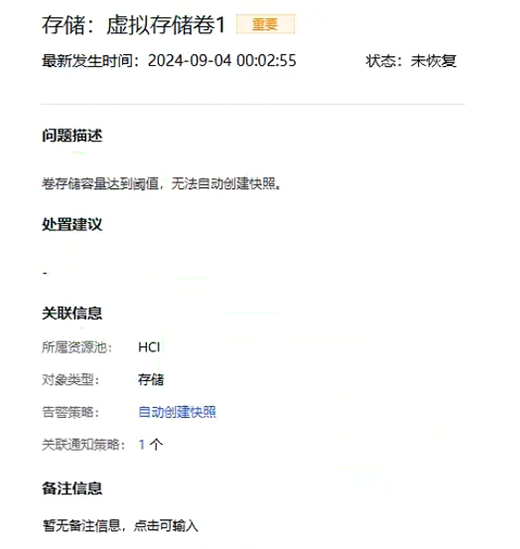
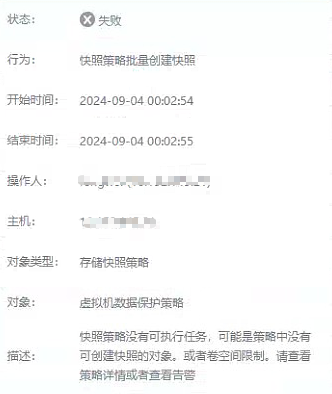
aSEC, enable the data protection function, add a VM/Virtual Machine or Consistency Group to the data protection policy, and the automatic creation of snapshots during the daily policy Take Snapshot fails.
Warning Information
Effective troubleshooting steps
- Through the alarm information and the error report of the storage snapshot policy operation log, we can know that the cause of the problem is basically that the Virtual Datastore volume capacity has reached the threshold and the snapshot cannot be taken anymore.
snapshot policy. The default Virtual Datastore VM Cluster in [Reliable Service-snapshot policy the HCI cluster where the virtual machineConsistency Groupconsistency group is located.
- Go to [Storage-Virtual Storage-Virtual Datastore] to check the threshold of virtual Virtual Datastore usage, and combine the data protection policy threshold to determine whether the snapshot cannot be automatically created because the threshold is exceeded.
Root Cause
The virtual Virtual Datastore has reached the upper threshold limit.
Solution
Clean up the specified virtual Virtual Datastore to free up storage space or go to [Reliable Service – snapshot policy – Advanced Settings] to adjust the threshold of the specified virtual Virtual Datastore
Operation Impact Scope
none
Is this a temporary solution?
none
Suggestions and Conclusion
none
Troubleshooting content
none