
[ASEC] Failed to enable security capability. Reason for failure: Failed to authorize the Virtual Machine security protection component. Please contact technical support
Problem Description
aSEC has been deployed in the customer environment, but the process of starting the cloud security protection component fails.
Warning Information
Failed to enable security capability
Failed to Virtual Machine security protection component. Please contact technical support

Effective troubleshooting steps
SCP [System Management – Authorization Management], in the aSec authorization card, Virtual Machine security protection needs to be enabled, and the current date needs to be within the Update Service Expiration Date (not showing expired status)
Root Cause
The authorization of EDR is issued by aSec. The authorization time issued by aSec to EDR uses the service authorization of aSec. The service authorization has expired, so EDR cannot be in the normal Licensed state.
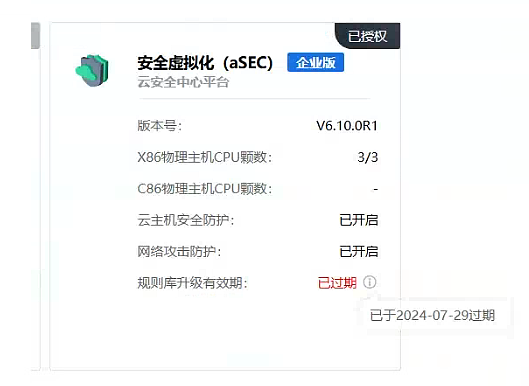
Update Service Expiration Date validity period of the rule base upgrade also uses aSec's service authorization, so you can check the aSec authorization card to determine the aSec service authorization time.
Solution
Update the authorization Licensing/license key so that the aSec service authorization time is not expired, and then try to enable the Virtual Machine security protection component
Operation Impact Scope
none
Is this a temporary solution?
no
Suggestions and Conclusion
none
Troubleshooting content
none