
[ASEC] The number of authorized CPUs aSEC Cluster resource pool have been disabled, and the protection status of the Virtual Machine are all displayed as unprotected
Problem Description
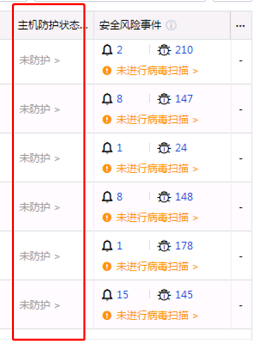
The customer environment authorization changes result in insufficient authorized CPUs in aSEC. The backend automatically disables the enabled resource pool security capabilities. The aSEC interface prompts an alarm, and the Virtual Machine
Node protection status is all "Unprotected"
Warning Information
It is detected that the number of authorized CPUs in aSEC is insufficient. The security capability of the xx resource pool has been disabled. It is recommended to re-authorize and try to restore the security capability of the resource pool to normal on the security capability management page.

Effective troubleshooting steps
none
Root Cause
The customer environment authorization changes result in insufficient authorized CPUs aSEC. The background automatically disables the added resource pool security capabilities. Disabling will disconnect the G2H Proxy forwarding channel between the Agent and EDR, causing the terminal on the EDR to
Revoke/Deallocate (default configuration during deployment), and the removed terminal status will be reported to aSec. Therefore, the asset center has installed the Agent Virtual Machine
Node protection status changes to "Unprotected"
Solution
Re-authorize according to the instructions in the alarm information, restore the number of authorized CPUs, then go to the security capability management page and change the disabled security capability of the resource pool to enabled.
aSec backend will restore the G2H Proxy forwarding channel between Agent and EDR. As long as Agent is not manually uninstalled on the Virtual Machine, Agent will automatically reconnect to EDR after the forwarding channel is restored, and EDR will report the connected Agent information to aSec.
On the aSec asset center interface, you can see that Node protection status has been restored to its previous state.
The Agent reconnects to the EDR, and the EDR reports aSec. It is estimated that it will take 5 to 10 minutes. The asset center cannot immediately see the Node security capability is enabled.
Operation Impact Scope
none
Is this a temporary solution?
no
Suggestions and Conclusion
none
Troubleshooting content
none