
[EDS] When the Sundray switch is connected to a Cisco switch, the Cisco switch network port will go down
Problem Description
The 10G optical port (10G multi-mode optical module) on the Xinrui switch is connected to the 10G optical port (10G multi-mode optical module) on the Cisco switch. The Cisco switch port will go down in less than 10 minutes (up to 50 minutes).
Alarm Information
-
Symptom: The switch port indicator light is always orange, and there is no red light in the optical module;
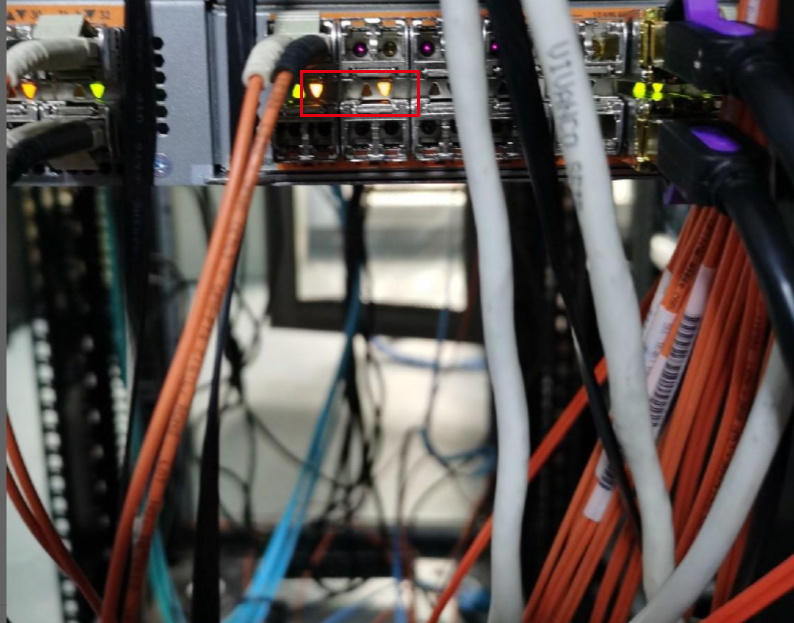
5239460476dbc78b12.png (1.15 MB) -
Check the down network port information on the Cisco switch:

5107860476d80f2521.png (420.1 KB)
Process –
- Plug the optical module on the down port of the Cisco switch into another port, and it will light up red normally.
- Replace the optical module on the Xinrui switch with a Cisco optical module, but the problem still exists;
- Use other network ports of Cisco switch or Sundray switch to test, the problem still exists;
- After checking the switch port alarm information and searching for related issues online, the LLDP protocol was disabled on the Cisco switch and the problem was solved.
Solution
Disable LLDP protocol on Cisco switch to solve the problem.
Suggestions and Summary
- First, confirm which side has the problem;
- Confirm whether the problem is a hardware problem or a configuration problem, and then confirm which hardware is the problem;
- Internet resources can be used to assist in making decisions;
Original Link
https://support.sangfor.com.cn/cases/list?product_id=33&type=1&category_id=16276&isOpen=true