
[HCI] External storage having data block reused
Issue Description
External storage appear warning "Data block in the datastore is being reused. Please contact technical support representative as soon as possible."
Error/Warning Information

Handling Process
- Login to HCI Web UI check which external datastore is affected.
- Shut down all the virtual machines or NFV running on the corresponding external datastore.
- In back end, use command sffsck -C /dev/mapper/{Datastore ID} to check whether having data block reused.
Note: Just need to take note of ‘ReusedBlock’
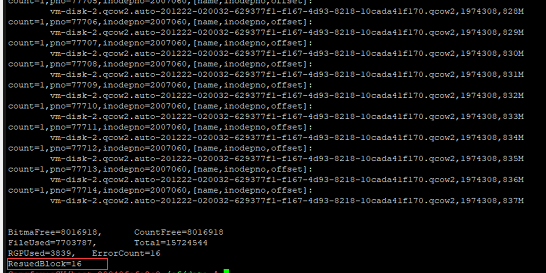
As result shown in the screenshot, the ‘ReusedBlock’ parameter is showing value, which means that there are data block reused. - Stop the automatic mount storage service with command :
vs_cluster_cmd.sh e "/sf/etc/init.d/vtpstatd stop" - Umount the storage for all the hosts :
vs_cluster_cmd.sh e "umount /sf/data/{Datastore Name}"
Note : Make sure there is no task running with the storage, else the umount action will fail. Check with "ps auxf | grep storageid" or "lsof | grep storageid". - Check whether the storage has been unmount :
vs_cluster_cmd.sh e "mount | grep {Datastore Name}"
If there is no output indicating the umount executed successfully. Otherwise, you will need to check the mount status. - Repair the external storage by using command : sffsck -a -f /dev/mapper/{DataStore Name} until the ReusedBlock value turn into 0.

- After the storage is repaired, mount back the external storage by staring the automatic mount storage service which disabled earlier :
vs_cluster_cmd.sh e "/sf/etc/init.d/vtpstatd start" - After the storage is mount back, go to web UI to check whether the storage status is ‘Normal’.
Root Cause
- External datastore not supported for hardware accreleration will cause data block reused.
- Storage is unstable or problematic.
- Storage connection unstable.
Solution
Unmount the storage and repair the external storage until the ReusedBlock value turn into 0.
Suggestions
- Check whether external datastore supported for hardware accreleration.
- Check on the kernel logs whether there are storage connection errors.