
[HCI-LMT] Importing a VM VMA template, the progress bar is stuck and cannot be completed
Problem Description
Importing a VMA VM template is stuck at a certain progress and cannot be completed
Warning Information
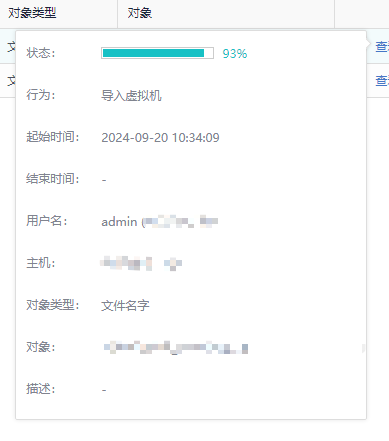
Root Cause
vma template file problem, compare file md5 and re-import
Solution
Node host, check that the imported task is in running state, and the child processes are not in D state
ps aux | grep -A5 -i upid
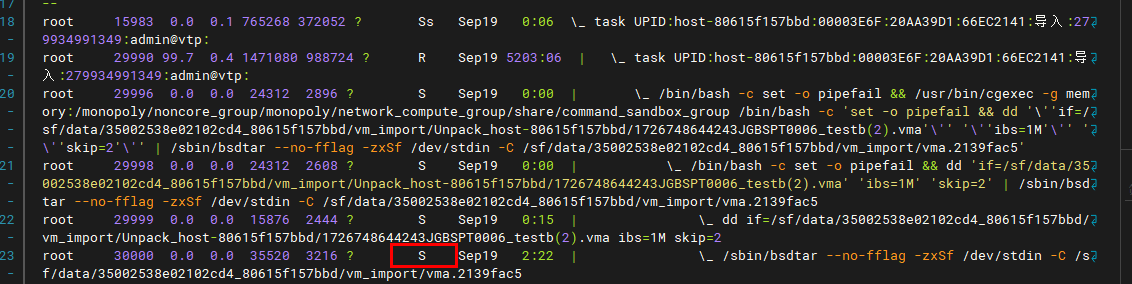
2. Track the actions of the corresponding bsdtar process
strace -p $pid # $pid is replaced with the pid of the bsdtar process, such as 30000 in the figure above
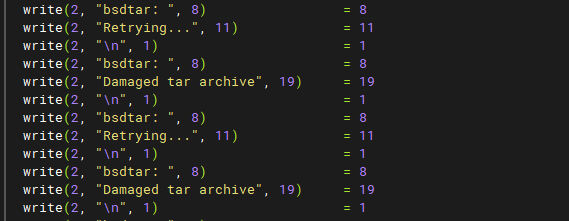
bsdtar keeps outputting Damaged tar archive error messages
3. The reason for this problem is that there is a problem with the imported VMA template, the tar format header file is damaged, and bsdtar enters an infinite loop

Calculate the md5 value of the vma file imported into the background (the file path behind the dd process in the above figure)
md5sum xxxx.vma
Compare it with the MD5 value of the vma file. If they are inconsistent, it means that 英文. Re-upload the test
If they are consistent, it means that the imported vma file is damaged. Check whether the md5 value is consistent with the vma source. If not, change the template and re-import.
4. To clean up the stuck operation log, first kill the imported upid process and subprocess, and then clean up the operation log according to this method
http://tskb.sangfor.com/forum.php?mod=viewthread&tid=34586