
[HCI-SCMT] The amount of internal data in the virtual machine decreases after migration.
Problem Description
To solve the problem of virtual storage not being released after deleting files within virtual machines in HCI, the customer used SCMT to migrate virtual machines to this cluster within the HCI Cluster. It is found that the usage rate of the virtual machine mount point changes significantly after migration.
Effective Troubleshooting Steps
-
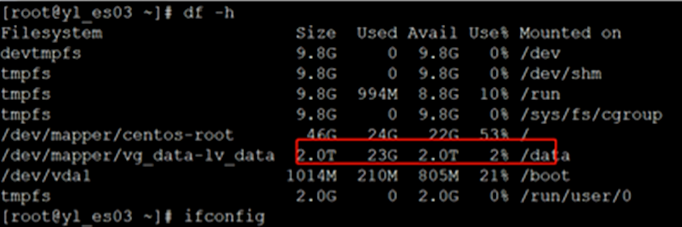
The source virtual machine /data mount point usage is 23G;
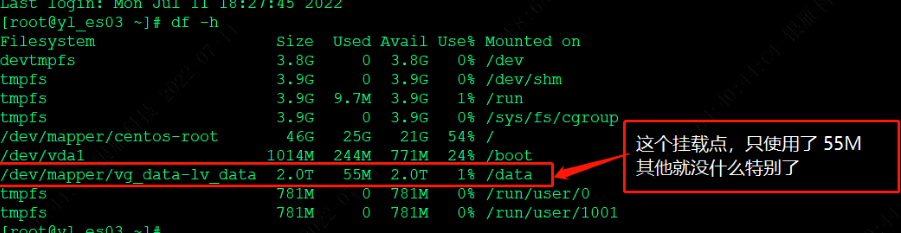
After migration, the usage of the /data mount point is only 55M.
-
It is suspected that after deleting the file in the source VM, the file still occupies the handle. After coordinating with the customer to restart the source VM, the usage of the source VM /data mount point is still 23G.
-
Migrate the source virtual machine to this cluster again (before migration, you can copy some files from the source machine for verification), select the target machine to shut down when switching, and take a snapshot on the target machine.
-
Load the iso image on the target machine, enter the rescue mode, and check that the /data mount point is also 23G in the rescue mode before the target virtual machine is turned on.
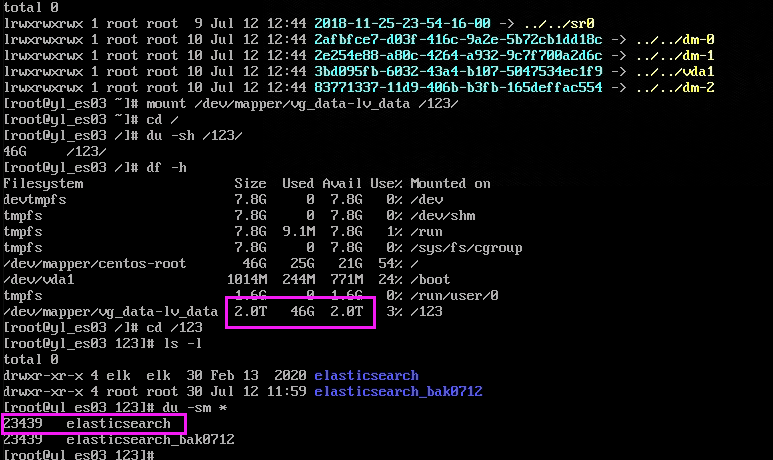
Note: The mount point is shown as 46G because a copy of the data was made on the source machine (step 3) to verify that only the files under the original elasticsearch folder are deleted after the virtual machine is started. -
After starting the target virtual machine, it is found that the size of the backed-up elasticsearch_bak0712 folder has not changed, and the elasticsearch folder has become smaller, indicating that it was deleted by the application inside the virtual machine.
Solution
scmt will not delete files inside the operating system. The current internal files of the operating system are deleted because the internal program of the operating system deleted the files under the /data mount point. The specific application process needs to be checked by the customer's operation and maintenance.
Original Link
https://support.sangfor.com.cn/cases/list?product_id=33&type=1&category_id=16671&isOpen=true