
[HCI-SCP] The operation of disabling ASEC is not correct , causing the cluster to fail to be added to SCP.
Issue Description
In certain cases, customers who disabled the aSEC service via SCP and then deleted the cluster on SCP encountered a failure when attempting to re-add the cluster.
Error/Warning Information
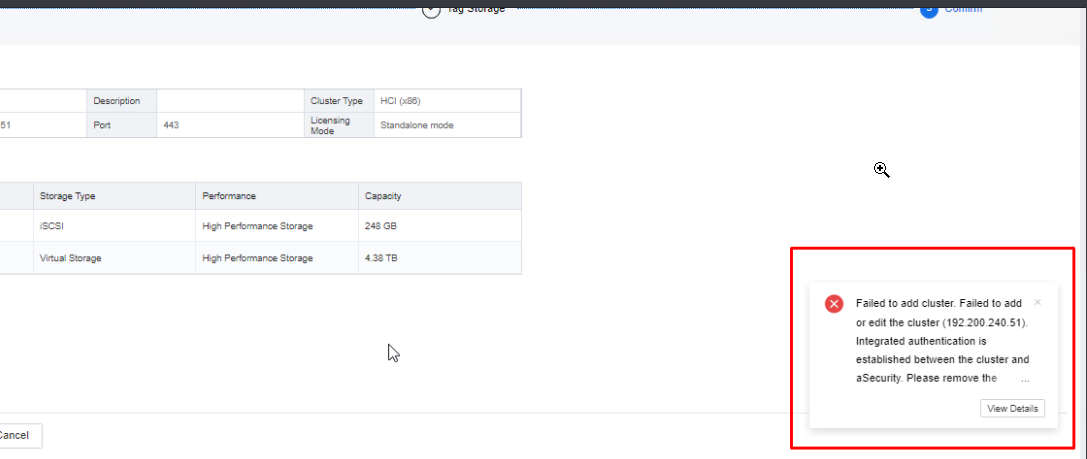
Failed to add cluster. Failed to add or edit the cluster (192.200.X.X). Integrated authentication is established between the cluster and aSecurity. Please remove the cluster then add the cluster again!
Error Code:0x101001010019
Handling Process
-
The user initially disabled the aSEC service in SCP, deleted the HCI cluster, and encountered an error while attempting to re-add the cluster.
-
Based on the user’s feedback, the aSEC integration linkage was not disabled according to the standard procedure.
-
Due to this, the integration configuration on HCI had to be manually deleted from the backend to resolve the issue.
Root Cause
Failure to disable integration following the proper procedures resulted in residual authentication data.
Solution
-
Navigate to /cfs/portal-service directory and clear the contents of the thirdpartyservice.json file.
vim thirdpartyservice.json
"dd" – to remove the contents of the line.

Note : Keep the "{ }", as the file is in json format.
-
Similarly, navigate to /cfs/authsvc/aksk/ak directory and clear the contents in the ak.json file.
vim ak.json
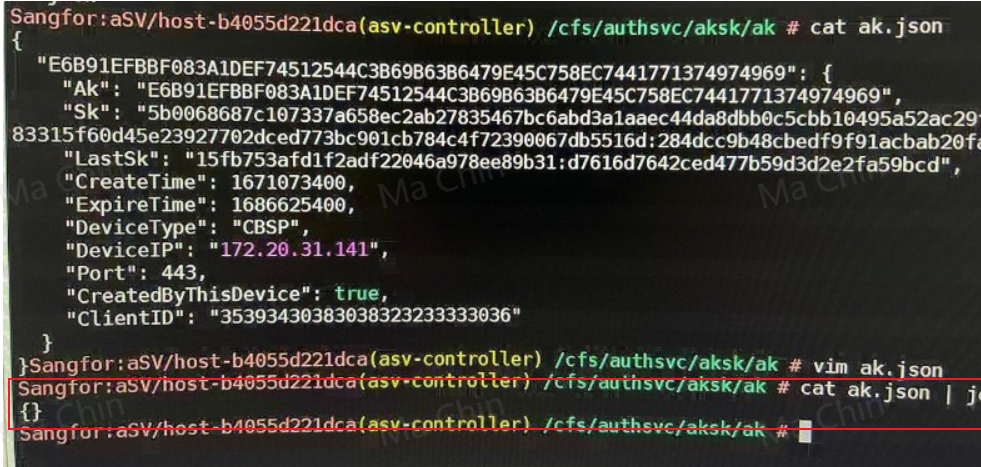
Note : Keep the "{ }", as the file is in json format.
-
Retry adding the cluster in SCP. The cluster should now be added successfully.
Suggestions
- Follow the handling process and solution provided above.
- If the situation differs from the described scenario or the solution does not resolve the issue, consult with a specialist or R&D for further assistance.