
[HCI-VN] Configuring IP on the vxlan port causes a network segment conflict alarm, error code: B105000D
Problem Description
A network segment conflict error message appears on the front desk
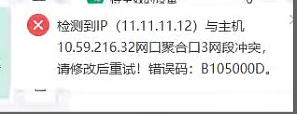
Effective Troubleshooting Steps
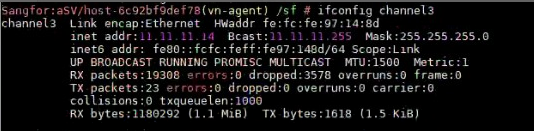
- Check the network port in the background to see if the IP address in this network segment exists.
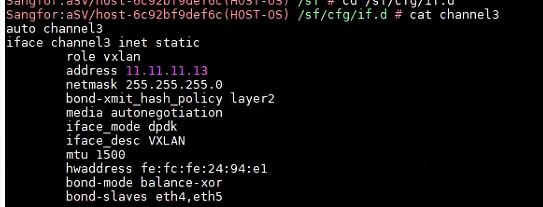
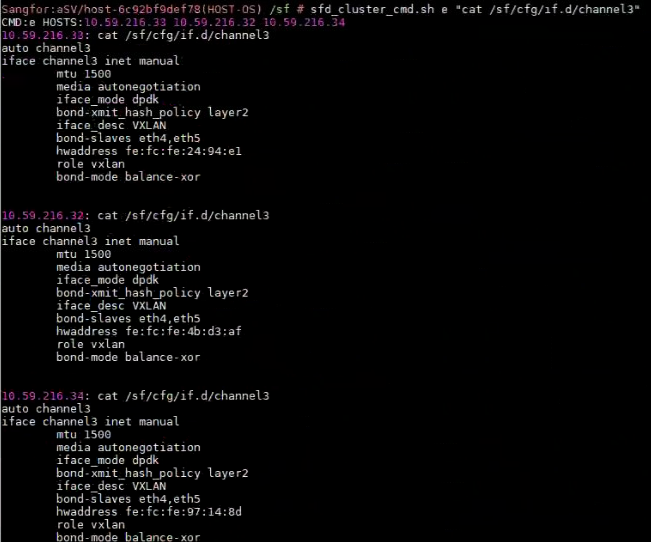
- Check the configuration file to confirm that the network port is a vxlan port, and the ip is configured in the configuration file
- Edit the aggregation aggregate interface the front desk and find that the IP is indeed manually configured
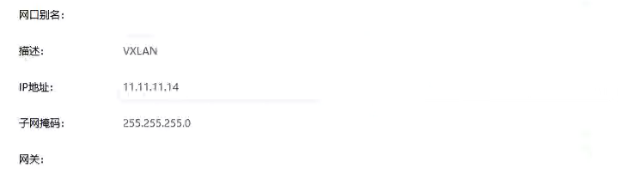
- Confirm with the customer that the IP is misconfigured and not actually used. Then edit the network port in the front desk and delete all manually configured IPs. After deletion, check the configuration file to confirm that there is no IP configuration in the configuration file.
Root Cause
Manually configured ip on the vxlan port
Solution
Delete manually configured IP
Scope of Operation Impact
Confirm with the customer whether the manually configured IP is in use. If not, delete it without any impact.
Is this a temporary solution?
Disabled
Original Link
https://support.sangfor.com.cn/cases/list?product_id=33&type=1&category_id=16795&isOpen=true