
【HCI】Storage port interrupt core isolation
Problem Description
The storage port interrupt core is Best Effort, affecting the stability of the storage network.
Observe the CPU indicators. If %idle is very low and other items except %soft are relatively high, it indicates that the system is Best Effort. A high %soft is normal because NIC sending and receiving is reflected in this item.
Best Effort, which is reflected in the %guest item.
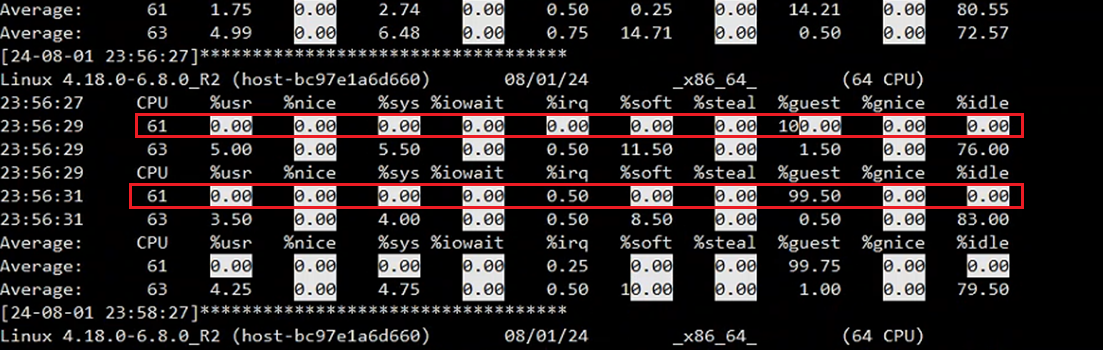
**PS: The method in this article is not limited to the isolation of storage port interrupt cores, but is applicable to any kernel port (network ports not taken over by DP, and network ports such as p_ethX (except Mellanox NIC)). **
Warning Information
HCI6.10.0 and later versions have an alarm added to the front end. If the interrupt core is fully used, the following alarm will appear:

Effective troubleshooting steps
**1. First, we need to confirm which storage port interrupt cores are? **
Non-Mellanox NIC can be viewed like this:
Assume eth6/eth7 is the storage port cat /proc/interrupts |grep -E "eth6|eth7"|awk -F':' '{print $1}' # The output of the command above is the interrupt number, assuming it is 10, then use the following command to get the CPU core where the interrupt is located cat /proc/irq/10/smp_affinity_list

NIC Mellanox network card using the above method, you need to check it like this:
Assume the storage port is eth6 ls /sys/class/net/eth6/device/msi_irqs|head -2 # The above output is the interrupt number, assuming it is 10, and use the following command to get the CPU core where the interrupt is located /proc/irq/10/smp_affinity_list

2. Confirm whether the interrupt core is fully utilized
- If there is a phenomenon
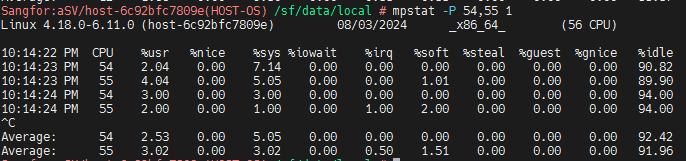
You can execute the following command to determine whether the interrupt core is fully utilized:
If the interrupt cores are 54 and 55, check the CPU Usage mpstat -P 54,55 1
- If there is no problem at present, it has been restored
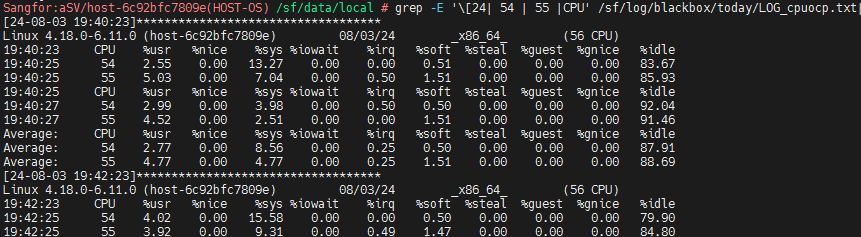
You can check the black box log /sf/log/blackbox/today/LOG_cpuocp.txt to see whether the interrupt core is fully utilized during the problem period.
Assuming the interrupt core is 54,55, use the following command to quickly view the black box grep -E '[24| 54 | 55 |CPU' /sf/log/blackbox/today/LOG_cpuocp.txt
Root Cause
Best Effort
Solution
This problem is completely solved in HCI version 6.11.0 (UI entry is provided for operation). Other versions need to rely on the following script:
sfd_performance_handling.zip ( 0.02M )
1. Upload the script to the /sf/data/local/directory of the customer environment and decompress it
unzip sfd_performance_handling.zip
2. Give the script executable permissions:
chmod +x /sf/data/local/sfd_performance_handling.sh;dos2unix /sf/data/local/sfd_performance_handling.sh
2. Enter the asv-c container:
container_exec -n asv-c
3. Get the storage port interrupt core of each Node. You can use the following command to get the interrupt core of all network ports. Each Node may be different:
/sf/data/local/sfd_performance_handling.sh get_ifirq
4. Each Node runs
/sf/data/local/sfd_performance_handling.sh isolate –inc-root –inc-vn –save-numa only_pcpu XX,YY -y
(XX,YY are replaced with the storage port interrupt core obtained in step 3 above. If there is only one core, it is XX)
If it is confirmed that the interrupt cores of each Node are consistent, you can use the Cluster command to modify them in batches:
First synchronize the script to each Node:
sfd_sync_file.sh /sf/data/local/sfd_performance_handling.sh
Confirm whether the Node host storage port are consistent:
sfd_cluster_cmd.sh e "/sf/data/local/sfd_performance_handling.sh get_ifirq"
**You can use the following command to batch modify only if they are consistent. Pay special attention! ! ! **
sfd_cluster_cmd.sh e "/sf/data/local/sfd_performance_handling.sh isolate –inc-root –inc-vn –save-numa only_pcpu XX,YY -y"
(XX,YY are replaced with the storage port interrupt core obtained in step 3 above. If there is only one core, it is XX)
**How to judge the success of isolation? **
You can check whether the isolate_vm cgroup exists. The following indicates that CPU core 55 is isolated successfully.

Operation Impact Scope
No impact on business
Is this a temporary solution?
Yes, the permanent solution is in HCI6.11.0, and patches will be released for other versions later.
Suggestions and Conclusion
Strictly follow the above requirements;
In addition to storage ports, it also applies to other kernel ports
Troubleshooting content
The storage port and kernel port interrupts are fully occupied, and core isolation is performed