
【HCI】Unable to Delete Old Residual VMware Backup Policy on HCI after HCI is managed by SCP
Issue Description
User requires to create a new Disaster Recovery policy for VMware VM, but unable to select all the desired VM due to aCMP/SCP showing the Vmware license is insufficient.
Handling Process
-
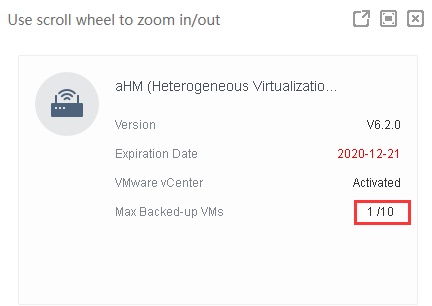
Checked the SCP license and found that 1 license is being used out of 10 licenses.
-
Check on SCP did not exist any disaster recovery policy. But on HCI side showing there is an old VMware Backup policy associated with 1 VM.

-
The policy is unable to delete from SCP because it does not support Vmware schedule backup. Also, On the HCI side, it is unable to delete the old policy because it is managed by SCP.
-
Temporarily remove the HCI from being managed by the aCMP/SCP.
Command :mv /cfs/acenter.json /sf/data/local/acenter.json

-
Now, you may remove the Vmware backup policy on HCI. After removing the policy, recover back the HCI and SCP.
Command: mv /sf/data/local/acenter.json /cfs/acenter.json

Solution
Temporarily remove the HCI from being managed by aCMP / SCP.