
[VDI]Node status are showing as “0%”
Issue Description
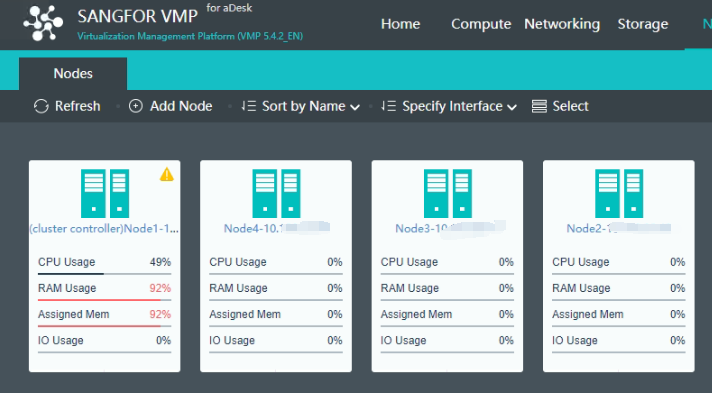
After using VDI normally for some time, suddenly noticed that the status of all other nodes except master node are showing up as 0%.
Error/Warning Information
Handling Process
-
Verify with user that no changes made on internal network.
-
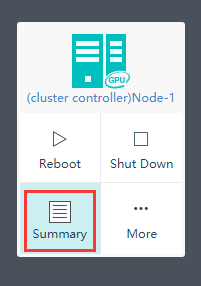
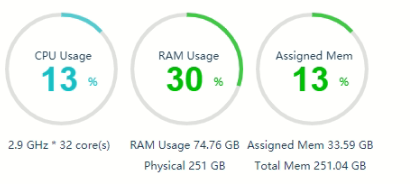
Visit Node summary of each nodes, able to view the status normally.
-
At this stage, we are almost certain that it is WEB display issue and not caused by physical switch communication problem
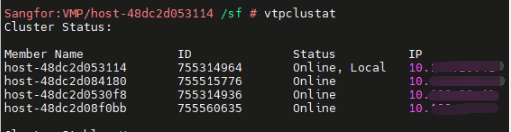
4.Go to backend, check vtpclustat is normal state. All nodes are online state, which means does not have communication issue between nodes. (can use chping to verify as well)
-
Restart the following service. (Does not impact production service)
Command:
vs_cluster_cmd.sh e "/sf/etc/init.d/vtp-datareportd restart"
vs_cluster_cmd.sh e "/sf/etc/init.d/vtp-datareport-server restart"
vs_cluster_cmd.sh e "/sf/etc/init.d/host_proxy restart"
vs_cluster_cmd.sh e "/sf/etc/init.d/cluster_task restart" -
Issue had been resolved.

Root Cause
WEBUI display issue, likely due to a process stuck. Restart service to quickly recover.
Solution
Restart the following service:
vs_cluster_cmd.sh e "/sf/etc/init.d/vtp-datareportd restart"
vs_cluster_cmd.sh e "/sf/etc/init.d/vtp-datareport-server restart"
vs_cluster_cmd.sh e "/sf/etc/init.d/host_proxy restart"
vs_cluster_cmd.sh e "/sf/etc/init.d/cluster_task restart"
Suggestions
-
In the event of the solution above does not apply to your scenario (confirmed not a WEBUI display issue), proceed to check on the physical switch connected to VMP server.
-
Ensure the switch has the following configuration on the interface connected to VMP server:
I. Enabled multicast
II. Disabled igmp snooping
III. Disabled stp