
Troubleshooting virtual machine latency issues
Problem Description
When virtual machines ping each other, there is a continuous high latency or latency jump, that is, an occasional high-latency packet.
Effective troubleshooting steps
**1. What are the causes of confirmation delay? **
There are several possibilities:
- The virtual machine itself has high latency * High data plane forwarding latency * Physical Network latency (involving crossNode communication)
2. How to confirm that the latency comes from the virtual machine
This refers to sending packets to the virtual machine, and the virtual machine responds relatively slowly. Medium is that a high-latency packet occasionally jumps:
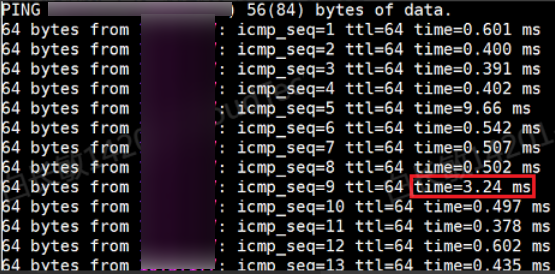
The simplest method is to capture packets, as shown below: vm1 pings vm2. In the figure, capture packets at points vlink1 and vlink2 respectively:
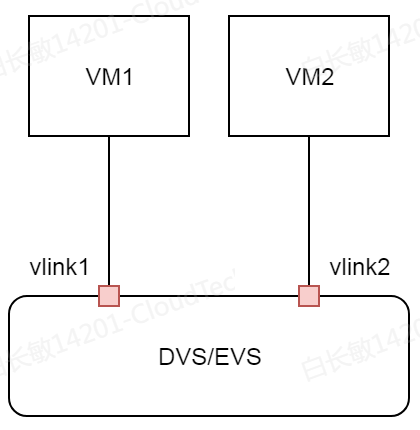
Observe the packet capture at the destination (that is, vlink 2). If the time interval between the request packet and the reply packet is relatively long, which matches the high latency of ping, the jitter is caused by the high latency of the virtual machine itself.

- By looking at the request packets of vlink1 and vlink2 at the same time, we can confirm the forwarding delay of DVS/EVS. We can see that it is only 4 us. * Looking only at the request and reply packets of vlink2, we can confirm the packet return latency of the virtual machine, which is about 12ms.
Gateway the same time to see whether the jitter time points are consistent. Inconsistency can also indicate that the delay occurs inside the virtual machine;
The reason this can be confirmed is that the data plane is the same, so if there is any impact, both will be affected at the same time. However, this point may not be convincing enough as evidence. The most convincing evidence is still packet capture!
**3. How to confirm that the latency comes from the data plane? **
If the ping latency is continuously high, it can be basically confirmed that dp has a performance bottleneck;
For versions 680 and later, you can check dpdebug 4 in the background to confirm whether the utilization rate of each forwarding core is very high. If it is very high, it means that dp has a performance bottleneck;
This command is not available in previous versions. You can check whether the vxlan port is reused with Management Interface. If it is reused, you can check the ping monitoring of the management network in the black box. If you see jitter in the latency, you can also confirm that the dp has a performance bottleneck;
If there is no reuse, this is difficult to confirm, but there are some ways to confirm it indirectly, such as:
Gateway the same time to see if high latency occurs at the same time. If so, you can confirm it; * Check the NIC Node host details page to see if there is a sudden increase in traffic or a relatively high traffic. Then check whether there are error packets such as rx_missed_error in the network port statistics to confirm * Another situation is that the number of sessions is full or the number of new sessions is high. The background dataplane logs show the number of sessions full, which can be used to determine the situation. The number of newly created sessions is high. This statistic is not turned on in the background (it is turned on only in 6110), so it cannot be confirmed when the problem occurs. However, you can check whether there is an alarm for too high virtual machine sessions in the front end (But please note that this alarm does not mean that there is a performance bottleneck, because the threshold set for the alarm is relatively low, but it can be used as a partial reference)
**4. How to confirm that the latency comes from Physical Network? **
This involves crossNode communication, and there is no good way to solve it. You can only capture packets on two Node at the same time, and then use the above-mentioned virtual machine delay judgment method to determine where the problem occurs.
Root Cause
The root cause of VM latency issues may be that the applications running inside the VM are resource-intensive, such as Oracle and other database applications. It may also be that the hyper-converged platform is severely over-provisioned, causing vCPU Best Effort.
The root cause of data plane latency issues is insufficient data plane performance, which may be caused by heavy traffic and high number of newly created sessions.
The Network latency issues is external and not HCI issues, so Medium not of concern.
Solution
Virtual machine latency issue
- If the Network latency Best Effort is caused by vCPU preemption (the steal value in top of the virtual machine is high, or the %wait value of the kvm process in the background pidstat is high), You can make the virtual machine exclusive (there is a switch on the front end of version 670 and later, and the old version has a background script to bind the core (consult Wu Dongdong)), or you can migrate other virtual machines on the Node Node load. If the overall load is relatively high, it is recommended to consider Expand Capacity.
Best Effort resolving the vCPU preemption issue, it is necessary to analyze specifically whether the application inside the virtual machine interferes with the network packet reception and transmission.
Data plane latency
- If the forwarding core is single core, adjust to 4 cores * If it is already 4 cores, you can check whether there is any traffic overload on the aggregation port. If so, you can adjust the aggregation mode to 4 layers. memory" (currently 20 million is enough) * If there is still a bottleneck after all the above adjustments, it is more difficult to deal with. You need to find out where the bottleneck is in the software and then optimize the version; If you can confirm that it is a hardware bottleneck, then replace the NIC (for example, if the customer traffic exceeds 10G, you may need a 25G NIC)
Operation Impact Scope
Depending on the situation:
- Adjusting the forwarding core will affect the business, but adjusting the forwarding memory will not affect * After the virtual machine is exclusive, you need to restart the virtual machine. The rest of the operations depend on the situation.
Is this a temporary solution?
no
Suggestions and Conclusion
According to different situations:
- If there is a delay jump, it is basically certain that the delay comes from the virtual machine. You can capture a packet to confirm it. * If there is a continuous high latency, it is basically determined to be a dp performance bottleneck, and other methods can be used to confirm it
Troubleshooting content
Virtual machine latency, data plane forwarding latency, and physical Network latency