
【HCI】Security Whitepaper_V6.8.0
Overview
Hyperconverged infrastructure (HCI) is a unified system of data storage. As opposed to a traditional system, hyper-converged software combines storage, computing, networking, and management all under one roof.
Sangfor HCI is a one-stop software-defined data center solution. It provides a proven and integral data center solution to empower enterprises and institutions for digital transformation. It also provides a comprehensive and highly-reliable underlying platform to support digital transformation, high-performance storage to meet high computing power requirements for digital transformation, and a full range of security capabilities to address security issues encountered during digital transformation.
Security Protection Architecture
Service Access Path
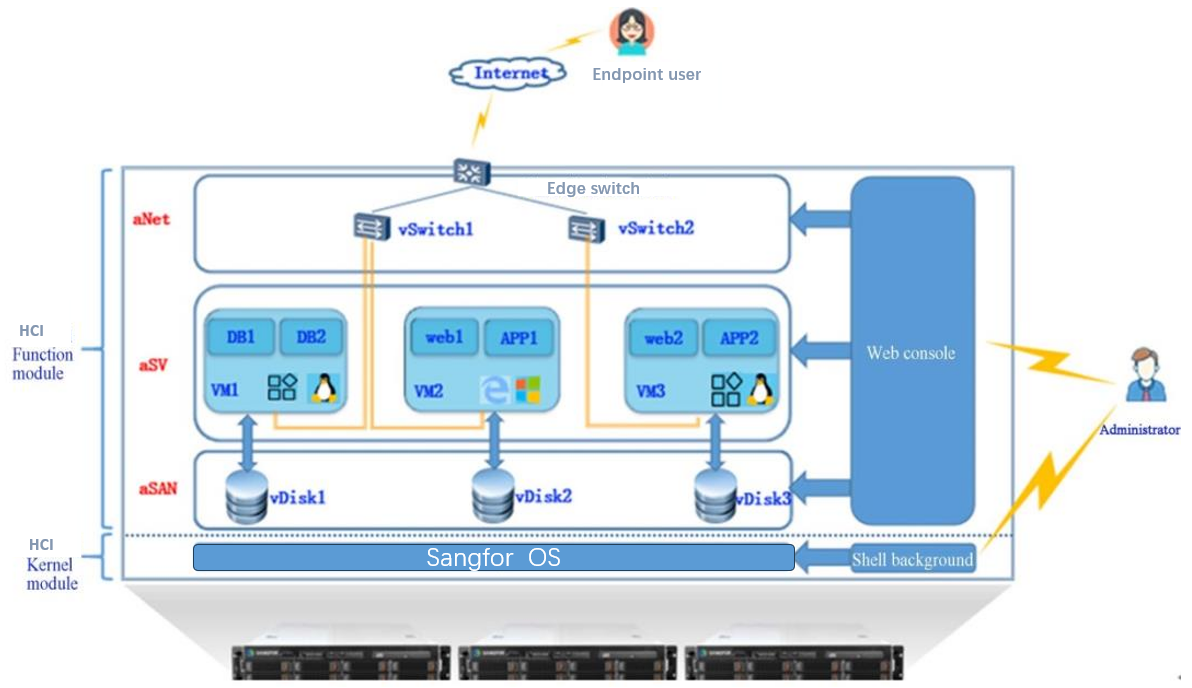
The service access of the HCI is as follows:
- The VM image and service data are stored in the vDisk provided by aSAN.
- VMs communicate with each other through the distributed virtual switch (vSwitch).
- Endpoint users access the VMs services open to the Internet through the Edge Switch.
- The administrator logs in to the HCI platform to perform routine management on the Web console.
- The administrator uses an SSH port to manage the underlying HCI platform (for example, to obtain backend monitoring logs).
-
Cyber Attack Path
The HCI internal access path is also a possible cyber attack path, as shown below:
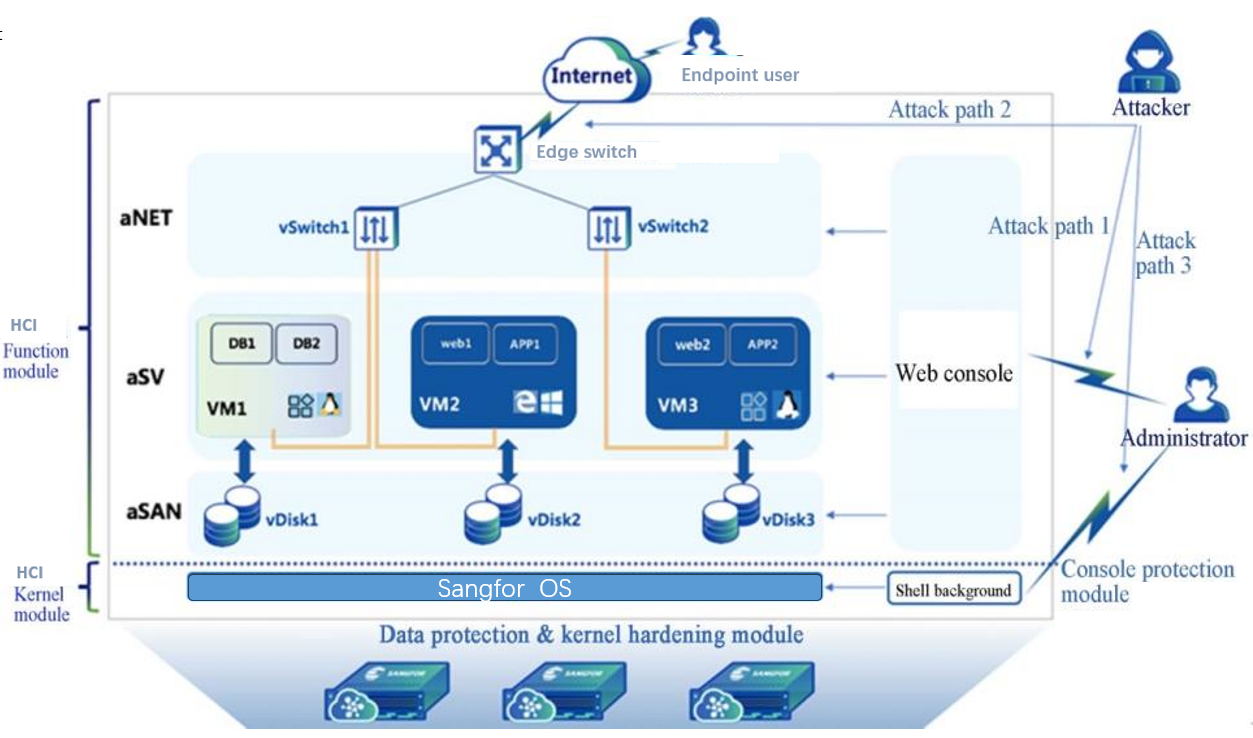
Attack path 1: The administrator accesses the HCI web console through the web port; the attacker’s attack methods include man-in-the-middle attack, password theft, password decryption, unauthorized operations, and web injection.
Attack path 2: Endpoint users access services provided by virtual machines through the edge switch.
Attack path 3: The administrator accesses the HCI underlying operating system through the SSH port.
Security Protection
Protection against attack path 1: The HCI platform provides comprehensive security modules at the management layer, including HTTPS, Two-factor Authentication, Weak Password detection, IP and MAC login address restrictions, Anti Brute-force, resource permission management, session inactivity management, and built-in Web Application Firewall.
Protection against attack path 2: The HCI platform provides comprehensive security modules at the service layer, including virtual switch isolation mechanisms, distributed firewalls, NFV components, Endpoint Secure antivirus, and aSecurity.
Protection against attack path 3: The HCI platform has an isolation mechanism for the underlying OS, including isolation between virtual machines, isolation between virtual machines and the hypervisors, and security enhancement for the system kernel.
Suppose an attacker bypasses all the protection mentioned above. In that case, the HCI platform will still provide a comprehensive data protection mechanism to minimize the damage. The data protection mechanism includes snapshots, data backup and recovery, continuous data protection(CDP), and aDR (Cross-Site Disaster Recovery). These mechanisms ensure the rapid recovery of the services.
aSEC (aSecurity)
aSEC Technology Architecture
The aSecurity architecture contains the following three layers:
- Basic architecture layer
Hypervisor technology is the core to virtualize physical resources and maximizes the use of resources. The HCI platform provides basic computing, storage, and network functions; The SCP platform provides cluster management, tenants, permissions, and other management functions.
- Core engine layer
The capabilities provided by the basic architecture layer encapsulate the interfaces of different platforms (Endpoint Secure, HCI, SCP) in the core engine layer. Integrate the capabilities of various management and security platforms, and build the basic component functions (such as multi-version management, etc.) that the aSEC service needs to support.
- Function presentation layer
Combining the basic component functions encapsulated by the core engine layer with actual business scenarios divides the services layer into multiple management function modules, such as Endpoint Secure Manager, Threat Management, Vulnerability Management, etc. The services layer comes with User Interface(UI), and the UI is embedded with HCI /SCP platform.VM Security
The architecture of VM security is shown below.
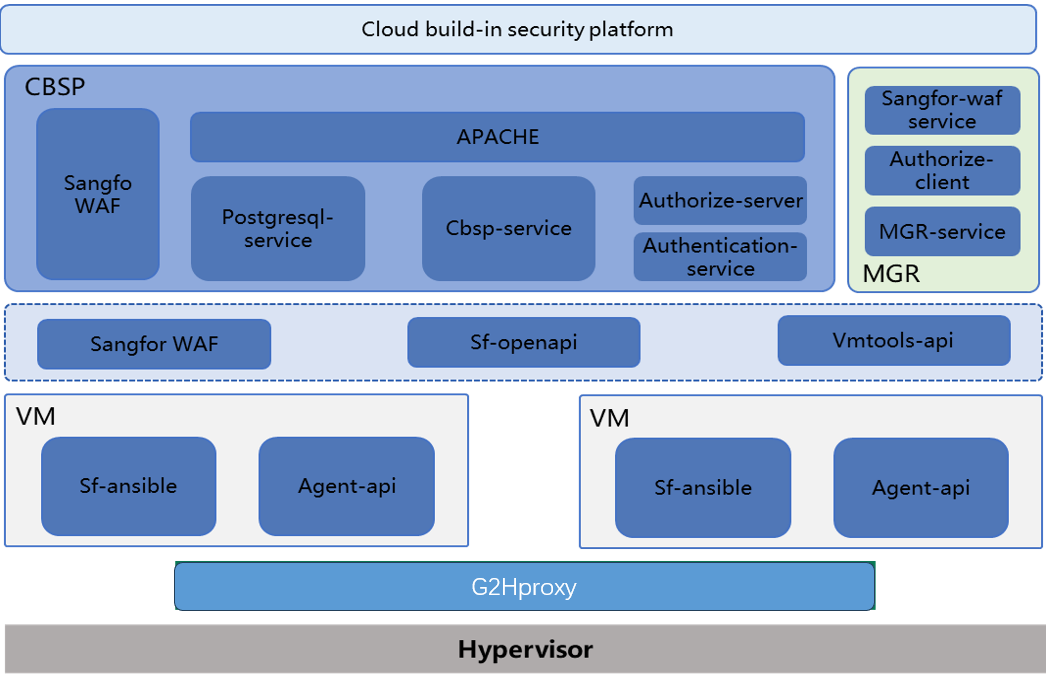
VM security capabilities cover: Safety is guaranteed once online, asset identification, one-click remediation, data protection (correlated snapshotting), etc.
Auto-Protection
-
Easy Deployment
Automated deployment of endpoint security protection: The aSEC automatically installs protective components on assets after it goes online. It enables automatic activation of protection features based on identified assets, eliminating the need for manual installation and reducing the risk of security vulnerabilities caused by oversight. -
Security Control
The aSEC monitors assets from the moment the service goes online. It provides real-time visibility into the operational status of the service, the version and change history of internal applications, and current vulnerabilities and risks such as viruses and vulnerabilities. It ensures comprehensive coverage without any omissions. It also offers convenient and fast access points to perform batch scanning and handling risky assets, simplifying daily security operations and maintenance management.It incorporates Endpoint Secure capabilities such as application identification, virus detection and removal, vulnerability scanning, and real-time protection. A VM is dedicated to antivirus purposes, and VM that provide services only require installing the lightweight agents through vmtools to perform necessary threat response actions with minimal resource consumption.
-
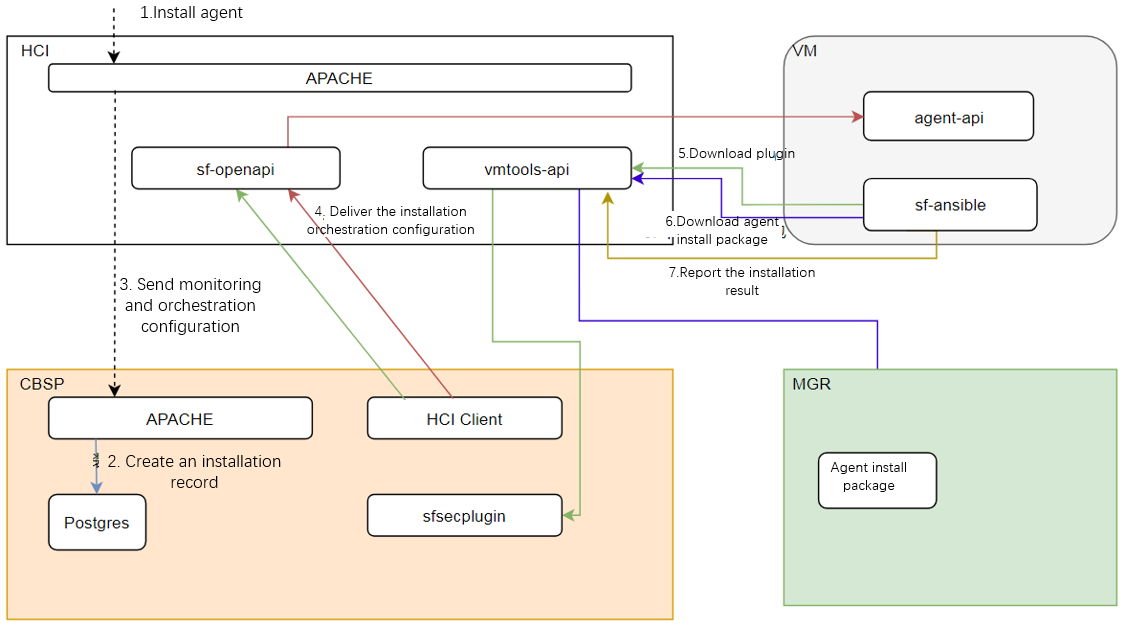
Agent installation principle
Enable network communication between virtual machines and physical hosts through virtio-serial or virtio-vsock, and utilize proxy services on the physical host to forward the virtual machine’s requests to Endpoint Secure and the aSEC. This allows the agent installation on the virtual machine and receives instructions such as virus scanning by Endpoint Secure, even when the virtual machine is not directly connected to the Endpoint Secure and aSEC networks.
-
Cloud Security Lifecycle
After creating and powering on a virtual machine, the security protection components can be automatically installed along with VMTools. It ensures immediate security once online. By installing the security protection components and combining them with HCI (Hyperconverged Infrastructure) and Endpoint Secure (Endpoint Detection and Response) functionalities, security policies can be provided for the virtual machine, enabling real-time protection. During the virtual machine’s runtime, it is protected against viruses, vulnerabilities, and network attacks. Convenient and efficient remediation methods are provided in case of security incidents. When a security incident is detected, real-time correlated snapshotting is activated to preserve the data. Additionally, email notifications are sent to ensure timely handling. The aSEC can safeguard the virtual machine against potential security risks throughout its lifecycle.
Asset Identification
The aSEC platform can identify, collect, and display asset context information in near to real-time for assets such as new asset onboarding and asset changes. By leveraging the capabilities of VMTools and Endpoint Secure, detailed information such as the operating system and its version, web applications and their versions, databases and their versions, middleware, and their versions can be automatically collected from virtual machines through the VMTools backend. The Endpoint Secure periodically synchronizes the collected asset fingerprint information to the aSEC platform.
-
Vulnerability Management
Vulnerability management consists of three main functions: scanning, remediation, and management:
a. Vulnerability Scanning
The Endpoint Security Manager management console reports asset information, such as virtual machines, applications, middleware, etc., to the aSEC every five minutes, along with the corresponding vulnerability information for each asset.
Through asset change identification, the aSEC automatically issues scanning tasks to Endpoint Security Manager. Users can also manually trigger vulnerability scans through the interface on virtual machine endpoints with the agent security component installed. The agent will provide real-time progress updates and vulnerability information to the aSEC.
b. Vulnerability Remediation
The built-in Endpoint Secure provides vulnerability remediation and a query interface for remediation status. The aSEC sends remediation instructions to Endpoint Secure for execution. Real-time execution results can be queried from Endpoint Secure and reflected on the interface. Before remediation, snapshots are automatically taken for the affected virtual machines. If there are any issues with the service after remediation, the system can be restored to the snapshot point on time. The aSEC can issue vulnerability remediation requests through Endpoint Security Manager to perform actual fixes for Windows system vulnerabilities, mark and handle Linux system vulnerabilities, and mark and fix application software vulnerabilities for both Windows and Linux systems.
c. Vulnerability Management
Endpoint Security Manager can update the latest signature database and vuln intelligence with the Sangfor Neural-X. The aSEC provides a visual interface to classify the impact of vulnerabilities and actively scans all assets. It highlights high-risk affected assets and prioritizes the handling sequence. This makes it convenient to quickly address the related vulnerabilities and virtual machines in a unified manner.
-
Ransomware Recovery
The aSEC provides guided handling of security incidents, network isolation, pre-remediation snapshot backups, and post-remediation recovery. It also provides guided recovery for encrypted ransomware, including network isolation, taking snapshots when ransomware occurs, sandbox verification, security checks, and service online validation.
a. Network Isolation
The aSEC provides the ability for one-click quarantine, which can quickly isolate encrypted assets to prevent further virus spread. Additionally, adaptive isolation is provided for assets infected with contagious viruses that require continuous services. This function blocks ports with no traffic for daily operations and commonly used high-risk ports such as shared and remote access prone to virus propagation. It aims to reduce the avenues of virus transmission while ensuring business continuity.
b. Data Verification
The aSEC adopts link cloning for business validation, enabling the creation to be completed in seconds without occupying additional storage space. The environment is completely isolated, and restoring to the infected time point during the process does not result in virus propagation. After determining the recovery point and executing the recovery, the entire process strictly isolates the encrypted assets from other assets. The isolation is lifted only after confirming the virus has been eliminated and ensuring safety.
c. Business Recovery
The aSEC uses a snapshot mechanism that ensures consistency, allowing any infected service part to be restored to a usable state, thereby reducing the service’s recovery time objective (RTO). Before recovery, a snapshot is retained for subsequent decryption. After recovery, scan the virus to ensure the security of the recovered environment at the time point.
One-click Remediation
The aSEC integrates Endpoint Secure (Endpoint Detection and Response) virus scanning capabilities, providing comprehensive/quick scans and virus remediation.
- In the scenarios such as new asset deployment and backup recovery, the aSEC obtains status information through internal coordination and promptly provides virus scanning suggestions to the users. Depending on the scanning scope, it offers both quick and full scans. Tasks are sent to Endpoint Secure for virus scanning on virtual machines and show the scanning result.
- It supports categorizing viruses based on risk levels, helping users prioritize the handling sequence. The threat information is presented on a single page, highlighting the high-risk virtual machines. It also provides convenient and efficient options for handling a single virtual machine or bulk handling on multiple machines. Integrating with Endpoint Secure to remediate the identified viruses and ensures the user assets are back in a secure state.
- False positives from security software are inevitable, especially after introducing AI-driven and behavior-based identification features. Some services processes or files may be mistakenly flagged as viruses. Additionally, some infectious viruses can inject themselves into critical system files. Mishandling these viruses can result in abnormal services or systems. To address this, the aSEC implements pre-remediate isolation. The files are stored in a separate sandbox, and a snapshot is taken automatically before remediation. If a mistaken deletion occurs, the file can be quickly restored; If the system crashes and cannot boot, you can use the snapshot for rapid recovery.
Data Protection (Correlated Snapshot)
-
All assets are protected daily through scheduled snapshots.
Traditional backup solutions are limited by factors such as backup space and time windows. Critical service data is typically backed up once a day, while general service data is backed up once a week, and the less important data may not be backed up at all. The aSEC utilizes a rolling snapshot backup approach, eliminating the need for initial full backups of assets. The maximum occupied space is just an additional copy of daily incremental data.
-
When security software is uninstalled, or there is suspected ransomware, an immediate snapshot is taken to protect the data. At the same time, take snapshots periodically to avoid data overwriting from infected data.
Since ransomware has distinguishable characteristics, most security software effectively protects against it. However, most ransomware attacks occur after uninstalling security software and infecting systems with encryption malware. Relying solely on security software can improve protection capabilities but cannot prevent software uninstallation.
Through the aSEC asset identification and multiple behavioral detection mechanisms, it promptly triggers snapshots to provide real-time protection when it detects a potential uninstallation on endpoints. It ensures you restore the data from a low RPO recovery point, even if a ransomware attack occurs.
NFV Components
Next-Generation Application Firewall
The Sangfor Next-Generation Application Firewall(NGAF) series products are next-generation firewalls dedicated to security protection and defense. Building upon the foundation of NGFW (Next-Generation Firewall) products in the industry, they integrate practical security innovation technologies to enhance the security detection and prevention capabilities at the network perimeter. They protect organizational networks from increasingly complex threats, ensuring the security and availability of business operations.
The virtual next-generation application firewall(vNGAF) fully inherits the core capabilities of Sangfor NGAF. It is based on edge defense, with application assets as the core, and constructs a comprehensive and all-encompassing security protection system suitable for various scenarios. With a focus on edge defense and the evolving security landscape, NGAF primarily encompasses five core capabilities: comprehensive application asset identification and protection, granular application access control measures, professional application security protection capabilities, comprehensive detection and blocking of unknown threats, and continuous threat intelligence sharing empowerment.
The HCI platform integrates the virtual next-generation application firewall(vNGAF) component, providing comprehensive protection and visualization capabilities before, during, and after security incidents. It can provide access control for applications, users, and content. It aggregates multiple-module security processing of edge security devices and manages, analyzes, and integrates with other data, systems, and device scenarios to provide comprehensive protection.
IAG
The IAG component has the following capabilities:
-
Bandwidth management: Helps organizational managers thoroughly understand the organization’s current and historical bandwidth resource usage and formulate bandwidth management strategies based on this information to verify their effectiveness.
-
Application Control: Assists organizational managers in gaining comprehensive insights into employee network behavior and content distribution.
-
Access Management: Administrators can establish a user authentication system based on the organizational structure and implement network behavior control based on periods, users, applications, and content. It ensures that employees’ internet access privileges match their job responsibilities, reducing incidents of unauthorized access and misuse of privileges.
-
Information leakage prevention, safeguard organizational information security: Assists administrators in implementing content-based outbound information filtering, controlling file and email sending behavior, generating timely alerts for abnormal network traffic and user behavior, retaining relevant logs in the report center, and utilizing risk intelligence reports to identify potential data leakage incidents. It enables proactive prevention, interception during incidents, and subsequent investigation.
-
Filter harmful information, mitigate management and legal risks: Helps administrators filter illegal, improper web pages, and network information containing undesirable keywords, preventing users from accessing untrusted websites and avoiding legal risks.
-
Optimize Internet environment and enhance Internet security: The Internet Access Gateway component detects abnormal network traffic, such as malware in infected endpoints, and automatically blocks them while initiating alerts, thus improving LAN security.
-
Optimize the organization’s IT environment.
ADC
As a professional Application Delivery Controller (ADC) product, Sangfor ADC provides a comprehensive solution for application delivery, including multi-data center load balancing, multi-link load balancing, and server load balancing. With performance optimization, one-sided acceleration, and multiple intelligent management technologies, it achieves real-time monitoring of the status of various data centers, links, and servers. It allocates user access requests to the corresponding data centers, links, and servers based on preset rules, ensuring the rational distribution of data traffic and maximizing the utilization of all data centers, links, and servers. It not only expands the overall processing capacity of the application system and improves its stability but also effectively enhances the user’s browsing experience and reduces IT investment costs for organizations.
SSL VPN
The SSL VPN component aims to create values for the user. Based on the deep understanding of the user businesses scenario, provide innovative solutions to address the issues during Internet transformation.
In addition to traditional SSL VPN applications such as remote access and access privilege management, it can address critical system security concerns. SSL encryption and logical isolation features protect against data leakage for the user’s core data.
Distributed Firewall
When attackers bypass the defenses, vulnerable servers become easy targets for hackers. They can easily attack other servers within the data center. It is time-consuming to manually patch many servers in the data center; during this period, the virus can quickly spread, causing widespread disruption to the data center. Therefore, the HCI provides a distributed firewall that extends security to the core, implementing micro-segmentation between virtual machines and providing Layer 3 and Layer 4 protection for internal data center traffic. This approach minimizes the impact of attacks on the data center to a greater extent.
- Distributed Firewall Features:
-
Comprehensive protection for all virtual machines: It can be configured on any distributed switch port for access protection, protecting the inbound and outbound traffic interface on a specific zone and achieving micro-segmentation. Even if virtual machines migrate to different locations, the policies will follow.
-
Fast implementation of protection policies: The Sangfor Cloud Platform allows quick distributed firewall deployment without needing user-installed plugins. Combined with the what-you-draw-is-what-you-get feature, it makes O&M easier; Combined with the Test Connectivity feature, it enables fast troubleshooting and reduces the time to find out the problem’s causes.
-
Simplify network structure for easy troubleshooting: The distributed firewall is built-in. Combined with the what-you-draw-is-what-you-get feature, it offers a simple structure for easier O&M. It provides BYPASS and interception log display features to verify the effectiveness of rules quickly. Combined with the Test Connectivity feature, it enables fast troubleshooting and reduces the time to find out the problem’s causes.
-
Collaborative security protection with vNGAF: The distributed firewall is built on a distributed architecture, and its policies are effective across the entire platform to control traffic within virtual networks. On the other hand, vNGAF is typically deployed at the edge to provide maximum protection against inbound traffic attacks.
-
It supports specifying virtual machines, virtual machine groups, virtual machine tags, IP addresses, IP groups, IP ranges, etc.
Activating network virtualization(aNET) is required to use the distributed firewall. It provides comprehensive security protection when combined with vNGAF, ensuring the safety of the data center.