
[BA] After installing the external SP package, the external console cannot log in
Problem Description
After BA installed the SP_DC_UPDSSL_01 package, the console could not log in and was stuck on the login page (loading)
Effective troubleshooting steps
- Check that the external data center services are normal (data_center process and processmanager service, Sangfor Web server service);
- After rolling back the sp package, it is normal;
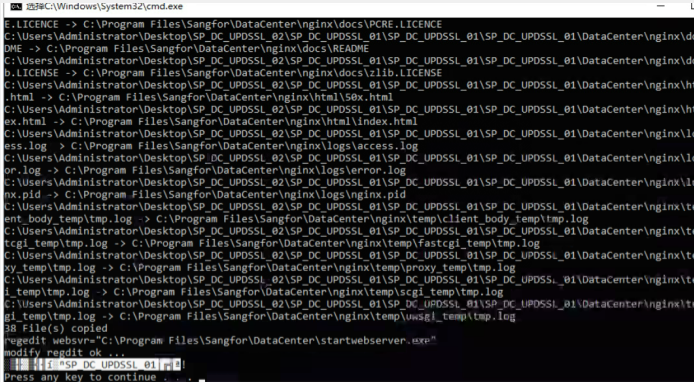
- Repackaging found that the successful packaging prompt is garbled:
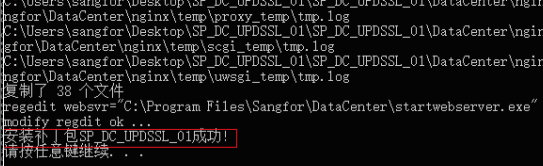
Refer to normal tips:
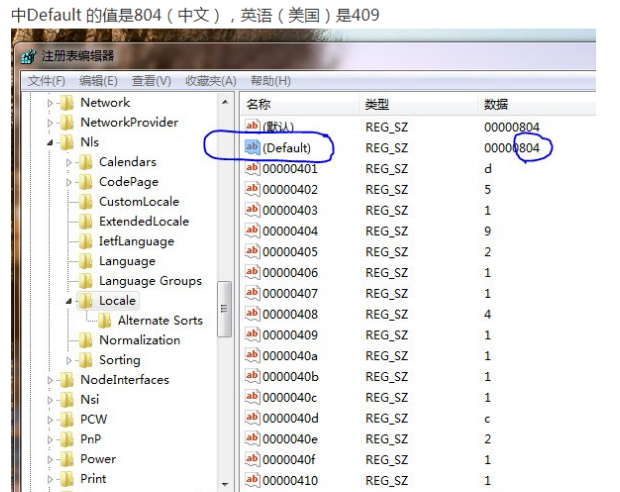
- Start typing regedit and check the registry (HKEY_LOCAL_MACHINE\SYSTEM\CurrentControlSet\ControlNI\Locale) for the English operating system (the screenshot is a Chinese screenshot)
Root cause
The client operating system is an English operating system, and the Chinese BA is installed;
As of the standard version BA4.0.13, it is currently only supported on Chinese operating systems (the BA4.0.13 installation package supports installation on Windows Server 2008 x64 (including R version), Windows Server 2012 x64, and Windows Server 2016 x64 operating systems;)
solution
Replace the server and reinstall
Original Link
https://support.sangfor.com.cn/cases/list?product_id=22&type=1&category_id=9679&isOpen=true